<?xml version="1.0" encoding="utf-8"?><feed xmlns="http://www.w3.org/2005/Atom" ><generator uri="https://jekyllrb.com/" version="3.10.0">Jekyll</generator><link href="https://michaelfatemi.com/feed.xml" rel="self" type="application/atom+xml" /><link href="https://michaelfatemi.com/" rel="alternate" type="text/html" /><updated>2026-03-08T07:28:24-07:00</updated><id>https://michaelfatemi.com/feed.xml</id><title type="html">Michael Yoo Fatemi</title><subtitle>Personal website</subtitle><author><name>Michael Yoo Fatemi</name><email>myfatemi04@gmail.com</email></author><entry><title type="html">Experimentation with N-Queens and Monte Carlo</title><link href="https://michaelfatemi.com/nqueens-monte-carlo/" rel="alternate" type="text/html" title="Experimentation with N-Queens and Monte Carlo" /><published>2024-12-27T00:00:00-08:00</published><updated>2024-12-27T00:00:00-08:00</updated><id>https://michaelfatemi.com/nqueens-monte-carlo</id><content type="html" xml:base="https://michaelfatemi.com/nqueens-monte-carlo/"><![CDATA[<p>If you have a chessboard, how can you place 8 queens so that none of them are attacking each other? For a board of size N, this is the N-queens problem. We could solve this directly through recursive backtracking; however, I want to see how well we could do with a pure sampling-based approach. Can we treat this “constraint satisfaction” problem as a sampling problem, where the target probability distribution is \(0\) for any boards with attacking queens, and non-zero for “satisfying” boards? For REALLY big boards, sampling-based approaches might be more efficient at finding boards that are nearly optimal.</p>

<p>To solve this problem, I use “rejection sampling”. In a nutshell, this means we have a way to generate “probably good” boards, and then afterwards we filter through those to see which ones are “actually good”. The “probably good” boards form a proposal distribution, and our decision criteria for whether a board is “actually good” is an acceptance ratio.</p>

<p>More mathematically, we have a proposal distribution \(q(y)\), from which we can easily sample and estimate probability densities. Then, using a target distribution \(p(y)\) from which we <em>cannot</em> easily sample but <em>can</em> easily estimate probability densities, we determine whether \(q(y)\) overrepresents a certain sample; if so, by how much; and then reject with a certain probability accordingly. We first sample from the proposal distribution \(y \sim q(y)\), and then \(u \sim \operatorname{Unif}(0, 1)\). Then, we compute \(r = \frac{p(y)}{cq(y)}\), where \(p(y)\) is the target distribution and \(c\) is a constant such that \(r \leq 1\) for all \(y\). If \(u &lt; r\), we accept \(y\) as a sample from \(p(x)\). We can also write this in terms of log probabilities. We have \(\log r = \log p(y) - \log q(y) - \log c\). If \(\log u &lt; \log r\), we accept \(y\) as a sample from \(p(x)\). In this case, because \(\log p(x) = -\infty\) for all \(x\) that don’t satisfy the constraints, we can simply reject any values that do not satisfy the constraints, and accept the values that do.</p>

<!-- In this case, we have a target distribution $$p(x) = \frac{\mathbf{1}_{\Omega_{sat}}(x)}{\mid \Omega_{sat}\mid }$$, where $$\Omega_{sat}$$ is the set of boards (outcomes) which have no queens attacking each other. Our proposal distribution is uniform over the space of "reasonable guess" board representations. We require that $$r \in [0, 1]$$, or equivalently that $$\log r \leq 0$$. Because $$\log p(x) \leq 0$$ already, $$\log c$$ is simply the lowest value of $$\log q(y)$$ we could possibly attain. -->

<h2 id="rejection-sampling-with-uniform-proposal-distribution">Rejection Sampling with Uniform Proposal Distribution</h2>

<p>We note that no two queens can be in the same row. Therefore, there must be exactly one queen in each row. So, we can represent the board as a list (e.g. \([2, 0, 3, 1]\) for a \(4 \times 4\) board), where the position in the list represents which row the queen is in, and the value at that position represents the column. We can randomly generate such boards uniformly by taking random permutations of \([0, 1, 2, 3]\). To add rejection sampling, we simply check if the resulting board after the random permutation has any attacking queens, and if not, accept it. The proportion of accepted samples to proposal samples is called the acceptance ratio, which I report here.</p>

<div class="language-python highlighter-rouge"><div class="highlight"><pre class="highlight"><code><span class="kn">import</span> <span class="nn">numpy</span> <span class="k">as</span> <span class="n">np</span>


<span class="k">def</span> <span class="nf">count_conflicts</span><span class="p">(</span><span class="n">board</span><span class="p">):</span>
    <span class="n">has_conflict</span> <span class="o">=</span> <span class="p">[</span><span class="bp">False</span><span class="p">]</span> <span class="o">*</span> <span class="nb">len</span><span class="p">(</span><span class="n">board</span><span class="p">)</span>
    <span class="k">for</span> <span class="n">queen_index</span> <span class="ow">in</span> <span class="nb">range</span><span class="p">(</span><span class="nb">len</span><span class="p">(</span><span class="n">board</span><span class="p">)):</span>
        <span class="k">for</span> <span class="n">other_queen_index</span> <span class="ow">in</span> <span class="nb">range</span><span class="p">(</span><span class="n">queen_index</span> <span class="o">+</span> <span class="mi">1</span><span class="p">,</span> <span class="nb">len</span><span class="p">(</span><span class="n">board</span><span class="p">)):</span>
            <span class="k">if</span> <span class="n">board</span><span class="p">[</span><span class="n">queen_index</span><span class="p">]</span> <span class="o">==</span> <span class="n">board</span><span class="p">[</span><span class="n">other_queen_index</span><span class="p">]:</span>
                <span class="n">has_conflict</span><span class="p">[</span><span class="n">queen_index</span><span class="p">]</span> <span class="o">=</span> <span class="bp">True</span>
                <span class="n">has_conflict</span><span class="p">[</span><span class="n">other_queen_index</span><span class="p">]</span> <span class="o">=</span> <span class="bp">True</span>

            <span class="k">if</span> <span class="nb">abs</span><span class="p">(</span><span class="n">board</span><span class="p">[</span><span class="n">queen_index</span><span class="p">]</span> <span class="o">-</span> <span class="n">board</span><span class="p">[</span><span class="n">other_queen_index</span><span class="p">])</span> <span class="o">==</span> <span class="nb">abs</span><span class="p">(</span>
                <span class="n">queen_index</span> <span class="o">-</span> <span class="n">other_queen_index</span>
            <span class="p">):</span>
                <span class="n">has_conflict</span><span class="p">[</span><span class="n">queen_index</span><span class="p">]</span> <span class="o">=</span> <span class="bp">True</span>
                <span class="n">has_conflict</span><span class="p">[</span><span class="n">other_queen_index</span><span class="p">]</span> <span class="o">=</span> <span class="bp">True</span>

    <span class="k">return</span> <span class="nb">sum</span><span class="p">(</span><span class="n">has_conflict</span><span class="p">)</span>


<span class="k">def</span> <span class="nf">is_satisfied</span><span class="p">(</span><span class="n">board</span><span class="p">):</span>
    <span class="k">return</span> <span class="n">count_conflicts</span><span class="p">(</span><span class="n">board</span><span class="p">)</span> <span class="o">==</span> <span class="mi">0</span>


<span class="k">def</span> <span class="nf">energy_function</span><span class="p">(</span><span class="n">board</span><span class="p">):</span>
    <span class="k">return</span> <span class="n">np</span><span class="p">.</span><span class="n">exp</span><span class="p">(</span><span class="o">-</span><span class="n">count_conflicts</span><span class="p">(</span><span class="n">board</span><span class="p">))</span>


<span class="k">def</span> <span class="nf">propose_initial_board_uniform</span><span class="p">(</span><span class="n">board_size</span><span class="p">):</span>
    <span class="k">return</span> <span class="n">np</span><span class="p">.</span><span class="n">random</span><span class="p">.</span><span class="n">permutation</span><span class="p">(</span><span class="n">board_size</span><span class="p">)</span>

</code></pre></div></div>

<h2 id="acceptance-ratio-with-increasing-board-size">Acceptance Ratio with Increasing Board Size</h2>

<p>As we see here, increasing the board size results in an exponentially decreasing acceptance ratio. This suggests that we need to improve the proposal distribution. The better of a match the proposal distribution has, the highest the acceptance ratio. If the proposal distribution matches the target distribution, the acceptance ratio is 1.</p>

<div class="language-python highlighter-rouge"><div class="highlight"><pre class="highlight"><code><span class="n">X_uniform_proposal</span> <span class="o">=</span> <span class="p">[]</span>
<span class="n">y_uniform_proposal</span> <span class="o">=</span> <span class="p">[]</span>

<span class="k">for</span> <span class="n">board_size</span> <span class="ow">in</span> <span class="p">[</span><span class="mi">4</span><span class="p">,</span> <span class="mi">5</span><span class="p">,</span> <span class="mi">6</span><span class="p">,</span> <span class="mi">7</span><span class="p">,</span> <span class="mi">8</span><span class="p">,</span> <span class="mi">9</span><span class="p">,</span> <span class="mi">10</span><span class="p">,</span> <span class="mi">11</span><span class="p">,</span> <span class="mi">12</span><span class="p">,</span> <span class="mi">13</span><span class="p">,</span> <span class="mi">14</span><span class="p">,</span> <span class="mi">15</span><span class="p">]:</span>
    <span class="n">freqs</span> <span class="o">=</span> <span class="p">{}</span>
    <span class="n">nshots</span> <span class="o">=</span> <span class="mi">100000</span>
    <span class="c1"># Now let's sample a couple of boards.
</span>    <span class="n">samples</span> <span class="o">=</span> <span class="p">[]</span>
    <span class="k">for</span> <span class="n">_</span> <span class="ow">in</span> <span class="nb">range</span><span class="p">(</span><span class="n">nshots</span><span class="p">):</span>
        <span class="n">board</span> <span class="o">=</span> <span class="n">propose_initial_board_uniform</span><span class="p">(</span><span class="n">board_size</span><span class="o">=</span><span class="n">board_size</span><span class="p">)</span>
        <span class="k">if</span> <span class="n">is_satisfied</span><span class="p">(</span><span class="n">board</span><span class="p">):</span>
            <span class="c1"># for the uniform distribution, E(x) = 0 everywhere, and logc can just be 0, so we can accept all samples.
</span>            <span class="n">samples</span><span class="p">.</span><span class="n">append</span><span class="p">(</span><span class="n">board</span><span class="p">)</span>
            <span class="n">board_str</span> <span class="o">=</span> <span class="s">','</span><span class="p">.</span><span class="n">join</span><span class="p">(</span><span class="nb">str</span><span class="p">(</span><span class="n">item</span><span class="p">)</span> <span class="k">for</span> <span class="n">item</span> <span class="ow">in</span> <span class="n">board</span><span class="p">)</span>
            <span class="n">freqs</span><span class="p">[</span><span class="n">board_str</span><span class="p">]</span> <span class="o">=</span> <span class="n">freqs</span><span class="p">.</span><span class="n">get</span><span class="p">(</span><span class="n">board_str</span><span class="p">,</span> <span class="mi">0</span><span class="p">)</span> <span class="o">+</span> <span class="mi">1</span>

    <span class="k">print</span><span class="p">(</span><span class="n">board_size</span><span class="p">,</span> <span class="nb">sum</span><span class="p">(</span><span class="n">freqs</span><span class="p">.</span><span class="n">values</span><span class="p">())</span><span class="o">/</span><span class="n">nshots</span><span class="p">,</span> <span class="s">"acceptance ratio"</span><span class="p">)</span>

    <span class="n">X_uniform_proposal</span><span class="p">.</span><span class="n">append</span><span class="p">(</span><span class="n">board_size</span><span class="p">)</span>
    <span class="n">y_uniform_proposal</span><span class="p">.</span><span class="n">append</span><span class="p">(</span><span class="nb">sum</span><span class="p">(</span><span class="n">freqs</span><span class="p">.</span><span class="n">values</span><span class="p">())</span><span class="o">/</span><span class="n">nshots</span><span class="p">)</span>

<span class="kn">import</span> <span class="nn">matplotlib.pyplot</span> <span class="k">as</span> <span class="n">plt</span>

<span class="n">plt</span><span class="p">.</span><span class="n">plot</span><span class="p">(</span><span class="n">X_uniform_proposal</span><span class="p">,</span> <span class="n">y_uniform_proposal</span><span class="p">)</span>
<span class="n">plt</span><span class="p">.</span><span class="n">yscale</span><span class="p">(</span><span class="s">"log"</span><span class="p">)</span>
<span class="n">plt</span><span class="p">.</span><span class="n">show</span><span class="p">()</span>
</code></pre></div></div>

<div class="language-plaintext highlighter-rouge"><div class="highlight"><pre class="highlight"><code>4 0.08289 acceptance ratio
5 0.0831 acceptance ratio
6 0.00584 acceptance ratio
7 0.00854 acceptance ratio
8 0.00239 acceptance ratio
9 0.00093 acceptance ratio
10 0.00013 acceptance ratio
11 0.00013 acceptance ratio
12 4e-05 acceptance ratio
13 1e-05 acceptance ratio
14 0.0 acceptance ratio
15 1e-05 acceptance ratio
</code></pre></div></div>

<p><img src="/images/posts/2024/12/nqueens-monte-carlo/nqueens_blog_4_1.png" alt="png" /></p>

<h2 id="improving-the-proposal-distribution">Improving the Proposal Distribution</h2>

<p>A nice idea is to use MCMC to sample from a superior proposal distribution, which might represent a sort of “surrogate objective”. For example, reducing the number of conflicts on the board. But wait - how can we do this? Aren’t the distributions unnormalized?</p>

<p>For a simple proposal distribution, we can use the energy function \(E(y) = \operatorname{CountConflicts}(y)\), with the corresponding proposal distribution \(q(y) \propto e^{-E(y)}\). Although we cannot sample from this proposal distribution directly, we can indirectly sample from it using Markov Chain Monte Carlo. There are a few details about Markov Chain Monte Carlo that I will omit here. But the premise is that you take a starting board, \(x_t\), and change it slightly to see if there is a reduction in the number of conflicting queens. If there is, then you accept the change. If there isn’t, then you conditionally accept the change, according to an exponential decay based on the number of mismatched queens. The decision for whether to “accept” the changed board is made with probability \(A(x', x)\), where \(x\) is the source board, and \(x'\) is the changed board. The range of boards you can get by “changing” your current board is called a proposal distribution, \(g(\cdot \\mid  x)\).</p>

<p>In the general case, the acceptance function is:</p>

\[A(x', x) = \max\left(1, \frac{P(x')}{P(x)}\frac{g(x\mid x')}{g(x'\mid x)}\right)\]

<p>If your proposal distribution is symmetric (proposing a change and proposing “undoing” the change have the same probability for all \(x\) and \(x'\)), then the acceptance function becomes:</p>

\[A(x', x) = \max\left(1, \frac{P(x')}{P(x)}\right)\]

<p>This is because \(g(x \mid x') = g(x' \mid  x)\) in that case.</p>

<p>Bringing it back to our problem, let’s say that the proposal distribution is a mutation of some sorts. Like switching index \(i\) and index \(j\) of our list representation. There are \(\frac{n(n-1)}{2}\) ways to make this switch, and each is sampled from uniformly randomly. Therefore, the proposal distribution is symmetric, and we can use the second simplified acceptance ratio.</p>

<p>Now, we wanted to use this to sample from \(q(x) \sim e^{-E(x)}\). Then \(\log A(x', x) = \max(0, \log q(x') - \log q(x)) = \max(0, -(E(x') - E(x)))\). In practical terms, this means we accept any mutation that reduces the number of conflicts, and accept mutations that increase the number of conflicts with exponential hesitancy.</p>

<div class="language-python highlighter-rouge"><div class="highlight"><pre class="highlight"><code><span class="k">def</span> <span class="nf">propose_initial_board_mcmc</span><span class="p">(</span><span class="n">E</span><span class="p">,</span> <span class="n">x0</span><span class="p">,</span> <span class="n">proposal_distribution</span><span class="p">,</span> <span class="n">steps</span><span class="p">):</span>
    <span class="c1"># E is the energy function.
</span>    <span class="n">x</span> <span class="o">=</span> <span class="p">[</span><span class="n">x0</span><span class="p">]</span>
    <span class="k">for</span> <span class="n">_</span> <span class="ow">in</span> <span class="nb">range</span><span class="p">(</span><span class="n">steps</span><span class="p">):</span>
        <span class="nb">next</span> <span class="o">=</span> <span class="n">proposal_distribution</span><span class="p">(</span><span class="n">x</span><span class="p">[</span><span class="o">-</span><span class="mi">1</span><span class="p">])</span>
        <span class="n">logA</span> <span class="o">=</span> <span class="o">-</span><span class="p">(</span><span class="n">E</span><span class="p">(</span><span class="nb">next</span><span class="p">)</span> <span class="o">-</span> <span class="n">E</span><span class="p">(</span><span class="n">x</span><span class="p">[</span><span class="o">-</span><span class="mi">1</span><span class="p">]))</span>
        <span class="k">if</span> <span class="n">logA</span> <span class="o">&gt;=</span> <span class="mi">0</span> <span class="ow">or</span> <span class="n">np</span><span class="p">.</span><span class="n">random</span><span class="p">.</span><span class="n">rand</span><span class="p">()</span> <span class="o">&lt;</span> <span class="n">np</span><span class="p">.</span><span class="n">exp</span><span class="p">(</span><span class="n">logA</span><span class="p">):</span>
            <span class="n">x</span><span class="p">.</span><span class="n">append</span><span class="p">(</span><span class="nb">next</span><span class="p">)</span>
    <span class="k">return</span> <span class="n">x</span><span class="p">[</span><span class="o">-</span><span class="mi">1</span><span class="p">]</span>


<span class="k">def</span> <span class="nf">propose_next_board_by_swap</span><span class="p">(</span><span class="n">board</span><span class="p">):</span>
    <span class="n">new_board</span> <span class="o">=</span> <span class="n">board</span><span class="p">.</span><span class="n">copy</span><span class="p">()</span>
    <span class="n">i</span><span class="p">,</span> <span class="n">j</span> <span class="o">=</span> <span class="n">np</span><span class="p">.</span><span class="n">random</span><span class="p">.</span><span class="n">choice</span><span class="p">(</span><span class="nb">len</span><span class="p">(</span><span class="n">board</span><span class="p">),</span> <span class="mi">2</span><span class="p">,</span> <span class="n">replace</span><span class="o">=</span><span class="bp">False</span><span class="p">)</span>
    <span class="n">new_board</span><span class="p">[</span><span class="n">i</span><span class="p">],</span> <span class="n">new_board</span><span class="p">[</span><span class="n">j</span><span class="p">]</span> <span class="o">=</span> <span class="n">new_board</span><span class="p">[</span><span class="n">j</span><span class="p">],</span> <span class="n">new_board</span><span class="p">[</span><span class="n">i</span><span class="p">]</span>
    <span class="k">return</span> <span class="n">new_board</span>
</code></pre></div></div>

<div class="language-python highlighter-rouge"><div class="highlight"><pre class="highlight"><code><span class="n">X_mcmc_proposal</span> <span class="o">=</span> <span class="p">[]</span>
<span class="n">y_mcmc_proposal</span> <span class="o">=</span> <span class="p">[]</span>

<span class="k">for</span> <span class="n">board_size</span> <span class="ow">in</span> <span class="p">[</span><span class="mi">4</span><span class="p">,</span> <span class="mi">5</span><span class="p">,</span> <span class="mi">6</span><span class="p">,</span> <span class="mi">7</span><span class="p">,</span> <span class="mi">8</span><span class="p">,</span> <span class="mi">9</span><span class="p">,</span> <span class="mi">10</span><span class="p">,</span> <span class="mi">11</span><span class="p">,</span> <span class="mi">12</span><span class="p">,</span> <span class="mi">13</span><span class="p">,</span> <span class="mi">14</span><span class="p">,</span> <span class="mi">15</span><span class="p">]:</span>
    <span class="n">freqs</span> <span class="o">=</span> <span class="p">{}</span>
    <span class="n">nshots</span> <span class="o">=</span> <span class="mi">5000</span>
    <span class="c1"># Now let's sample a couple of boards.
</span>    <span class="n">samples</span> <span class="o">=</span> <span class="p">[]</span>
    <span class="k">for</span> <span class="n">_</span> <span class="ow">in</span> <span class="nb">range</span><span class="p">(</span><span class="n">nshots</span><span class="p">):</span>
        <span class="n">x0</span> <span class="o">=</span> <span class="n">propose_initial_board_uniform</span><span class="p">(</span><span class="n">board_size</span><span class="o">=</span><span class="n">board_size</span><span class="p">)</span>
        <span class="n">board</span> <span class="o">=</span> <span class="n">propose_initial_board_mcmc</span><span class="p">(</span>
            <span class="n">count_conflicts</span><span class="p">,</span>
            <span class="n">x0</span><span class="p">,</span>
            <span class="n">propose_next_board_by_swap</span><span class="p">,</span>
            <span class="n">steps</span><span class="o">=</span><span class="mi">20</span><span class="p">,</span>
        <span class="p">)</span>
        <span class="k">if</span> <span class="n">is_satisfied</span><span class="p">(</span><span class="n">board</span><span class="p">):</span>
            <span class="c1"># for the uniform distribution, E(x) = 0 everywhere, and logc can just be 0, so we can accept all samples.
</span>            <span class="n">samples</span><span class="p">.</span><span class="n">append</span><span class="p">(</span><span class="n">board</span><span class="p">)</span>
            <span class="n">board_str</span> <span class="o">=</span> <span class="s">","</span><span class="p">.</span><span class="n">join</span><span class="p">(</span><span class="nb">str</span><span class="p">(</span><span class="n">item</span><span class="p">)</span> <span class="k">for</span> <span class="n">item</span> <span class="ow">in</span> <span class="n">board</span><span class="p">)</span>
            <span class="n">freqs</span><span class="p">[</span><span class="n">board_str</span><span class="p">]</span> <span class="o">=</span> <span class="n">freqs</span><span class="p">.</span><span class="n">get</span><span class="p">(</span><span class="n">board_str</span><span class="p">,</span> <span class="mi">0</span><span class="p">)</span> <span class="o">+</span> <span class="mi">1</span>

    <span class="k">print</span><span class="p">(</span><span class="n">board_size</span><span class="p">,</span> <span class="nb">sum</span><span class="p">(</span><span class="n">freqs</span><span class="p">.</span><span class="n">values</span><span class="p">())</span> <span class="o">/</span> <span class="n">nshots</span><span class="p">,</span> <span class="s">"acceptance ratio"</span><span class="p">)</span>

    <span class="n">X_mcmc_proposal</span><span class="p">.</span><span class="n">append</span><span class="p">(</span><span class="n">board_size</span><span class="p">)</span>
    <span class="n">y_mcmc_proposal</span><span class="p">.</span><span class="n">append</span><span class="p">(</span><span class="nb">sum</span><span class="p">(</span><span class="n">freqs</span><span class="p">.</span><span class="n">values</span><span class="p">())</span> <span class="o">/</span> <span class="n">nshots</span><span class="p">)</span>

<span class="kn">import</span> <span class="nn">matplotlib.pyplot</span> <span class="k">as</span> <span class="n">plt</span>

<span class="n">plt</span><span class="p">.</span><span class="n">plot</span><span class="p">(</span><span class="n">X_mcmc_proposal</span><span class="p">,</span> <span class="n">y_mcmc_proposal</span><span class="p">)</span>
<span class="n">plt</span><span class="p">.</span><span class="n">yscale</span><span class="p">(</span><span class="s">"log"</span><span class="p">)</span>
<span class="n">plt</span><span class="p">.</span><span class="n">show</span><span class="p">()</span>
</code></pre></div></div>

<div class="language-plaintext highlighter-rouge"><div class="highlight"><pre class="highlight"><code>4 0.5934 acceptance ratio
5 0.7486 acceptance ratio
6 0.083 acceptance ratio
7 0.1806 acceptance ratio
8 0.0816 acceptance ratio
9 0.0558 acceptance ratio
10 0.0168 acceptance ratio
11 0.0064 acceptance ratio
12 0.005 acceptance ratio
13 0.004 acceptance ratio
14 0.0018 acceptance ratio
15 0.0012 acceptance ratio
</code></pre></div></div>

<p><img src="/images/posts/2024/12/nqueens-monte-carlo/nqueens_blog_7_1.png" alt="png" /></p>

<h3 id="comparison">Comparison</h3>

<p>It looks like this approach is much better! In both cases, we gave the opportunity for \(100000\) “proposals” or “evaluations”. (For the second, we ran for \(5000\) samples which each took \(20\) Monte Carlo steps to generate). Let’s compare the number of boards we get.</p>

<div class="language-python highlighter-rouge"><div class="highlight"><pre class="highlight"><code><span class="n">num_boards_mcmc_proposal</span> <span class="o">=</span> <span class="p">[</span><span class="n">v</span> <span class="o">*</span> <span class="mi">5000</span> <span class="k">for</span> <span class="n">v</span> <span class="ow">in</span> <span class="n">y_mcmc_proposal</span><span class="p">]</span>
<span class="n">num_boards_uniform_proposal</span> <span class="o">=</span> <span class="p">[</span><span class="n">v</span> <span class="o">*</span> <span class="mi">100000</span> <span class="k">for</span> <span class="n">v</span> <span class="ow">in</span> <span class="n">y_uniform_proposal</span><span class="p">]</span>

<span class="n">plt</span><span class="p">.</span><span class="n">plot</span><span class="p">(</span><span class="n">X_mcmc_proposal</span><span class="p">,</span> <span class="n">num_boards_mcmc_proposal</span><span class="p">,</span> <span class="n">label</span><span class="o">=</span><span class="s">"MCMC"</span><span class="p">)</span>
<span class="n">plt</span><span class="p">.</span><span class="n">plot</span><span class="p">(</span><span class="n">X_uniform_proposal</span><span class="p">,</span> <span class="n">num_boards_uniform_proposal</span><span class="p">,</span> <span class="n">label</span><span class="o">=</span><span class="s">"Uniform"</span><span class="p">)</span>
<span class="n">plt</span><span class="p">.</span><span class="n">yscale</span><span class="p">(</span><span class="s">"log"</span><span class="p">)</span>
<span class="n">plt</span><span class="p">.</span><span class="n">legend</span><span class="p">()</span>
<span class="n">plt</span><span class="p">.</span><span class="n">show</span><span class="p">()</span>

</code></pre></div></div>

<p><img src="/images/posts/2024/12/nqueens-monte-carlo/nqueens_blog_9_0.png" alt="png" /></p>

<p>As we can see, using MCMC to initialize drastically reduces the number of samples we need to take. The curve is still exponential (which makes sense, as there are an increasing number of constraints), but the slope has been weakened, allowing us to sample larger boards as if they were a smaller size (here, seemingly as if they were 25% smaller or so). But can we do better? MCMC does not take into account the gradient. Basically, it doesn’t even know that you are better off moving conflicting queens than ones that are already safe. Langevin Dynamics might be a way to fix this. Here, I’m sort of just trying things out and seeing what works.</p>

<h2 id="continuous-board-representations">Continuous Board Representations</h2>

<p>It’s possible that my current optimization space is not great. Maybe it’s too easy to get caught in local minima. What if we use a continuous version instead, where we have a tensor \(x \in \mathbb{R}^{n \times n}\)? We can interpret this as \(x_{ij} =\) log probability of the queen in row \(i\) being in column \(j\). Then the energy function can still be the number of conflicts, but we could try to guide each step using the gradient.</p>

<p>Of course, the actual number of conflicts is a discontinuous function of \(x\). We can try to make a continuous approximation, though. The way I’ll try this is by marking the argmax of each row as a “de facto” queen. Then, we can count the number of “expected conflicts” by looking at the squares that this “de facto” queen attacks, and summing up the probabilities. We can see that for the discrete case, this is the same as simply counting the number of pairs of queens that attack each other.</p>

<p>The energy function then becomes the following. Let \(\mathcal{G}\) represent the “de facto” queens; i.e. \(\{(i, j) : i \in \{1, \ldots, n\}, j : \forall k \in \{1, \ldots, n\}, k \neq j : x_{ij} &gt; x_{ik} \}\), and let \(\operatorname{Conflicts}(q)\) represent the board squares that a queen at position \(q\) attacks. Let’s let \(\ell(q)\) represent the log probability that a queen is the selected one in its row.</p>

\[\begin{align*}
E(x)
&amp;= \sum_{q_a \in \mathcal{G_x}} \sum_{q_b \in \operatorname{Conflicts}(q_a)} p(q_b) \\
&amp;= \sum_{q_a \in \mathcal{G_x}} \sum_{q_b \in \operatorname{Conflicts}(q_a)} e^{\log p(q_b)} \\
&amp;= \sum_{q_a \in \mathcal{G_x}} \sum_{q_b \in \operatorname{Conflicts}(q_a)} e^{\ell(q_b)}
\end{align*}\]

<p>Noting that conflict sets are symmetric; i.e. if \(q_b \in \operatorname{Conflicts}(q_a)\), then \(q_a \in \operatorname{Conflicts}(q_b)\), we can rewrite this as a sum over all of the board squares:</p>

\[\begin{align*}
E(x)
&amp;= \sum_{q_a \in Q} \sum_{q_b \in (\operatorname{Conflicts}(q_a) \cap \mathcal{G_{x}})} e^{\ell(q_a)} \\
&amp;= \sum_{q_a \in Q} \mid \operatorname{Conflicts}(q_a) \cap \mathcal{G_{x}}\mid  e^{\ell(q_a)}
\end{align*}\]

<p>Then, we can calculate the gradient:</p>

\[\begin{align*}
\nabla_{l(q_a)} E(x) = \mid \operatorname{Conflicts}(q_a) \cap \mathcal{G_x}\mid  e^{l(q_a)}
\end{align*}\]

<p>This intuitively says that the gradient with respect to logprobs is proportional to the probability of a queen being here times the number of conflicts with argmax queens.</p>

<div class="language-python highlighter-rouge"><div class="highlight"><pre class="highlight"><code><span class="c1"># here, the board is represented by log probabilities.
</span><span class="k">def</span> <span class="nf">continuous_energy_function</span><span class="p">(</span><span class="n">board</span><span class="p">:</span> <span class="n">np</span><span class="p">.</span><span class="n">ndarray</span><span class="p">):</span>
    <span class="n">grad_E</span> <span class="o">=</span> <span class="n">np</span><span class="p">.</span><span class="n">zeros_like</span><span class="p">(</span><span class="n">board</span><span class="p">)</span>
    <span class="n">E</span> <span class="o">=</span> <span class="mi">0</span>

    <span class="k">for</span> <span class="n">de_facto_row</span> <span class="ow">in</span> <span class="nb">range</span><span class="p">(</span><span class="n">board</span><span class="p">.</span><span class="n">shape</span><span class="p">[</span><span class="mi">0</span><span class="p">]):</span>
        <span class="c1"># de facto queen
</span>        <span class="n">de_facto_column</span> <span class="o">=</span> <span class="n">np</span><span class="p">.</span><span class="n">argmax</span><span class="p">(</span><span class="n">board</span><span class="p">[</span><span class="n">de_facto_row</span><span class="p">])</span>
        <span class="k">for</span> <span class="n">j</span> <span class="ow">in</span> <span class="nb">range</span><span class="p">(</span><span class="n">board</span><span class="p">.</span><span class="n">shape</span><span class="p">[</span><span class="mi">0</span><span class="p">]):</span>
            <span class="k">if</span> <span class="n">de_facto_row</span> <span class="o">==</span> <span class="n">j</span><span class="p">:</span>
                <span class="k">continue</span>

            <span class="c1"># Conflict at row occupied column in row j
</span>            <span class="n">grad_E</span><span class="p">[</span><span class="n">j</span><span class="p">,</span> <span class="n">de_facto_column</span><span class="p">]</span> <span class="o">+=</span> <span class="n">np</span><span class="p">.</span><span class="n">exp</span><span class="p">(</span><span class="n">board</span><span class="p">[</span><span class="n">j</span><span class="p">,</span> <span class="n">de_facto_column</span><span class="p">])</span>
            <span class="n">E</span> <span class="o">+=</span> <span class="n">np</span><span class="p">.</span><span class="n">exp</span><span class="p">(</span><span class="n">board</span><span class="p">[</span><span class="n">j</span><span class="p">,</span> <span class="n">de_facto_column</span><span class="p">])</span>

            <span class="c1"># Conflict at diagonal locations
</span>            <span class="n">occupied_column_offset</span> <span class="o">=</span> <span class="nb">abs</span><span class="p">(</span><span class="n">de_facto_row</span> <span class="o">-</span> <span class="n">j</span><span class="p">)</span>
            <span class="k">if</span> <span class="n">de_facto_column</span> <span class="o">-</span> <span class="n">occupied_column_offset</span> <span class="o">&gt;=</span> <span class="mi">0</span><span class="p">:</span>
                <span class="n">grad_E</span><span class="p">[</span><span class="n">j</span><span class="p">,</span> <span class="n">de_facto_column</span> <span class="o">-</span> <span class="n">occupied_column_offset</span><span class="p">]</span> <span class="o">+=</span> <span class="n">np</span><span class="p">.</span><span class="n">exp</span><span class="p">(</span>
                    <span class="n">board</span><span class="p">[</span><span class="n">j</span><span class="p">,</span> <span class="n">de_facto_column</span> <span class="o">-</span> <span class="n">occupied_column_offset</span><span class="p">]</span>
                <span class="p">)</span>
                <span class="n">E</span> <span class="o">+=</span> <span class="n">np</span><span class="p">.</span><span class="n">exp</span><span class="p">(</span><span class="n">board</span><span class="p">[</span><span class="n">j</span><span class="p">,</span> <span class="n">de_facto_column</span> <span class="o">-</span> <span class="n">occupied_column_offset</span><span class="p">])</span>

            <span class="k">if</span> <span class="n">de_facto_column</span> <span class="o">+</span> <span class="n">occupied_column_offset</span> <span class="o">&lt;</span> <span class="n">board</span><span class="p">.</span><span class="n">shape</span><span class="p">[</span><span class="mi">1</span><span class="p">]:</span>
                <span class="n">grad_E</span><span class="p">[</span><span class="n">j</span><span class="p">,</span> <span class="n">de_facto_column</span> <span class="o">+</span> <span class="n">occupied_column_offset</span><span class="p">]</span> <span class="o">+=</span> <span class="n">np</span><span class="p">.</span><span class="n">exp</span><span class="p">(</span>
                    <span class="n">board</span><span class="p">[</span><span class="n">j</span><span class="p">,</span> <span class="n">de_facto_column</span> <span class="o">+</span> <span class="n">occupied_column_offset</span><span class="p">]</span>
                <span class="p">)</span>
                <span class="n">E</span> <span class="o">+=</span> <span class="n">np</span><span class="p">.</span><span class="n">exp</span><span class="p">(</span><span class="n">board</span><span class="p">[</span><span class="n">j</span><span class="p">,</span> <span class="n">de_facto_column</span> <span class="o">+</span> <span class="n">occupied_column_offset</span><span class="p">])</span>

    <span class="k">return</span> <span class="n">E</span><span class="p">,</span> <span class="n">grad_E</span>
</code></pre></div></div>

<h2 id="sanity-checking-our-energy-function">Sanity-Checking our Energy function</h2>

<p>Let’s make a simple board with 4 queens, and visualize the gradient of the energy function. We’ll intentionally misplace one of the queens, and plot the gradient of the energy function, \(\nabla_x E(x)\). This misplaced queen conflicts with 3 other queens. Each of the other queens has only a single conflict. Therefore, decreasing the probability of the misplaced queen will proportionally decrease the energy 3 times as much as decreasing the probability of any of the other queens.</p>

<div class="language-python highlighter-rouge"><div class="highlight"><pre class="highlight"><code><span class="n">board</span> <span class="o">=</span> <span class="n">np</span><span class="p">.</span><span class="n">array</span><span class="p">([</span>
    <span class="p">[</span><span class="o">-</span><span class="mi">100</span><span class="p">,</span>    <span class="mi">0</span><span class="p">,</span> <span class="o">-</span><span class="mi">100</span><span class="p">,</span> <span class="o">-</span><span class="mi">100</span><span class="p">],</span>
    <span class="p">[</span><span class="o">-</span><span class="mi">100</span><span class="p">,</span> <span class="o">-</span><span class="mi">100</span><span class="p">,</span> <span class="o">-</span><span class="mi">100</span><span class="p">,</span>    <span class="mi">0</span><span class="p">],</span>
    <span class="p">[</span>   <span class="mi">0</span><span class="p">,</span> <span class="o">-</span><span class="mi">100</span><span class="p">,</span> <span class="o">-</span><span class="mi">100</span><span class="p">,</span> <span class="o">-</span><span class="mi">100</span><span class="p">],</span>
    <span class="p">[</span><span class="o">-</span><span class="mi">100</span><span class="p">,</span>    <span class="mi">0</span><span class="p">,</span> <span class="o">-</span><span class="mi">100</span><span class="p">,</span> <span class="o">-</span><span class="mi">100</span><span class="p">],</span> <span class="c1"># misplaced queen.
</span><span class="p">])</span>

<span class="n">E</span><span class="p">,</span> <span class="n">grad_E</span> <span class="o">=</span> <span class="n">continuous_energy_function</span><span class="p">(</span><span class="n">board</span><span class="p">)</span>

<span class="c1"># plot the gradient of the energy function.
</span>
<span class="n">plt</span><span class="p">.</span><span class="n">imshow</span><span class="p">(</span><span class="n">grad_E</span><span class="p">)</span>
<span class="n">plt</span><span class="p">.</span><span class="n">colorbar</span><span class="p">()</span>
<span class="n">plt</span><span class="p">.</span><span class="n">show</span><span class="p">()</span>

</code></pre></div></div>

<p><img src="/images/posts/2024/12/nqueens-monte-carlo/nqueens_blog_14_0.png" alt="png" /></p>

<h2 id="projected-gradient-descent-for-optimization-with-langevin-dynamics">Projected Gradient Descent for Optimization with Langevin Dynamics</h2>

<p>Here, we use the above energy function and corresponding gradient to perform Langevin Dynamics sampling over “good” N-queens boards. Concretely, at each step, we “should” do (see Eq.6 of <a href="https://yang-song.net/blog/2021/score/">Yang Song’s blog</a>):</p>

\[x_{t+1} \gets x_t - \epsilon_t \nabla_{x_t} E(x_t) + \sqrt{2 \epsilon_t} z,\quad z_{ij} \sim \mathcal{N}(0, I)\]

<p>Where \(\epsilon_t\) is a variance schedule. However I empirically found that just using no coefficient of \(\epsilon_t\) led to better results. Additionally, because we are working with log probabilities, we must project to a simplex, as taking arbitrary gradient steps in log space may cause the probabilities to no longer sum to 1.</p>

<div class="language-python highlighter-rouge"><div class="highlight"><pre class="highlight"><code><span class="k">def</span> <span class="nf">project_to_simplex</span><span class="p">(</span><span class="n">x</span><span class="p">):</span>
    <span class="n">sums</span> <span class="o">=</span> <span class="n">np</span><span class="p">.</span><span class="nb">sum</span><span class="p">(</span><span class="n">np</span><span class="p">.</span><span class="n">exp</span><span class="p">(</span><span class="n">x</span><span class="p">),</span> <span class="n">axis</span><span class="o">=</span><span class="mi">1</span><span class="p">)</span>
    <span class="n">x</span> <span class="o">-=</span> <span class="n">np</span><span class="p">.</span><span class="n">log</span><span class="p">(</span><span class="n">sums</span><span class="p">)[:,</span> <span class="bp">None</span><span class="p">]</span>
    <span class="k">return</span> <span class="n">x</span>

<span class="k">def</span> <span class="nf">sample_langevin</span><span class="p">(</span><span class="n">x0</span><span class="p">,</span> <span class="n">noise_schedule</span><span class="p">,</span> <span class="n">differentiable_energy_function</span><span class="p">):</span>
    <span class="n">x</span> <span class="o">=</span> <span class="p">[</span><span class="n">x0</span><span class="p">]</span>
    <span class="k">for</span> <span class="n">noise_level</span> <span class="ow">in</span> <span class="n">noise_schedule</span><span class="p">:</span>
        <span class="n">xnext</span> <span class="o">=</span> <span class="n">project_to_simplex</span><span class="p">(</span>
            <span class="n">x</span><span class="p">[</span><span class="o">-</span><span class="mi">1</span><span class="p">]</span>
            <span class="o">-</span> <span class="n">differentiable_energy_function</span><span class="p">(</span><span class="n">x</span><span class="p">[</span><span class="o">-</span><span class="mi">1</span><span class="p">])[</span><span class="mi">1</span><span class="p">]</span>
            <span class="o">+</span> <span class="n">np</span><span class="p">.</span><span class="n">sqrt</span><span class="p">(</span><span class="mi">2</span> <span class="o">*</span> <span class="n">noise_level</span><span class="p">)</span> <span class="o">*</span> <span class="n">np</span><span class="p">.</span><span class="n">random</span><span class="p">.</span><span class="n">randn</span><span class="p">(</span><span class="o">*</span><span class="n">x</span><span class="p">[</span><span class="o">-</span><span class="mi">1</span><span class="p">].</span><span class="n">shape</span><span class="p">)</span>
        <span class="p">)</span>
        <span class="n">x</span><span class="p">.</span><span class="n">append</span><span class="p">(</span><span class="n">xnext</span><span class="p">)</span>

    <span class="k">return</span> <span class="n">x</span>
</code></pre></div></div>

<h3 id="visualizing-an-optimization-path">Visualizing an Optimization Path</h3>

<p>I had to run this cell a few times to get a nice timeline… So it is not guaranteed. However, we see that it is capable of converging to a valid N-queens board when it gets close enough to the local minimum in the energy function.</p>

<div class="language-python highlighter-rouge"><div class="highlight"><pre class="highlight"><code><span class="n">nsteps</span> <span class="o">=</span> <span class="mi">100</span>
<span class="n">board_size</span> <span class="o">=</span> <span class="mi">6</span>
<span class="n">steps</span> <span class="o">=</span> <span class="n">sample_langevin</span><span class="p">(</span>
    <span class="n">project_to_simplex</span><span class="p">(</span><span class="n">np</span><span class="p">.</span><span class="n">random</span><span class="p">.</span><span class="n">randn</span><span class="p">(</span><span class="n">board_size</span><span class="p">,</span> <span class="n">board_size</span><span class="p">)),</span>
    <span class="n">np</span><span class="p">.</span><span class="n">exp</span><span class="p">(</span><span class="n">np</span><span class="p">.</span><span class="n">linspace</span><span class="p">(</span><span class="mi">0</span><span class="p">,</span> <span class="n">np</span><span class="p">.</span><span class="n">log</span><span class="p">(</span><span class="mf">0.001</span><span class="p">),</span> <span class="n">nsteps</span> <span class="o">+</span> <span class="mi">1</span><span class="p">)),</span>
    <span class="c1"># np.linspace(1, 0.001, nsteps + 1),
</span>    <span class="n">continuous_energy_function</span><span class="p">,</span>
<span class="p">)</span>
<span class="k">for</span> <span class="n">step</span> <span class="ow">in</span> <span class="n">steps</span><span class="p">[::</span><span class="n">nsteps</span><span class="o">//</span><span class="mi">4</span><span class="p">]:</span>
    <span class="n">plt</span><span class="p">.</span><span class="n">imshow</span><span class="p">(</span><span class="n">np</span><span class="p">.</span><span class="n">exp</span><span class="p">(</span><span class="n">step</span><span class="p">))</span>
    <span class="c1"># set value range to 0, 1
</span>    <span class="n">plt</span><span class="p">.</span><span class="n">clim</span><span class="p">(</span><span class="mi">0</span><span class="p">,</span> <span class="mi">1</span><span class="p">)</span>
    <span class="n">plt</span><span class="p">.</span><span class="n">colorbar</span><span class="p">()</span>
    <span class="n">plt</span><span class="p">.</span><span class="n">show</span><span class="p">()</span>
</code></pre></div></div>

<p><img src="/images/posts/2024/12/nqueens-monte-carlo/nqueens_blog_18_0.png" alt="png" /></p>

<p><img src="/images/posts/2024/12/nqueens-monte-carlo/nqueens_blog_18_1.png" alt="png" /></p>

<p><img src="/images/posts/2024/12/nqueens-monte-carlo/nqueens_blog_18_2.png" alt="png" /></p>

<p><img src="/images/posts/2024/12/nqueens-monte-carlo/nqueens_blog_18_3.png" alt="png" /></p>

<p><img src="/images/posts/2024/12/nqueens-monte-carlo/nqueens_blog_18_4.png" alt="png" /></p>

<h2 id="seeing-if-this-results-in-an-even-better-acceptance-ratio">Seeing if this results in an even better acceptance ratio</h2>

<p>Now, we use Langevin Dynamics to sample from our desired proposal distribution \(q(y) \sim e^{-\operatorname{Conflicts}(y)}\), and see if it creates an improvement over Monte Carlo sampling.</p>

<p>Note that we did forgo the previous prior that all the queens’ columns had to be unique! When we go to check the constraints, before we were guaranteed that each of the queens belonged to different columns. Now, when taking the argmax of each row, we could potentially get two queens in the same column. Is this prior essential?</p>

<p>One of the primary reasons I wanted to create a continuous extension of this problem (beyond the fact that it gives us a sort of gradient) is to allow the proposed samples to “wormhole” through valleys of low density.</p>

<div class="language-python highlighter-rouge"><div class="highlight"><pre class="highlight"><code><span class="k">def</span> <span class="nf">propose_initial_board_langevin</span><span class="p">(</span><span class="n">energy_function</span><span class="p">,</span> <span class="n">nsteps</span><span class="p">,</span> <span class="n">board_size</span><span class="p">):</span>
    <span class="n">steps</span> <span class="o">=</span> <span class="n">sample_langevin</span><span class="p">(</span>
        <span class="n">project_to_simplex</span><span class="p">(</span><span class="n">np</span><span class="p">.</span><span class="n">random</span><span class="p">.</span><span class="n">randn</span><span class="p">(</span><span class="n">board_size</span><span class="p">,</span> <span class="n">board_size</span><span class="p">)),</span>
        <span class="n">np</span><span class="p">.</span><span class="n">exp</span><span class="p">(</span><span class="n">np</span><span class="p">.</span><span class="n">linspace</span><span class="p">(</span><span class="mi">0</span><span class="p">,</span> <span class="n">np</span><span class="p">.</span><span class="n">log</span><span class="p">(</span><span class="mf">0.001</span><span class="p">),</span> <span class="n">nsteps</span> <span class="o">+</span> <span class="mi">1</span><span class="p">)),</span>
        <span class="c1"># np.linspace(1, 0.001, nsteps + 1),
</span>        <span class="n">energy_function</span><span class="p">,</span>
    <span class="p">)</span>
    <span class="n">final</span> <span class="o">=</span> <span class="n">steps</span><span class="p">[</span><span class="o">-</span><span class="mi">1</span><span class="p">]</span>

    <span class="c1"># plt.imshow(final)
</span>    <span class="c1"># plt.show()
</span>
    <span class="c1"># Convert this to a board with the same representation as before.
</span>    <span class="n">board</span> <span class="o">=</span> <span class="p">[]</span>
    <span class="k">for</span> <span class="n">row</span> <span class="ow">in</span> <span class="n">final</span><span class="p">:</span>
        <span class="n">board</span><span class="p">.</span><span class="n">append</span><span class="p">(</span><span class="n">np</span><span class="p">.</span><span class="n">argmax</span><span class="p">(</span><span class="n">row</span><span class="p">))</span>
    
    <span class="k">return</span> <span class="n">board</span>

</code></pre></div></div>

<div class="language-python highlighter-rouge"><div class="highlight"><pre class="highlight"><code><span class="n">X_langevin_proposal</span> <span class="o">=</span> <span class="p">[]</span>
<span class="n">y_langevin_proposal</span> <span class="o">=</span> <span class="p">[]</span>

<span class="k">for</span> <span class="n">board_size</span> <span class="ow">in</span> <span class="p">[</span><span class="mi">4</span><span class="p">,</span> <span class="mi">5</span><span class="p">,</span> <span class="mi">6</span><span class="p">,</span> <span class="mi">7</span><span class="p">,</span> <span class="mi">8</span><span class="p">,</span> <span class="mi">9</span><span class="p">,</span> <span class="mi">10</span><span class="p">,</span> <span class="mi">11</span><span class="p">,</span> <span class="mi">12</span><span class="p">,</span> <span class="mi">13</span><span class="p">,</span> <span class="mi">14</span><span class="p">,</span> <span class="mi">15</span><span class="p">]:</span>
    <span class="n">freqs</span> <span class="o">=</span> <span class="p">{}</span>
    <span class="n">nshots</span> <span class="o">=</span> <span class="mi">5000</span>
    <span class="c1"># Now let's sample a couple of boards.
</span>    <span class="n">samples</span> <span class="o">=</span> <span class="p">[]</span>
    <span class="k">for</span> <span class="n">_</span> <span class="ow">in</span> <span class="nb">range</span><span class="p">(</span><span class="n">nshots</span><span class="p">):</span>
        <span class="n">board</span> <span class="o">=</span> <span class="n">propose_initial_board_langevin</span><span class="p">(</span>
            <span class="n">energy_function</span><span class="o">=</span><span class="n">continuous_energy_function</span><span class="p">,</span> <span class="n">nsteps</span><span class="o">=</span><span class="mi">20</span><span class="p">,</span> <span class="n">board_size</span><span class="o">=</span><span class="n">board_size</span>
        <span class="p">)</span>
        <span class="c1"># print(board)
</span>        <span class="k">if</span> <span class="n">is_satisfied</span><span class="p">(</span><span class="n">board</span><span class="p">):</span>
            <span class="c1"># for the uniform distribution, E(x) = 0 everywhere, and logc can just be 0, so we can accept all samples.
</span>            <span class="n">samples</span><span class="p">.</span><span class="n">append</span><span class="p">(</span><span class="n">board</span><span class="p">)</span>
            <span class="n">board_str</span> <span class="o">=</span> <span class="s">","</span><span class="p">.</span><span class="n">join</span><span class="p">(</span><span class="nb">str</span><span class="p">(</span><span class="n">item</span><span class="p">)</span> <span class="k">for</span> <span class="n">item</span> <span class="ow">in</span> <span class="n">board</span><span class="p">)</span>
            <span class="n">freqs</span><span class="p">[</span><span class="n">board_str</span><span class="p">]</span> <span class="o">=</span> <span class="n">freqs</span><span class="p">.</span><span class="n">get</span><span class="p">(</span><span class="n">board_str</span><span class="p">,</span> <span class="mi">0</span><span class="p">)</span> <span class="o">+</span> <span class="mi">1</span>

    <span class="k">print</span><span class="p">(</span><span class="n">board_size</span><span class="p">,</span> <span class="nb">sum</span><span class="p">(</span><span class="n">freqs</span><span class="p">.</span><span class="n">values</span><span class="p">())</span> <span class="o">/</span> <span class="n">nshots</span><span class="p">,</span> <span class="s">"acceptance ratio"</span><span class="p">)</span>

    <span class="n">X_langevin_proposal</span><span class="p">.</span><span class="n">append</span><span class="p">(</span><span class="n">board_size</span><span class="p">)</span>
    <span class="n">y_langevin_proposal</span><span class="p">.</span><span class="n">append</span><span class="p">(</span><span class="nb">sum</span><span class="p">(</span><span class="n">freqs</span><span class="p">.</span><span class="n">values</span><span class="p">())</span> <span class="o">/</span> <span class="n">nshots</span><span class="p">)</span>

<span class="kn">import</span> <span class="nn">matplotlib.pyplot</span> <span class="k">as</span> <span class="n">plt</span>

<span class="n">plt</span><span class="p">.</span><span class="n">plot</span><span class="p">(</span><span class="n">X_langevin_proposal</span><span class="p">,</span> <span class="n">y_langevin_proposal</span><span class="p">)</span>
<span class="n">plt</span><span class="p">.</span><span class="n">yscale</span><span class="p">(</span><span class="s">"log"</span><span class="p">)</span>
<span class="n">plt</span><span class="p">.</span><span class="n">show</span><span class="p">()</span>
</code></pre></div></div>

<div class="language-plaintext highlighter-rouge"><div class="highlight"><pre class="highlight"><code>4 0.643 acceptance ratio
5 0.8308 acceptance ratio
6 0.1306 acceptance ratio
7 0.294 acceptance ratio
8 0.1512 acceptance ratio
9 0.114 acceptance ratio
10 0.043 acceptance ratio
11 0.0254 acceptance ratio
12 0.0218 acceptance ratio
13 0.0134 acceptance ratio
14 0.0086 acceptance ratio
15 0.0068 acceptance ratio
</code></pre></div></div>

<p><img src="/images/posts/2024/12/nqueens-monte-carlo/nqueens_blog_21_1.png" alt="png" /></p>

<h2 id="comparison-to-other-approaches">Comparison to Other Approaches</h2>

<p>The acceptance probabilities seem really great compared to the Monte Carlo version, EVEN without explicitly adding the constraint that all queens belong to different columns. This suggests that continuous representations for optimization could possibly be even more efficient in higher dimensions than discrete counterparts.</p>

<p>Maybe the next thing to consider would be, how well can we learn a cost function simply from samples? If we trained a model purely with example N-queens solutions, would it be able to infer the cost function?</p>

<p>Perhaps something concerning to note is the runtime. The Langevin approach takes quite a bit longer to run, possibly because we need to take gradient steps on large arrays.</p>

<p>One interesting thing to note is that the gap between the uniform and other approaches increases as the dimensionality of the problem increases.</p>

<div class="language-python highlighter-rouge"><div class="highlight"><pre class="highlight"><code><span class="n">num_boards_langevin_proposal</span> <span class="o">=</span> <span class="p">[</span><span class="n">v</span> <span class="o">*</span> <span class="mi">5000</span> <span class="k">for</span> <span class="n">v</span> <span class="ow">in</span> <span class="n">y_langevin_proposal</span><span class="p">]</span>
<span class="n">num_boards_mcmc_proposal</span> <span class="o">=</span> <span class="p">[</span><span class="n">v</span> <span class="o">*</span> <span class="mi">5000</span> <span class="k">for</span> <span class="n">v</span> <span class="ow">in</span> <span class="n">y_mcmc_proposal</span><span class="p">]</span>
<span class="n">num_boards_uniform_proposal</span> <span class="o">=</span> <span class="p">[</span><span class="n">v</span> <span class="o">*</span> <span class="mi">100000</span> <span class="k">for</span> <span class="n">v</span> <span class="ow">in</span> <span class="n">y_uniform_proposal</span><span class="p">]</span>

<span class="n">plt</span><span class="p">.</span><span class="n">plot</span><span class="p">(</span><span class="n">X_langevin_proposal</span><span class="p">,</span> <span class="n">num_boards_langevin_proposal</span><span class="p">,</span> <span class="n">label</span><span class="o">=</span><span class="s">"Langevin"</span><span class="p">)</span>
<span class="n">plt</span><span class="p">.</span><span class="n">plot</span><span class="p">(</span><span class="n">X_mcmc_proposal</span><span class="p">,</span> <span class="n">num_boards_mcmc_proposal</span><span class="p">,</span> <span class="n">label</span><span class="o">=</span><span class="s">"MCMC"</span><span class="p">)</span>
<span class="n">plt</span><span class="p">.</span><span class="n">plot</span><span class="p">(</span><span class="n">X_uniform_proposal</span><span class="p">,</span> <span class="n">num_boards_uniform_proposal</span><span class="p">,</span> <span class="n">label</span><span class="o">=</span><span class="s">"Uniform"</span><span class="p">)</span>
<span class="n">plt</span><span class="p">.</span><span class="n">yscale</span><span class="p">(</span><span class="s">"log"</span><span class="p">)</span>
<span class="n">plt</span><span class="p">.</span><span class="n">legend</span><span class="p">()</span>
<span class="n">plt</span><span class="p">.</span><span class="n">show</span><span class="p">()</span>
</code></pre></div></div>

<p><img src="/images/posts/2024/12/nqueens-monte-carlo/nqueens_blog_23_0.png" alt="png" /></p>

<h1 id="closing">Closing</h1>

<p>Anyway, that’s all I had planned to write for today. It would be interesting to continue exploring whether continuous extensions of discrete problems can allow for better optimization, and more broadly explore the space of Monte Carlo sampling more deeply.</p>]]></content><author><name>[&quot;Michael Fatemi&quot;]</name></author><summary type="html"><![CDATA[If you have a chessboard, how can you place 8 queens so that none of them are attacking each other? For a board of size N, this is the N-queens problem. We could solve this directly through recursive backtracking; however, I want to see how well we could do with a pure sampling-based approach. Can we treat this “constraint satisfaction” problem as a sampling problem, where the target probability distribution is \(0\) for any boards with attacking queens, and non-zero for “satisfying” boards? For REALLY big boards, sampling-based approaches might be more efficient at finding boards that are nearly optimal.]]></summary></entry><entry><title type="html">Robotics Exploration</title><link href="https://michaelfatemi.com/robotics-exploration/" rel="alternate" type="text/html" title="Robotics Exploration" /><published>2024-06-01T00:00:00-07:00</published><updated>2024-06-01T00:00:00-07:00</updated><id>https://michaelfatemi.com/robotics-exploration</id><content type="html" xml:base="https://michaelfatemi.com/robotics-exploration/"><![CDATA[<p>I had the opportunity to work with some of the UVA Collaborative
Robotics lab’s robots throughout my second semester. I followed several
research directions, as I learned about various components of robotic
learning.</p>

<h1 id="early-imitation-learning">Early Imitation Learning</h1>

<p><em>Date: Late December</em></p>

<h2 id="joint-velocity-prediction">Joint Velocity Prediction</h2>

<!--
Note: To replace all single-dollar-sign LaTeX expressions with double-dollar-sign ones, use the following
selector:

FIND:
    (?<!\$)\$([^$]+?)\$

REPLACE WITH (without spaces):
    $$ $$ $1 $$ $$

Explanation for FIND:

(?<!\$): Negative lookbehind. Prevents $[$x$]$ from being selected, by ensuring that the match is not preceded by a "$".
\$: Match the opening dollar sign. Escape this because dollar signs are special characters in RegEx.
([^$]+?): Match the shortest ("?") sequence of characters that are not dollar signs ("[^$]").
\$: Match the closing dollar sign.

Explanation for REPLACE:

$$ $$: Double dollar signs. Each "$$" becomes a single "$", because "$(x)" represent special replacements.
$1: Variable corresponding to the first capturing group. Capturing groups are made for every set of parentheses in the FIND expression. The string of interest is the (1)st open-parenthesis.
$$ $$: Closing double dollar signs.
-->

<p><strong>Problem Formulation</strong>. Given a set of demonstrations for a task, can
we learn to perform that task? We formulate this problem as “next
keypoint prediction", in which given a state \(s\), we aim to predict the
action \(a\) (that is, an \(SE(3)\) end-effector position and rotation) that
accurately imitates the demonstrations towards completing the task.</p>

<p><strong>Experimental Setup</strong>. I used CoppeliaSim and a small set of tasks from
the RLBench repository [@rlbench]. Because it was time-consuming to
generate new demonstrations online, I used a set of prepopulated task
demonstrations from the PerAct repository [@peract]. The training
objective was Huber loss (a type of mean-squared error meant to be
robust to outliers) trained on joint velocities (\(\dot q\)):
\(\mathcal{L}_{huber} = \begin{cases}
    \frac{1}{2}(\dot q - \hat {\dot q})^2 &amp; \text{if } |\dot q - \hat {\dot q}| \leq \delta \\
    |\dot q - \hat {\dot q}| &amp; \text{if } |\dot q - \hat {\dot q}| &gt; \delta
\end{cases}\) I experimented with two image encoders: the vision
transformer backbone from CLIP [@clip], and ResNet18 [@resnet]
(pretrained on ImageNet). One thing I did not realize at the time, but
think would have been interesting to compare, would be to use the vision
transformer backbone for CLIP and to compare it to the ResNet backbone
for CLIP. I believe this would have elucidated, in a more controlled
manner, whether convolutional neural networks or vision transformers
have the advantage in robotic manipulation. My intuition at this point
tells me that vision transformers are better for “where" inferences,
and that convolutional models are better for “what" inferences.</p>

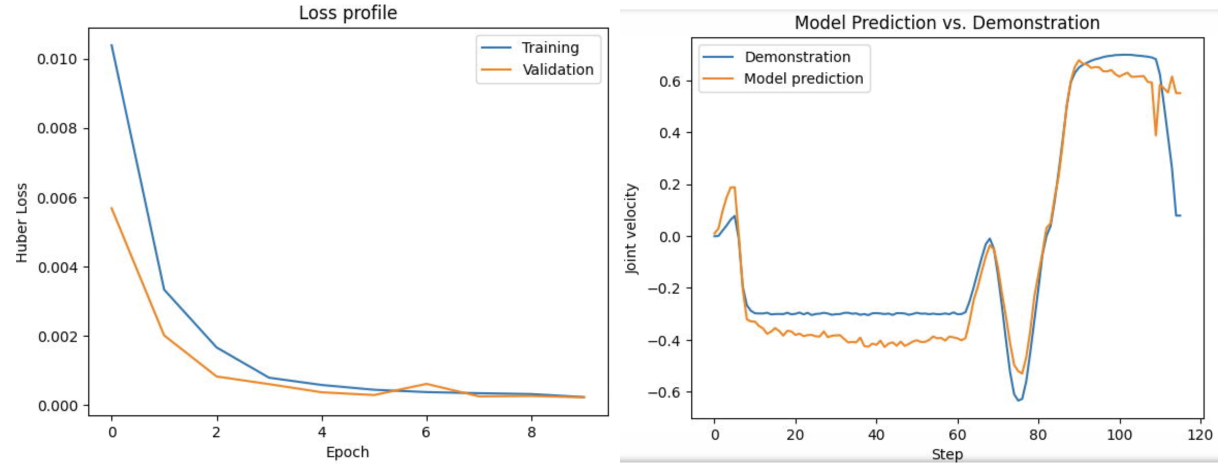
<p><strong>Results</strong>. I found that CLIP is a strong feature extractor compared to
the ResNet. In particular, it was able to predict joint velocities with
relatively high efficacy. I now realize that this is potentially because
of the ability for the CLIP vision transformer to utilize positional
embeddings, whereas ResNet models are translation-invariant. As an
inductive bias in object detection, this is great, but when action
outcomes can be dependent on position within an image,
position-sensitive models may be better.</p>

<p><img src="/images/posts/2024/06/robotics-exploration/001_clip_loss_curve.png" alt="CLIP Loss Curve" /></p>

<h2 id="keypoint-conditioned-imitation-learning">Keypoint-Conditioned Imitation Learning</h2>

<p>The next iteration on this was to do keypoint-conditioned imitation
learning, rather than directly predicting joint velocities. The
hypothesized advantage is that keypoints are simpler to predict, which
should make learning easier.</p>

<p><strong>Experimental Setup</strong>. Here, I adopt a scheme similar to RVT [@rvt]
(Robotic View Transformer) and PerAct [@peract] (Perceiver-Actor). Given
a set of demonstrations – particularly, a set of observations (RGB
images) and robot states (end-effector positions and rotations) – I
extract keyframes, and then create a small dataset in which observations
are mapped to the “next keyframe".</p>

<p><strong>Keyframe Extraction</strong> is done with a simple heuristic: Whether the
gripper state changes, or whether there is a change in velocity.
Keyframe extraction is simple for demonstrations that occur in
simulation, because motion is piecewise linear. It is also possible to
extract keyframes from human demonstrations [@waypointslxs].</p>

<p><strong>Simple Experiment: Vision Transformer Token Head</strong>. Aforementioned RGB
observations (images multiple input directions) have future keypoint
locations (members of \(SE(3)\)) projected onto them according to camera
matrices. I used a pretrained vision transformer (CLIP) trained with
cross-entropy loss to identify future keypoint locations.</p>

<p><em>Aside: Vision Transformers:</em> Vision transformers [@vit] (ViTs) tokenize
images by (1) (optional preprocessing step, not used everywhere)
resizing them to \(224 \times 224\) and potentially scaling pixel values,
and (2) breaking up the preprocessed image into tokens (often, these are
\(14 \times 14\) or \(16 \times 16\) chunks of pixels). These raw tokens
(which can be thought of as the word embeddings before a language-based
transformer) are encoded through the transformer layers, resulting in
contextualized features. For my approach, I simply take an overhead
input image and train a classification head for whether a certain token
contains the future keypoint.</p>

<p><em>Aside (Camera Projection Matrices):</em> Given a Cartesian keypoint
location \($[\vec x] = [x, y, z, 1]^\top\)$ in robot frame (with homogeneous
coordinates), then for each camera, there exists a camera matrix
\(M \in \mathbb{R}^{3 \times 4}\) such that
\([\vec y] = M [\vec x] \in \mathbb{RP}^2\) is a pixel location.
Basically, multiply by the matrix, and turn robot coordinates into pixel
locations. This matrix, if you are trying to self-teach, is finicky to
construct.</p>

<p><strong>Simple Experiment: Voxelization</strong>. Following the Robotic View
Transformer from Nvidia, I took point clouds and applied a voxelization
step followed by a rendering step. I created my own voxelizer to do this
because I was having problems with pytorch3d. I rendered “virtual
views" along the orthogonal coordinate axes, and applied the
aforementioned keypoint prediction pipeline. This resulted in decent-ish
results. However, I was never able to quantify them strongly, nor test
them in closed loop.</p>

<p><em>Aside: Voxelization:</em> To perform voxelization, I defined workspace
boundaries (\(\vec x_{min}\) and \(\vec x_{max}\) in robot coordinate
system) and discretized the coordinates into buckets. Each 3-tuple of
coordinates formed a voxel, which was assigned an occupancy level
(\(\alpha\)) and a color (\(c\)). Then, I created a voxel renderer along
each axis, through a rendering technique very similar to NeRF: creating
rays parallel to the view axis (using an orthographic projection, so all
such rays were parallel), and marching them forward. As an example, if
the workspace along the \(z\) axis ranges from \(z_{near}\) to \(z_{far}\), I
calculate the final pixel value in the image as
\(\hat c(x, y) \gets \alpha_n c(x, y, z_n) + (1 - \alpha_n) \hat c(x, y)\)
iterating from \(z_n = z_{far}\) to \(z_n = z_{near}\), with \(\hat c(x, y)\)
representing the final pixel value for the \(z\) axis image.
\(\hat c(x, y)\) is initialized as \((0, 0, 0)\) to give images a black
background.</p>

<p>TAKEAWAY: Try things in closed-loop. Keep going until they work!</p>

<h1 id="in-context-learning">In-Context Learning</h1>

<p><em>Date: Early January</em></p>

<p>One motif that I was interested in (since the beginning of the lab) was
in-context learning. My vision was to create a robot for which you could
explain tasks in natural language, and have the robot ultimately perform
them for you. However, I think I did not realize how challenging this
would be, because I did not stop to think about what pieces would be
necessary.</p>

<p><strong>Background Reading</strong>. There was an object-centric prompting mechanism
[@vima] and meta-learning [@adaptiveagents] set of papers which were
cool cool. I do not believe that I understood them deeply. I also
designed an approach to use a temporal (i.e., multiple input-image)
vision transformer to predict future actions conditioned on previous
actions. Finally, I considered that it was important to train policies
to run on the actual robot. I made a couple of setups:</p>

<ol>
  <li>
    <p><strong>Pick Same Object</strong>. Sequences of two images. The first would have
a certain item circled. The second would have the items shuffled,
and the target label would be the item that was circled.</p>
  </li>
  <li>
    <p><strong>Squares</strong>. I made a prompt:
<code class="language-plaintext highlighter-rouge">observe the &lt;color&gt; square, and continue the pattern</code>.</p>
  </li>
  <li>
    <p><strong>Left, Right, Red, Blue</strong>. A flag would be set in the model input,
prompting it to change its selection behavior between left/right
side of an image, or red/blue side of an image.</p>
  </li>
</ol>

<p>It took a surprising amount of compute for the model to learn which one
to use with in-context instructions. It was easy to train the model to
make predictions for single tasks, though. Some of the things I learned
were:</p>

<ol>
  <li>
    <p><strong>Learning rate is important in transformers</strong>. Dynamic learning
rate schedules can be important as well. For example, without a
linear warmup, some transformer models will simply never converge,
or it would take forever to work. After the linear warmup, some form
of annealing is good.</p>
  </li>
  <li>
    <p><strong>Without pretraining, in-context learning is fairly difficult</strong>.</p>
  </li>
</ol>

<h1 id="using-a-real-life-robot">Using a Real-Life Robot</h1>

<p><em>Date: Early February</em></p>

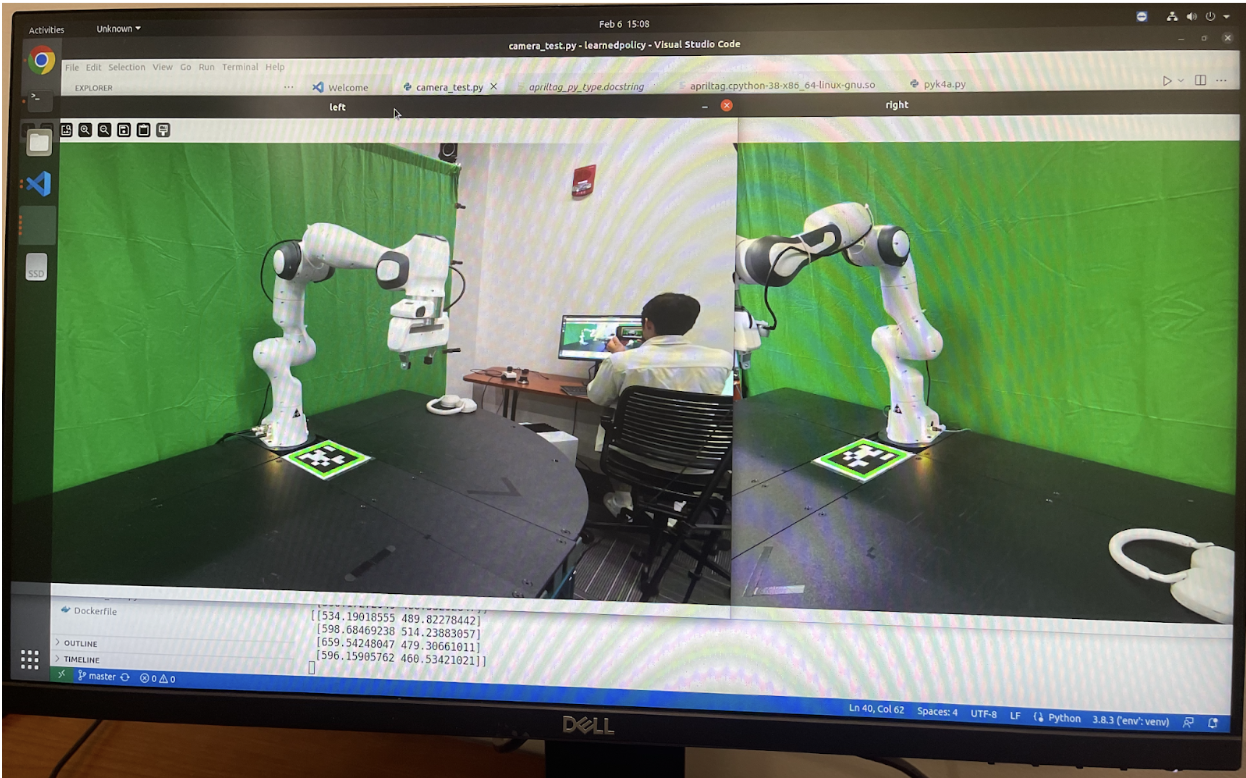
<p><img src="/images/posts/2024/06/robotics-exploration/003_apriltags.png" alt="image" /></p>

<p style="text-align: center;">AprilTags</p>

<p>I wanted to try working on a real-life robot. I started by working with
a pair of Azure Kinect RGBD cameras, and an AprilTag. To interact with
cameras, I use the <code class="language-plaintext highlighter-rouge">pyk4a</code> library on GitHub, which requires the
proprietary <code class="language-plaintext highlighter-rouge">libk4a</code> package (which is unfortunately only available in
binary form). I used the <code class="language-plaintext highlighter-rouge">apriltag</code> library on GitHub, which provides
the pixel locations of each AprilTag’s corners. Using the built-in
camera intrinsic parameters, distortion coefficients, and known
coordinates of the AprilTag in robot frame, it is possible to calculate
a perspective-and-point (PnP) transform, which essentially determines
the extrinsic matrix of the camera. Note that this is susceptible to
noisy measurements of AprilTag coordinates, or inaccurate AprilTag
placement. I (much later) go on to develop a more sophisticated and
robust calibration system, which results in strong results after just
1-2 minutes of calibration per camera. The ability to place point clouds
in robot frame allows for point clouds from different perspectives to be
fused.</p>

<h2 id="using-offline-data">Using Offline Data</h2>

<p>I tried to use some existing data we had collected. Some notes for
future work:</p>

<ol>
  <li>
    <p><strong>Ensure timestamps are correct</strong>: In addition to being
unsynchronized, I ran into the surprising issue that dependent on
the run, images and robot control commands were collected with
trial-dependent time offsets. This made it a bit difficult to do
anything with the offline data.</p>
  </li>
  <li>
    <p><strong>Use a standardized setup</strong>: It was also difficult to create
correct mappings from robot state space to pixel space.</p>
  </li>
</ol>

<p>At this point I tried to label 3D keypoints visually. That is, given two
camera views, I specified target locations by manually selecting the
target location as 2D coordinates. As a result of my camera calibration,
I was able to have a robot move to a precise 3D location, simply using
2D information. This was an important moment because I realized that 2D
image information could be highly useful for robotic policies.</p>

<h1 id="video-diffusion-models">Video Diffusion Models</h1>

<p><em>Date: Late February to Early March</em></p>

<p>I then decided that large pretrained diffusion models would be good for
robotic manipulation. I recognized that many problems in robotic
control, similar to large language models with transformers, can be
reduced to the form “generate a video of a robot performing X action",
conditioned on the robot’s previous observations. There were several
signals that would indicate positive performance in this direction. (1)
Diffusion Policy [@diffusionpolicy] was demonstrating impressive
multimodal (“multi-solution") planning capabilities in robot state
space. (2) Image inpainting and video prediction models seemed to be
doing well as well [@videolanguageplanning; @susie]. (3) Sergey Levine
and Chelsea Finn created a patent for image prediction-based methods for
robotic planning (although I think other works had done it earlier?).
This may appear true, at least superficially.</p>

<p>I made a presentation of some existing video diffusion methods (<a href="https://docs.google.com/presentation/d/1Uty0a7Vsi9bXAz9pd2Pvavi7Nr-TQ1PNiJqae59jro0/edit#slide=id.g1f1f68ae257_0_35">view
here</a>).
Still think I should have thought more logically / at a higher level
about this one though, even if the theory was technically there. It’s
important to consider the compute and talent budgets that other labs
have to execute on more ambitious ideas.</p>

<p>Regardless, I decided to just try this out. I learned how to train large
models on multiple A100 GPUs, but I think I could have saved a lot of
time lol by focusing on more direct parts of the project and saving this
for future work. I learned about EDM preconditioning strategies for
diffusion models [@edm], which essentially dictate the loss function
weighting at each training diffusion timestep, and the tradeoff between
predicting \(x_0\) and predicting \(\epsilon\). I also rederived the forward
diffusion reparameterization trick.</p>

<p>For training, I used a pretrained Stable Video Diffusion (SVD)
[@stablevideodiffusion] model, and modified an existing HuggingFace
training script for the image-based Stable Diffusion. This was harder
than I anticipated, because the model architectures were different, and
it was my first time training a diffusion model in such a way. In fact,
this was so difficult that in order to check my sanity, I followed a
guide from <a href="https://nn.labml.ai/diffusion/ddpm/unet.html"><code class="language-plaintext highlighter-rouge">nn.labml.ai</code></a>
and trained/implemented my own diffusion model on MNIST. <a href="https://yang-song.net/blog/2021/score/">Yang
Song</a> and <a href="https://lilianweng.github.io/posts/2021-07-11-diffusion-models/">Lilian
Weng</a>’s
blogposts is a great place to learn how diffusion models work.</p>

<p>In terms of learning about diffusion, I learned about the importance of
the signal-to-noise ratio schedule: It should go from \(1\) to \(0\)
[@fixtheschedule], this is much easier to tune correctly than a \(\beta\)
schedule; besides, you can derive a \(\beta\) schedule from a
signal-to-noise ratio, and I think the signal-to-noise ratio is more
interpretable. <a href="https://www.crosslabs.org/blog/diffusion-with-offset-noise">Offset
noise</a> is
also important to be able to sample very bright or very dark images from
diffusion models. I also learned about the importance of the sampling
step. You can get significantly better results with slightly
under-optimized diffusion models simply by applying more backward
inference steps. From a standpoint of annealed Langevin Dynamics, this
allows the model to make more corrections at a given noise level, which
seems to stabilize things. This all sort of ties into a great underlying
theme about the success of diffusion models: They allow ML models to
specify cost functions / local gradients (the score function), which are
significantly easier to learn than direct samples from the probability
distribution. The point is, it is easier to detect mistakes than to
generate a satisfying sample directly.</p>

<p>This whole principle that diffusion models are optimizers allows for
striking out-of-the-box capabilities. One example is that of optical
illusions created by diffusion models [@diffusionillusions].</p>

<p>Anyway. I’m getting sidetracked. Here’s more training details about the
video diffusion model. I trained my models on the RT-1 dataset from
Google [@rt1]. I formatted the dataset by taking \(25\)-frame chunks
(which is what SVD was finetuned for), using no text conditioning (I
just wanted to get video diffusion working whatsoever). The results are
conditioned on the initial image, the features of which are concatenated
to the noisy latents of all future frames to guide generation. I used
the <a href="https://github.com/huggingface/accelerate">HuggingFace Accelerate</a>
library, which includes advanced techniques for distributing workloads
to multiple GPUs, for training. Overall, I used 10k samples and trained
for 2 epochs. The result was a model capable of generating relatively
decent results for the compute budget I had. I initially experimented
with LoRA to save memory, but I found that the model did not improve
enough if I did that.</p>

<p>One important detail that I had not noticed before during training was
the impact of the VAE. Misconfiguring the VAE = death for your training.
I did not realize that the VAE was trained with a scaling parameter, and
during my finetuning, I at one point was training without regard for
that. And thus, I deviated too far from the pretraining distribution,
resulting in subpar performance for a bit. Once this was fixed, video
generations looked significantly better.</p>

<p><img src="/images/posts/2024/06/robotics-exploration/004_video_diffusion_result.png" alt="image" /></p>

<p style="text-align: center;">Diffused Image from My Model</p>

<p><img src="/images/posts/2024/06/robotics-exploration/004_loss_curve.png" alt="image" /></p>

<p style="text-align: center;">Loss Curve for Diffusion Training</p>

<p>Considering the lower-level details in retrospect, there are many
reasons this should not have worked:</p>

<ol>
  <li>
    <p><strong>Compute limitations</strong>. Pretrained diffusion models require massive
amounts of compute, and I was not a researcher on model efficiency,
I was a researcher in robotics. Additionally, it is unclear whether
video diffusion models even <em>should</em> be the standard for motion
planning and prediction. Sure, it makes sense to make prediction in
image space in some sense, but there are also many more practical
approaches that should work equally well before getting to a point
where that would make a difference.</p>
  </li>
  <li>
    <p><strong>Implementation limitations</strong>. Even with a trained diffusion model,
performing evaluations on such a model would be difficult, when
considering how it would look in material form. This would require
some form of visual servoing, or otherwise, some model to encode the
action space (serving as the dynamics model as a function of
actions), and some model to extract meaningful reward information
about future states (a reward model).</p>
  </li>
</ol>

<h1 id="2d-diffusion-models">2D Diffusion Models</h1>

<p><em>Date: March</em></p>

<p><em>Note: I found that concurrent work actually implemented what I was
thinking about doing here. This paper is called Render and Diffuse, and
it came from the Dyson Robot Learning Lab. [@renderanddiffuse]</em>.</p>

<p>One valid question I had, after seeing that much robotic planning could
be performed in 2D space, was to use diffusion over images. This is
already sort of what Diffusion Policy does (in retrospect). There were
many theoretical reasons for this though:</p>

<ol>
  <li>
    <p><strong>Access to internet-scale pretraining</strong>. There are a ton of
image-language pretrained transformers that are capable of a wide
range of downstream tasks. Additionally, such transformers
demonstrate great scene understanding.</p>
  </li>
  <li>
    <p><strong>Compute efficiency</strong>. Video diffusion models are extremely costly.
Performing diffusion in action space instead is much better.</p>
  </li>
  <li>
    <p><strong>Analogies to visual servoing</strong>. Humans primarily measure motor
errors visually. Therefore, it should seem natural for an agent to
be able to correct its movements given an input image and
proprioception, and in the best case, this reduces to a deep-learned
version of visual servoing.</p>
  </li>
</ol>

<p>There are some issues though with this approach:</p>

<ol>
  <li>
    <p><strong>Simpler prior work</strong>: At a high level, this approach purports to
have exactly the same benefits as the well-established Diffusion
Policy [@diffusionpolicy]. Therefore, I should have worked with
that.</p>
  </li>
  <li>
    <p><strong>Insufficiency of 2D corrective terms</strong>: My model outputted 2D
correction terms, and my hope was that by optimizing the score
function across all views simultaneously, I would eventually reach a
mode of the joint probability distribution \(\pi(x, y, z | o)\).
However, this is simply not true. A maximizer of \(P(x, y)\),
\(P(y, z)\), \(P(z, x)\) is not necessarily a maximizer of \(P(x, y, z)\);
there is too much ambiguity.</p>
  </li>
</ol>

<p>I created a noise-conditioned score matching model, where conditional on
the noise level, each output token of a vision transformer would include
a direction to move to the nearest mode. The training loss was as
follows. For a token at position \((x, y)\), and true keypoint position at
\((x_0, y_0)\), predicting the noise \(\hat \epsilon\) and quaternion map
\(\hat q\), the loss function was as follows:
\(\mathcal{L} = \underbrace{\frac{1}{\sigma^2}((x - x_0) - \hat \epsilon)^2}_{\text{translation noise}} + \underbrace{(\hat q - q_0)^2(e^{-(x - x_0)^2/\sigma^2})}_{\text{quaternion field}}\)
Where \(\sigma\) is the standard deviation used by noise conditioning. The
quaternion loss was used to enable prediction of end-effector rotations
at multiple modes; broadly encouraging nearby quaternion predictions to
be the same, but not penalizing distant quaternion predictions for one
mode when they were correct for a closer mode. The result was a model
that seemed capable of predicting keypoints. Below I have some images:</p>

<p><img src="/images/posts/2024/06/robotics-exploration/005_orthogonal_views.png" alt="image" /></p>

<p style="text-align: center;">2D Keypoint Diffusion</p>

<p><img src="/images/posts/2024/06/robotics-exploration/005_rotation_angles.png" alt="image" /></p>

<p style="text-align: center;">Rotation Angle Prediction</p>

<p>I was actually able to get virtual plan rendering working, which was
deceptively difficult! This required loading the URDF files and a 3D
model into a 3D rendering environment, and using the quaternions and
translation vectors to calculate where the end-effector should land in
the scene. I don’t think I ever ended up doing anything with this
though.</p>

<p><img src="/images/posts/2024/06/robotics-exploration/005_virtual_plan_rendering.png" alt="image" /></p>

<p style="text-align: center;">Virtual Plan Rendering</p>

<h1 id="language-models-for-planning">Language Models for Planning</h1>

<p>After I realized that it was mathematically impossible for my
formulation of 2D diffusion to work (optimizing from multiple views), I
decided to pivot towards using language models as planners. The primary
reason for this is their <strong>impressive zero-shot capability</strong>: Language
models are great for code generation, and have an impressive prior over
general world knowledge. With a bit of fine-tuning, they should perform
excellently for robotic control tasks. One line of work on language
models for robotic planning, particularly for long-horizon robotic
planning, envisions the use of a language model that processes
observations about the environment via external APIs called via tool use
[@innermonologue] or code generation
[@codeaspolicies; @voxposer; @progprompt].</p>

<p>There are also some interesting open questions for language models:</p>

<ol>
  <li>
    <p><strong>Closed-loop control</strong>: Language models generate code policies for
multiple timesteps. Executing these code policies without checking
for task execution errors isn’t a great idea. What ways are there to
use VLMs as “error checkers"?</p>
  </li>
  <li>
    <p><strong>Instruction memory</strong>: Can we encode instructions and use language
models to “recall" desired behavior in the future? What ways are
there to implicitly create this type of memory?</p>
  </li>
  <li>
    <p><strong>Visual grounding</strong>: When (vision) language models reason, it is
hard to connect their reasoning to the images they refer to.
However, if we <em>could</em> reason over grounded objects, we could unlock
significantly more advanced planning capabilities. This is still an
open question and something I am interested in exploring further.</p>
  </li>
</ol>

<p>I explored the first and third points by creating an agentic LLM
planner. Particularly, I created a notion of an “event stream", in
which observations, actions, rationales, and reflections would enter a
shared space for future reference by the language model.</p>

<p>There was also a ton of engineering effort required to make this into a
reality. First, there was camera calibration to be able to fuse RGBD
point clouds in robot space. Then, there was camera-robot calibration,
which adjusted the resulting detections. Finally, there was grasp
synthesis, and execution on the robot control system.</p>

<p><img src="/images/posts/2024/06/robotics-exploration/006_object_detection_and_selection.png" alt="image" /></p>

<p style="text-align: center;">Object Detection and Selection</p>

<p><strong>Plan generation</strong>. Based on previous actions taken, the current
instruction, and the current image observation, the VLM generates a plan
for how to interact with the objects in scene.</p>

<p><strong>Code generation</strong>. Based on the reasoning generated by the VLM, I then
use a separate prompt to generate code to control the robot. I expose a
small set of APIs:</p>

<ol>
  <li>
    <p><strong>Object detection</strong>: This returns objects with 3D point clouds in
robot frame, conditioned on a target text label.</p>
  </li>
  <li>
    <p><strong>Relative motion</strong>: This allows the robot to translate or rotate
its end-effector by a calculated amount, in meters. This is useful,
for example, for lifting items up simply by performing an upward
translation.</p>
  </li>
  <li>
    <p><strong>Absolute motion</strong>: This allows motion with respect to anchor
coordinate locations. One example for why this might be useful is if
the robot arm needs to move above a certain item to pick it up.</p>
  </li>
  <li>
    <p><strong>Gripper control</strong>: This allows the robot to open or close its
gripper. Additional logic adjusts the grasp axis to perform a force
closure, through a rough (and non-robust) heuristic I made.</p>
  </li>
</ol>

<p><strong>Object selection</strong>. I used an OwlV2 [@owlv2] model (which is great for
open-vocabulary object detection) to locate objects of a specific type.
To choose specific objects based on fine-grained attributes (like color,
text, etc.), I create image crops centered around each of the object
detections, and ask the VLM to describe the physical attributes of those
objects. Then, these descriptions are compiled into a summary (a list of
lines <code class="language-plaintext highlighter-rouge">Object 1: &lt;Description&gt;\nObject 2: &lt;Description&gt;\n ...</code>), before
the VLM makes its final decision for which object to select, or none of
the objects if none match.</p>

<p><strong>Object point cloud extraction</strong>. Once an object has been located in a
2D image, we must further ground it in a 3D location. This is done in
two steps. The first step is to use the Segment Anything Model [@sam] to
generate an image segmentation. Because images are in RGBD, this image
segmentation automatically generates a set of object points in robot
state space. However, these object points only represent one side of the
object, and grasp planning with this will not work. To fix this, I use a
camera on the other side of the robot, as depicted below.</p>

<p><img src="/images/posts/2024/06/robotics-exploration/006_camera_layout.png" alt="image" /></p>

<p style="text-align: center;">Camera Layout</p>

<p><strong>Camera-Robot Cross Calibration</strong>. To create accurate calibrations of
images to robot state, I wrote a script that (1) allowed a user to place
a block with an AprilTag on it in the robot’s gripper, and (2) moved the
AprilTag block to predefined locations in a 3D cubic grid. I then logged
robot state information directly from the robot (rather than using the
waypoint as a ground truth) due to control error. Using the
correspondences between image pixel locations from the center of the
AprilTag, and the known positions in robot coordinate space, I was able
to use OpenCV’s <code class="language-plaintext highlighter-rouge">solvePnP</code> function to create a more accurate camera
extrinsic calibration than the original AprilTag approach described
earlier.</p>

<p><strong>Robot Control</strong>. Robotic control was done with Polymetis, a framework
that allows specialized control policies to be deployed at a high
frequency. It includes a barebones min-jerk motion planner as well.
Control is done with PID over joint positions/velocities in a tight loop
rather than model predictive control. I found that this mostly worked
out of the box except for two major challenges:</p>

<ol>
  <li>
    <p><strong>Flange frame miscalibration</strong>: For some reason, all actions the
robot took were offset by \(10.34\) centimeters downward, and with a
rotation of \(\pi/4\) radians around the z axis. Other people
experienced this too
(<a href="https://github.com/pantor/frankx/issues/21">here</a>).</p>
  </li>
  <li>
    <p><strong>Improper control coefficients</strong>: This was much easier to discover
and debug. I found that the robot sagged under gravity at times, and
was otherwise susceptible to slight pushes; to fix this, I increased
the proportional gain in the PID.</p>
  </li>
</ol>

<p>I also used a very simple motion planning heuristic to reduce the number
of collisions with items on the table. First, whenever the robot’s Z
value was anticipated to move downward during a motion, I would first
make the horizontal motion, and then the downward motion. If a movement
involved upward motion, I would make the upward motion first, and then
the horizontal motion. The overall result from this is that most of the
horizontal motion occurs at higher Z levels, resulting in fewer
collisions for basic tabletop tasks.</p>

<p><img src="/images/posts/2024/06/robotics-exploration/006_block_in_cup.png" alt="image" /></p>

<p style="text-align: center;">Robot Completing a Task</p>

<p><strong>Grasp Generation Heuristic</strong>. When the robot attempts to grasp a
target object, it uses a grasp generation heuristic I created. This
voxelizes the object point cloud, rotates the voxels on their side, and
rotates around the (former) z-axis, looking for appropriate planes to
grasp along. This plane estimation approach is highly non-robust, and
simply uses the slope of the voxelization at the top and bottom of the
object to calculate the angles (\(\alpha\)) that dictate the amount of
friction generated. Hole-filling or other techniques would make it
better. A score is calculated based on these angles of approach which
determines whether there is enough friction to perform the grasp. This
is based on the Fast Force Closure algorithm by Van-Duc Nguyen
[@fastforceclosure]. I found that this approach was capable of
correcting gripper rotation angles for objects rotated at 45 degrees,
enabling more successful grasps.</p>

<h2 id="object-memory-for-language-models">Object Memory for Language Models</h2>

<p>I performed some additional experiments to create a sort of “visual
object memory" for language models. For example, when looking at a
snickers bar, a robot should be able to recognize that it contains
peanuts, and thus not recommend it to someone with a peanut allergy. In
retrospect, this set of experiments was hard to test, and it was not
clear there was high demand for this sort of feature compared to other,
high-priority components. To implement a non-verbal form of object
memory, I used the following technique:</p>

<p><strong>CLIP heatmap of the scene</strong>: I used the MaskCLIP reparameterization
trick [@maskclip] to create text-aligned, dense CLIP features. The trick
works by replacing the final transformer layer in the CLIP ViT: instead
of applying self-attention, we perform a value projection on each token,
and project from image embedding space to the multimodal text-image
embedding space. To enable CLIP heatmaps to be created from images of
arbitrary aspect ratios, I use positional encoding interpolation from
the original ViT paper and DINO [@vit; @dino], which I borrow from the
Distilled Feature Features [@featurefields] GitHub repository.
Essentially, this reshapes the \(16 \times 16\) grid of positional
encodings built into CLIP and applies a bilinear interpolation to any
arbitrary grid size desired. Finally, I take the token-level CLIP
features and interpolate them into pixel space.</p>

<p><strong>Registration of object features</strong>: Given an object segmentation
obtained via SAM, I then segment the pixel-level CLIP features to create
a positive set (inside the segmentation) and negative set (outside the
segmentation). I also augment these sets with Gaussian blurs, slight
rotations, and background removal. Finally, I reweight the classes to
25% positive features, and 75% negative features, before applying a
Support Vector Machine [@svm]. I found it to be crucial to perform class
reweighting and data augmentation to increase the robustness of the
classification. I used SVMs because of their ability to output
well-calibrated class probabilities compared to a naïve dot product.
Another reason for using SVMs is that they can use any kernel for
classification, be it a linear function (as I used) or radial basis
functions (which represent a mixture of Gaussians).</p>

<p><strong>Object tracking</strong>: To further augment object features, I used XMem
[@xmem], a method aimed at generating continual object segmentations in
video. This seemed highly capable and generally worked for tracking
objects as they rotated in a scene to enable fast collection of
additional features.</p>

<p><strong>Instance segmentation</strong>: After creating a feature detector, I needed
to be able to reconstruct accurate object segmentations. Given a new RGB
image of a scene, I extracted dense token-level CLIP features in the
same way as before. I used a threshold to identify positive features and
create a mask. Then, I encoded the input image with SAM and prompted it
with randomly-selected points within the mask. Any masks that had
sufficient duplication with other masks (e.g., IOU &gt; 0.7) would be
removed, and any masks which seemed to be false positives (e.g.,
positive features only made a small fraction of the resulting mask) were
also discarded.</p>

<p><strong>Result</strong>: Below is an image of one-shot object segmentation. In this
case, the model is given a small set of annotations for a certain type
of food packaging, and is able to recognize the target object regardless
of distractors in the scene.</p>

<p><img src="/images/posts/2024/06/robotics-exploration/006_one_shot_object_segmentation.png" alt="image" /></p>

<p style="text-align: center;">One-shot object segmentation</p>

<p>Alas, after this, I did not perform a closed-loop test of whether this
could be used to modify a robot’s behavior.</p>

<h1 id="visual-grounding-for-language-models">Visual Grounding for Language Models</h1>

<p><em>Date: May</em></p>

<p>I realized rather quickly for VLMs that a really important question is
whether we can have VLMs output <em>spatial locations</em> rather than just
language. That is, whether the objects of their reasoning can be
grounded in the input image. One way to do this is to first generate all
objects in a scene, and then detailed descriptions for each of these
objects, and finally, select the optimal object out of that stack.</p>

<p><strong>Can we have language models which reason about objects in a grounded
manner?</strong> One compelling ideal outcome is to have the same reasoning
capability as textual chain-of-thought, but for scenes. To experiment
with this, I use the test task of generating referring expressions and
detailed object captions given bounding boxes. Compared to other
approaches, though, which might require reencoding an image crop for
every object in a scene, allows one to directly decode object captions
prompted by bounding boxes. In addition to improved computational speed,
we can reason about objects within bounding boxes in terms of the
surrounding context, which is impossible to do when just describing an
object based on its cropped image.</p>

<p><strong>Vision-Language Models Effectively Extract Object Attributes</strong>. I
found that when using excellent vision-language models (such as GPT-4V),
accuracy increases significantly for tasks requiring references to
specific object attributes. For example, whereas a simple image
embedding might capture the general type of an object, generating object
captions with a vision-language model (which have more tokens allocated
to represent larger and potentially more complex objects) allows for
more granular detail, even compared to approaches that claim to “unleash
extraordinary object grounding", like Set-of-Mark prompting
[@setofmark]. However, in my opinion, it is unclear still whether these
results are due to superior attribute extraction or due to the choice of
vision model used (in our case, GPT-4V, which has who knows how many
parameters, compared to OwlV2, which has a couple hundred million
parameters).</p>

<table>
  <thead>
    <tr>
      <th>Object Category</th>
      <th><strong>Ours</strong></th>
      <th>SOM</th>
      <th>MaskCLIP Alignment</th>
      <th>Cropped Image CLIP Alignment</th>
    </tr>
  </thead>
  <tbody>
    <tr>
      <td>Cups</td>
      <td>75.00</td>
      <td>44.44</td>
      <td>55.56</td>
      <td>33.33</td>
    </tr>
    <tr>
      <td>Condiments</td>
      <td>85.71</td>
      <td>16.67</td>
      <td>35.71</td>
      <td>26.19</td>
    </tr>
    <tr>
      <td>Spoons</td>
      <td>60.00</td>
      <td>12.00</td>
      <td>40.00</td>
      <td>34.00</td>
    </tr>
  </tbody>
</table>

<p><img src="/images/posts/2024/06/robotics-exploration/007_shampoos.png" alt="image" /></p>

<p style="text-align: center;">A set of visually-similar objects</p>

<p><strong>Pretraining with Object Classification</strong>. I initially trained the
multimodal projection layer and sequence modeling components of
PaliGemma with object classification. Particularly, I prompted the model
to classify an object corresponding to a bounding box (represented as
four <code class="language-plaintext highlighter-rouge">&lt;locXXXX&gt;</code> tokens in xyxy format), and set the target to be the
text representation of the MSCOCO class name. When applied to the
<code class="language-plaintext highlighter-rouge">train2014</code> split of MSCOCO, this provides approximately 600000 training
examples, spanning 80000 images. This provides high object detection
density per image, forcing models to respect bounding box information to
generate correct labels.</p>

<p><strong>Finetuning with Referring Expressions: OCID-Ref and RefCOCO</strong>. I found
that OCID-Ref [@ocidref] seemed to be a good dataset for referring
expression comprehension. Importantly, it had a high density of objects
per image, making it a great way to train object captioning models with
strong respect for spatial locations. The RefCOCO datasets [@refcoco]
were also great for this. I fine-tuned PaliGemma to generate referring
expressions for objects given bounding boxes. I then ran an experiment
to see whether objects could be correctly disambiguated based on their
referring expressions.</p>

<p><strong>Finetuning with Descriptive Captions: Synthetic Data Approach</strong>. I
generated a small dataset of \(5000\) object-centric captions for
finetuning, using the Phi-3 Vision [@phi3] model from Microsoft to
extract object attributes for a large set of object detections in the
MSCOCO dataset. I found that including the class of object in the prompt
was crucial to generate attributes correctly, as otherwise, models would
misclassify objects and describe corresponding features incorrectly due
to the lack of surrounding context. Additionally, I prompted Phi-3 to
describe physical attributes of the images only, as it would otherwise
hallucinate features that correspond to the target object that were not
explicitly visible, or misclassify visible features. I finetuned
PaliGemma on this dataset for \(4\) epochs.</p>

<p><img src="/images/posts/2024/06/robotics-exploration/007_detailed_object_caption.png" alt="image" /></p>

<p style="text-align: center;">A detailed object caption</p>

<p><img src="/images/posts/2024/06/robotics-exploration/007_refcoco_result.png" alt="image" /></p>

<p style="text-align: center;">A referring expression generated from an object bounding box</p>

<p><img src="/images/posts/2024/06/robotics-exploration/007_object_pretraining.png" alt="image" /></p>

<p style="text-align: center;">Left: No object pretraining; Right: Object pretraining</p>

<h1 id="conclusion">Conclusion</h1>

<p>I learned a lot from this experience. In retrospect, much of the
research that was performed here was close to being a rich project, and
simply required more pointed investigation and testing.</p>

<h1 id="acknowledgements">Acknowledgements</h1>

<p>I would like to thank Mohammad Samin Yasar for his continual support of
my work, even during the week I returned to Charlottesville to try to
get something working, and for teaching me how to use the robots in the
lab.</p>

<h1 id="references">References</h1>

<!--

To generate references, use the following command with `pandoc`:

pandoc -t markdown_strict --bibliography ./refs.bib -s "$(pwd)/markdown_1.md" --citeproc -o ./markdown_2.md

See https://tex.stackexchange.com/questions/610876/generating-markdown-from-bib-file.

It seems that the most important component is to use (a) the --citeproc flag, and (b) the -t markdown_strict flag.

-->

<p>Black, Kevin, Mitsuhiko Nakamoto, Pranav Atreya, Homer Walke, Chelsea
Finn, Aviral Kumar, and Sergey Levine. 2023. “Zero-Shot Robotic
Manipulation with Pretrained Image-Editing Diffusion Models.”
<a href="https://arxiv.org/abs/2310.10639">https://arxiv.org/abs/2310.10639</a>.</p>

<p>Blattmann, Andreas, Tim Dockhorn, Sumith Kulal, Daniel Mendelevitch,
Maciej Kilian, Dominik Lorenz, Yam Levi, et al. 2023. “Stable Video
Diffusion: Scaling Latent Video Diffusion Models to Large Datasets.”
<a href="https://arxiv.org/abs/2311.15127">https://arxiv.org/abs/2311.15127</a>.</p>

<p>Brohan, Anthony, Noah Brown, Justice Carbajal, Yevgen Chebotar, Joseph
Dabis, Chelsea Finn, Keerthana Gopalakrishnan, et al. 2023. “RT-1:
Robotics Transformer for Real-World Control at Scale.”
<a href="https://arxiv.org/abs/2212.06817">https://arxiv.org/abs/2212.06817</a>.</p>

<p>Burgert, Ryan, Xiang Li, Abe Leite, Kanchana Ranasinghe, and Michael S.
Ryoo. 2023. “Diffusion Illusions: Hiding Images in Plain Sight.”
<a href="https://arxiv.org/abs/2312.03817">https://arxiv.org/abs/2312.03817</a>.</p>

<p>Caron, Mathilde, Hugo Touvron, Ishan Misra, Hervé Jégou, Julien Mairal,
Piotr Bojanowski, and Armand Joulin. 2021. “Emerging Properties in
Self-Supervised Vision Transformers.”
<a href="https://arxiv.org/abs/2104.14294">https://arxiv.org/abs/2104.14294</a>.</p>

<p>Cheng, Ho Kei, and Alexander G. Schwing. 2022. “XMem: Long-Term Video
Object Segmentation with an Atkinson-Shiffrin Memory Model.”
<a href="https://arxiv.org/abs/2207.07115">https://arxiv.org/abs/2207.07115</a>.</p>

<p>Chi, Cheng, Zhenjia Xu, Siyuan Feng, Eric Cousineau, Yilun Du, Benjamin
Burchfiel, Russ Tedrake, and Shuran Song. 2024. “Diffusion Policy:
Visuomotor Policy Learning via Action Diffusion.”
<a href="https://arxiv.org/abs/2303.04137">https://arxiv.org/abs/2303.04137</a>.</p>

<p>Dong, Xiaoyi, Jianmin Bao, Yinglin Zheng, Ting Zhang, Dongdong Chen, Hao
Yang, Ming Zeng, et al. 2023. “MaskCLIP: Masked Self-Distillation
Advances Contrastive Language-Image Pretraining.”
<a href="https://arxiv.org/abs/2208.12262">https://arxiv.org/abs/2208.12262</a>.</p>

<p>Dosovitskiy, Alexey, Lucas Beyer, Alexander Kolesnikov, Dirk
Weissenborn, Xiaohua Zhai, Thomas Unterthiner, Mostafa Dehghani, et al. 2021.
“An Image Is Worth 16x16 Words: Transformers for Image Recognition
at Scale.” <a href="https://arxiv.org/abs/2010.11929">https://arxiv.org/abs/2010.11929</a>.</p>

<p>Du, Yilun, Mengjiao Yang, Pete Florence, Fei Xia, Ayzaan Wahid, Brian
Ichter, Pierre Sermanet, et al. 2023. “Video Language Planning.”
<a href="https://arxiv.org/abs/2310.10625">https://arxiv.org/abs/2310.10625</a>.</p>

<p>Goyal, Ankit, Jie Xu, Yijie Guo, Valts Blukis, Yu-Wei Chao, and Dieter
Fox. 2023. “RVT: Robotic View Transformer for 3D Object Manipulation.”
<a href="https://arxiv.org/abs/2306.14896">https://arxiv.org/abs/2306.14896</a>.</p>

<p>He, Kaiming, Xiangyu Zhang, Shaoqing Ren, and Jian Sun. 2015. “Deep
Residual Learning for Image Recognition.”
<a href="https://arxiv.org/abs/1512.03385">https://arxiv.org/abs/1512.03385</a>.</p>

<p>Hearst, M. A., S. T. Dumais, E. Osuna, J. Platt, and B. Scholkopf. 1998.
“Support Vector Machines.” <em>IEEE Intelligent Systems and Their
Applications</em> 13 (4): 18–28. <a href="https://doi.org/10.1109/5254.708428">https://doi.org/10.1109/5254.708428</a>.</p>

<p>Huang, Wenlong, Chen Wang, Ruohan Zhang, Yunzhu Li, Jiajun Wu, and Li
Fei-Fei. 2023. “VoxPoser: Composable 3D Value Maps for Robotic
Manipulation with Language Models.” <a href="https://arxiv.org/abs/2307.05973">https://arxiv.org/abs/2307.05973</a>.</p>

<p>Huang, Wenlong, Fei Xia, Ted Xiao, Harris Chan, Jacky Liang, Pete
Florence, Andy Zeng, et al. 2022. “Inner Monologue: Embodied Reasoning
Through Planning with Language Models.”
<a href="https://arxiv.org/abs/2207.05608">https://arxiv.org/abs/2207.05608</a>.</p>

<p>James, Stephen, Zicong Ma, David Rovick Arrojo, and Andrew J. Davison. 2020.
“RLBench: The Robot Learning Benchmark &amp; Learning Environment.”
<em>IEEE Robotics and Automation Letters</em>.</p>

<p>Jiang, Yunfan, Agrim Gupta, Zichen Zhang, Guanzhi Wang, Yongqiang Dou,
Yanjun Chen, Li Fei-Fei, Anima Anandkumar, Yuke Zhu, and Linxi Fan. 2023.
“VIMA: General Robot Manipulation with Multimodal Prompts.”
<a href="https://arxiv.org/abs/2210.03094">https://arxiv.org/abs/2210.03094</a>.</p>

<p>Karras, Tero, Miika Aittala, Timo Aila, and Samuli Laine. 2022.
“Elucidating the Design Space of Diffusion-Based Generative Models.”
<a href="https://arxiv.org/abs/2206.00364">https://arxiv.org/abs/2206.00364</a>.</p>

<p>Kazemzadeh, Sahar, Vicente Ordonez, Mark Matten, and Tamara Berg. 2014.
“ReferItGame: Referring to Objects in Photographs of Natural Scenes.” In
<em>Proceedings of the 2014 Conference on Empirical Methods in Natural
Language Processing (EMNLP)</em>, edited by Alessandro Moschitti, Bo Pang,
and Walter Daelemans, 787–98. Doha, Qatar: Association for Computational
Linguistics. <a href="https://doi.org/10.3115/v1/D14-1086">https://doi.org/10.3115/v1/D14-1086</a>.</p>

<p>Kirillov, Alexander, Eric Mintun, Nikhila Ravi, Hanzi Mao, Chloe
Rolland, Laura Gustafson, Tete Xiao, et al. 2023. “Segment Anything.”
<a href="https://arxiv.org/abs/2304.02643">https://arxiv.org/abs/2304.02643</a>.</p>

<p>Liang, Jacky, Wenlong Huang, Fei Xia, Peng Xu, Karol Hausman, Brian
Ichter, Pete Florence, and Andy Zeng. 2023. “Code as Policies: Language
Model Programs for Embodied Control.”
<a href="https://arxiv.org/abs/2209.07753">https://arxiv.org/abs/2209.07753</a>.</p>

<p>Lin, Shanchuan, Bingchen Liu, Jiashi Li, and Xiao Yang. 2024. “Common
Diffusion Noise Schedules and Sample Steps Are Flawed.”
<a href="https://arxiv.org/abs/2305.08891">https://arxiv.org/abs/2305.08891</a>.</p>

<p>Microsoft. 2024. “Phi-3 Technical Report: A Highly Capable Language
Model Locally on Your Phone.” <a href="https://arxiv.org/abs/2404.14219">https://arxiv.org/abs/2404.14219</a>.</p>

<p>Minderer, Matthias, Alexey Gritsenko, and Neil Houlsby. 2023. “Scaling
Open-Vocabulary Object Detection.” <a href="https://arxiv.org/abs/2306.09683">https://arxiv.org/abs/2306.09683</a>.</p>

<p>Nguyen, Van-Duc. 1988. “Constructing Force- Closure Grasps.” <em>The
International Journal of Robotics Research</em> 7 (3): 3–16.
<a href="https://doi.org/10.1177/027836498800700301">https://doi.org/10.1177/027836498800700301</a>.</p>

<p>Radford, Alec, Jong Wook Kim, Chris Hallacy, Aditya Ramesh, Gabriel Goh,
Sandhini Agarwal, Girish Sastry, et al. 2021. “Learning Transferable
Visual Models from Natural Language Supervision.”
<a href="https://arxiv.org/abs/2103.00020">https://arxiv.org/abs/2103.00020</a>.</p>

<p>Shen, William, Ge Yang, Alan Yu, Jansen Wong, Leslie Pack Kaelbling, and
Phillip Isola. 2023. “Distilled Feature Fields Enable Few-Shot
Language-Guided Manipulation.” <a href="https://arxiv.org/abs/2308.07931">https://arxiv.org/abs/2308.07931</a>.</p>

<p>Shi, Lucy Xiaoyang, Archit Sharma, Tony Z. Zhao, and Chelsea Finn. 2023.
“Waypoint-Based Imitation Learning for Robotic Manipulation.”
<a href="https://arxiv.org/abs/2307.14326">https://arxiv.org/abs/2307.14326</a>.</p>

<p>Shridhar, Mohit, Lucas Manuelli, and Dieter Fox. 2022. “Perceiver-Actor:
A Multi-Task Transformer for Robotic Manipulation.” In <em>Proceedings of
the 6th Conference on Robot Learning (CoRL)</em>.</p>

<p>Singh, Ishika, Valts Blukis, Arsalan Mousavian, Ankit Goyal, Danfei Xu,
Jonathan Tremblay, Dieter Fox, Jesse Thomason, and Animesh Garg. 2022.
“ProgPrompt: Generating Situated Robot Task Plans Using Large Language
Models.” <a href="https://arxiv.org/abs/2209.11302">https://arxiv.org/abs/2209.11302</a>.</p>

<p>Team, Adaptive Agent, Jakob Bauer, Kate Baumli, Satinder Baveja, Feryal
Behbahani, Avishkar Bhoopchand, Nathalie Bradley-Schmieg, et al. 2023.
“Human-Timescale Adaptation in an Open-Ended Task Space.”
<a href="https://arxiv.org/abs/2301.07608">https://arxiv.org/abs/2301.07608</a>.</p>

<p>Vosylius, Vitalis, Younggyo Seo, Jafar Uruç, and Stephen James. 2024.
“Render and Diffuse: Aligning Image and Action Spaces for
Diffusion-Based Behaviour Cloning.” <a href="https://arxiv.org/abs/2405.18196">https://arxiv.org/abs/2405.18196</a>.</p>

<p>Wang, Ke-Jyun, Yun-Hsuan Liu, Hung-Ting Su, Jen-Wei Wang, Yu-Siang Wang,
Winston H. Hsu, and Wen-Chin Chen. 2021. “OCID-Ref: A 3D Robotic Dataset
with Embodied Language for Clutter Scene Grounding.”
<a href="https://arxiv.org/abs/2103.07679">https://arxiv.org/abs/2103.07679</a>.</p>

<p>Yang, Jianwei, Hao Zhang, Feng Li, Xueyan Zou, Chunyuan Li, and Jianfeng
Gao. 2023. “Set-of-Mark Prompting Unleashes Extraordinary Visual
Grounding in GPT-4V.” <a href="https://arxiv.org/abs/2310.11441">https://arxiv.org/abs/2310.11441</a>.</p>]]></content><author><name>[&quot;Michael Fatemi&quot;]</name></author><summary type="html"><![CDATA[I had the opportunity to work with some of the UVA Collaborative Robotics lab’s robots throughout my second semester. I followed several research directions, as I learned about various components of robotic learning.]]></summary></entry><entry><title type="html">Detecting Opps (Opponents in Autonomous Vehicles Race)</title><link href="https://michaelfatemi.com/posts/2024/04/detecting-opps/" rel="alternate" type="text/html" title="Detecting Opps (Opponents in Autonomous Vehicles Race)" /><published>2024-04-27T00:00:00-07:00</published><updated>2024-04-27T00:00:00-07:00</updated><id>https://michaelfatemi.com/posts/2024/04/detecting-opps</id><content type="html" xml:base="https://michaelfatemi.com/posts/2024/04/detecting-opps/"><![CDATA[<p>Our team is working to incorporate computer vision as an object tracking modality. We’re using a YOLOv5 model to do this, and the most difficult part has been to collect data. We use a semi-automated pipeline to achieve a high quantity of data through auto-labeling, without sacrificing on quantity.</p>

<h2 id="context-object-detection-for-autonomous-racing">Context: Object Detection for Autonomous Racing</h2>

<p>Our autonomous vehicle is supplied by the Indy Autonomous Challenge, which includes several state-of-the-art Luminar LiDAR sensors as well as six cameras (two front-facing, normal FOV cameras, and four wide-angle to capture the side and back views).</p>

<p>Each camera sends detections to a YOLOv5 model, which provides bounding boxes for the opponent vehicle. When given bounding boxes for the opponent that correspond across multiple views, we can calculate a 3D position. Because all cars used in this race have the same dimensions (the frames are provided by Dallara, an Italian auto manufacturer), we can use the size of the vehicle to estimate depth.</p>

\[\text{depth} = \frac{\text{known width of car}}{\text{width of bounding box}}\]

<p>To calculate the direction, we can use our knowledge of the camera’s intrinsic/extrinsic matrices and distortion parameters. The cameras on this car follow a Brown-Conrady distortion model, and although I have no idea how to derive how that works, I <em>do</em> know that I can use OpenCV to undistort the images for me! So I just use that, along with the distortion parameters provided from the manufacturer. We can calculate the direction of the opponent vehicle in map frame by taking the undistorted 2D locations on the camera’s embedding plan (at \(z = 1\)) and then rotating them to map frame. Given a point \([x, y, 1]\) on the camera embedding plane, we can undistort this to world frame simply by applying the camera’s rotation matrix \(R\) (more information in the <strong>Camera Background: Pinhole Camera Model</strong> section below). Then, we can scale this by the estimated depth of the vehicle, and add the camera’s translation vector \(\hat t = (x, y, z)\) to get the final 3D position in map frame.</p>

<p>We train these models using the standard pipeline from Ultralytics. We provide 2D bounding box labels for a large dataset of images collected from real-life historical data: an MIT-KAIST race from LVMS in a prior year, a UVA-MIT race from LVMS 2024, and a Euroracing-TUM race.</p>

<p>We are using <a href="https://github.com/IDEA-Research/GroundingDINO">Grounding Dino</a> to generate labels. This is a great foundation model, although we cannot use it in the race for two reasons: (1) it is slow; (2) there are some false positives (e.g. non-Indy cars). YOLO (or similar) models provide an opportunity to create distilled versions of foundation models with the added benefits of high speed and a more curated dataset.</p>

<p>We have a simple method for eliminating false positives from human supervision. We iterate through the video, frame-by-frame, automatically labelling new bounding boxes as correct if they are within a certain pixel distance of the previous detection. However, when a false positive appears, it is generally a high distance from our current car detection, and we automatically discard those. Whenever there is ambiguity (for example, the opponent enters the frame, and we cannot determine whether the label is accurate or not automatically), we defer to human supervision. This does not happen often. The end result is that we can take advantage of the general capability of the foundation model to detect cars, while simultaneously curating with human feedback.</p>

<h3 id="result">Result</h3>

<p>The resulting model is \(14\) Mb, which is great and can run at high Hz. Additionally, it has significantly higher recall than the original foundation model. We have integrated this into our object detection pipeline, and using the simple monocular depth estimation equation from before, we can estimate 3D location:
<img src="/images/posts/2024/04/detecting-opps/3d_pose_estimation.png" alt="3D Pose Estimation" /></p>

<p>Additionally, we find that the resulting model is excellent even in harsh lighting conditions. The following image grid consists only of images that were <em>not</em> in the training dataset, because their labels were <em>not detected successfully by the foundation model:</em>
<img src="/images/posts/2024/04/detecting-opps/harsh_lighting_conditions.png" alt="Harsh Lighting Conditions" /></p>

<h2 id="camera-background-pinhole-camera-model">Camera Background: Pinhole Camera Model</h2>

<p>Feel free to skip this section if you already know how the pinhole camera model works!</p>

<p>Cameras are determined by a <strong>position/orientation</strong> (extrinsic) and a <strong>focal length</strong> (intrinsic). Intrinsic means no matter how you move the camera around, they will stay the same. Extrinsic means when you move the camera, they change.</p>

<p>The pinhole camera model maps 3D locations to images. This is done via matrix multiplication. Think of matrix multiplication as <em>rotating</em> the world. We rotate <em>the world</em> so that <code class="language-plaintext highlighter-rouge">(0, 0, -1)</code> faces the camera. Then <code class="language-plaintext highlighter-rouge">x</code> and <code class="language-plaintext highlighter-rouge">y</code> in this rotated world correspond to the same <code class="language-plaintext highlighter-rouge">x</code> and <code class="language-plaintext highlighter-rouge">y</code> directions as an image. We use the intrinsic matrix to convert <code class="language-plaintext highlighter-rouge">x</code> and <code class="language-plaintext highlighter-rouge">y</code> in these rotated coordinates into pixel values (e.g. 1 meter in world coordinates becomes, say, 240 pixels). There is also a notion of translation; just think of this as subtracting coordinates so that <code class="language-plaintext highlighter-rouge">(0, 0, 0)</code> in the translated world is at the center of the camera.</p>

<h3 id="extrinsics">Extrinsics</h3>
<p>An extrinsic camera matrix follows the following format:
<code class="language-plaintext highlighter-rouge">[R t]</code>
where R is a 3x3 rotation matrix and t is a 3x1 translation vector.</p>

<p>The extrinsic matrix is something that takes a point in rear_axle_middle_ground frame and converts it to “camera” frame. The main difference between these (besides the angle/perspective of the camera) is the difference between the axes.</p>

<p>For the car, “forward” is X, “right” is Y, and “up” is Z.
For the camera, though, “forward” is Z, “right” is X, and “up” is Y (or -Y, if you go top-&gt;bottom in images).</p>

<p>Let’s say we want to design a matrix to convert a point in “world coordinates” to the coordinates from the point of view of the camera.</p>

<p>The first step is to translate. Let’s say the input point is (x, y, z), and the camera’s location is (tx, ty, tz). We can write this as a (4D) matrix multiplication in the following way:</p>
<div class="language-plaintext highlighter-rouge"><div class="highlight"><pre class="highlight"><code>[1 0 0 -tx][x]   [x - tx]
[0 1 0 -ty][y] = [y - ty]
[0 0 1 -tz][z]   [z - tz]
[0 0 0   1][1]   [1     ]
</code></pre></div></div>

<p>Consider this from the perspective of the camera. A point at (tx, ty, tz) must go to the point (0, 0, 0) from the perspective of the camera.
So this is the first part.</p>
<div class="language-python highlighter-rouge"><div class="highlight"><pre class="highlight"><code><span class="n">translation</span> <span class="o">=</span> <span class="n">np</span><span class="p">.</span><span class="n">array</span><span class="p">([</span>
    <span class="p">[</span><span class="mi">1</span><span class="p">,</span> <span class="mi">0</span><span class="p">,</span> <span class="mi">0</span><span class="p">,</span> <span class="o">-</span><span class="n">x</span><span class="p">],</span>
    <span class="p">[</span><span class="mi">0</span><span class="p">,</span> <span class="mi">1</span><span class="p">,</span> <span class="mi">0</span><span class="p">,</span> <span class="o">-</span><span class="n">y</span><span class="p">],</span>
    <span class="p">[</span><span class="mi">0</span><span class="p">,</span> <span class="mi">0</span><span class="p">,</span> <span class="mi">1</span><span class="p">,</span> <span class="o">-</span><span class="n">z</span><span class="p">],</span>
    <span class="p">[</span><span class="mi">0</span><span class="p">,</span> <span class="mi">0</span><span class="p">,</span> <span class="mi">0</span><span class="p">,</span> <span class="mi">1</span><span class="p">],</span>
<span class="p">])</span>
</code></pre></div></div>
<p>The next step is to rotate. Imagine the camera is pointing straight ahead.</p>

<p>For a rotation matrix (which is orthonormal), every row represents what that part of the matrix is “detecting”. To explain
more clearly, consider this matrix:</p>
<div class="language-plaintext highlighter-rouge"><div class="highlight"><pre class="highlight"><code>    [0 1 0 0][x]   [y]
    [0 0 1 0][y] = [z]
    [1 0 0 0][z]   [x]
    [0 0 0 1][1]   [1]
</code></pre></div></div>
<p>Recall:
For the car, “forward” is X, “right” is Y, and “up” is Z.
For the camera, though, “forward” is Z, “right” is X, and “up” is Y (or -Y, if you go top-&gt;bottom in images).</p>

<p>This means that for the output of this matrix,</p>
<ul>
  <li>Row 1 (the “x” row) is detecting Y values, by dot-producting [0 1 0 0] with [x y z 1]</li>
  <li>Row 2 (the “y” row) is detecting Z values, by dot-producting [0 0 1 0] with [x y z 1]</li>
  <li>Row 3 (the “z” row) is detecting Z values, by dot-producting [1 0 0 0] with [x y z 1]</li>
</ul>

<p>This makes sense if you consider a matrix multiplication onto a vector as dotting each row of the matrix with the vector
to produce a new vector.</p>

<p>Another thing this means is that if we invert the rotation matrix (which, by virtue of being orthonormal, amounts to a
matrix transpose [making the rows -&gt; columns and vice versa]), then multiplying by a point in “camera” coordinates outputs
how the point would look in rear_axle_middle_ground coordinates.</p>

<p>To create the final camera extrinsics matrix, we multiply the rotation matrix by the translation matrix. This creates a matrix that has the same effect of (1) translating the world to the center of the camera, and (2) rotates the world so the coordinate axes line up with the axes of the image.</p>]]></content><author><name>Michael Yoo Fatemi</name><email>myfatemi04@gmail.com</email></author><category term="cavalier-autonomous-racing" /><summary type="html"><![CDATA[Our team is working to incorporate computer vision as an object tracking modality. We’re using a YOLOv5 model to do this, and the most difficult part has been to collect data. We use a semi-automated pipeline to achieve a high quantity of data through auto-labeling, without sacrificing on quantity.]]></summary></entry><entry><title type="html">Sparse Autoencoder</title><link href="https://michaelfatemi.com/posts/2023/10/celeba-sparse-autoencoder" rel="alternate" type="text/html" title="Sparse Autoencoder" /><published>2023-10-22T00:00:00-07:00</published><updated>2023-10-22T00:00:00-07:00</updated><id>https://michaelfatemi.com/posts/2023/10/celeba-sparse-autoencoder</id><content type="html" xml:base="https://michaelfatemi.com/posts/2023/10/celeba-sparse-autoencoder"><![CDATA[<p>What kinds of useful features can we extract from images?</p>

<p>I wonder how we can meaningfully code for orientation and scale in images through neural networks. My goal is to maximize the number of explainable features that neural networks generate.</p>

<p>I experiment with the CelebA dataset and finetune a pretrained model (from ImageNet) to disambiguate between faces. The goal is that the model learns to output a fine-tuned vector space that distinguishes between faces. I could use a VAE but that takes a while; instead I will estimate mean and variance from a decent batch size and use KL divergence on that.</p>

<h2 id="download-dataset">Download Dataset</h2>

<p>We’ll be using the CelebA dataset for this. I’ll assume you have a Kaggle account and can download with that. To save me from the hassle of <code class="language-plaintext highlighter-rouge">kaggle.json</code>, I’m using environment variables.</p>

<div class="language-python highlighter-rouge"><div class="highlight"><pre class="highlight"><code><span class="c1"># First, download CelebA dataset.
</span><span class="kn">import</span> <span class="nn">os</span>
<span class="kn">import</span> <span class="nn">getpass</span>

<span class="n">os</span><span class="p">.</span><span class="n">environ</span><span class="p">[</span><span class="s">'KAGGLE_USERNAME'</span><span class="p">]</span> <span class="o">=</span> <span class="n">getpass</span><span class="p">.</span><span class="n">getpass</span><span class="p">(</span><span class="s">"Username"</span><span class="p">)</span>
<span class="n">os</span><span class="p">.</span><span class="n">environ</span><span class="p">[</span><span class="s">'KAGGLE_KEY'</span><span class="p">]</span> <span class="o">=</span> <span class="n">getpass</span><span class="p">.</span><span class="n">getpass</span><span class="p">(</span><span class="s">"API Key"</span><span class="p">)</span>

<span class="err">!</span><span class="n">kaggle</span> <span class="n">datasets</span> <span class="n">download</span> <span class="o">-</span><span class="n">d</span> <span class="n">jessicali9530</span><span class="o">/</span><span class="n">celeba</span><span class="o">-</span><span class="n">dataset</span> <span class="o">-</span><span class="n">p</span> <span class="n">CelebA</span>
</code></pre></div></div>

<div class="language-plaintext highlighter-rouge"><div class="highlight"><pre class="highlight"><code>Username··········
API Key··········
Downloading celeba-dataset.zip to CelebA
100% 1.33G/1.33G [00:12&lt;00:00, 230MB/s]
100% 1.33G/1.33G [00:12&lt;00:00, 117MB/s]
</code></pre></div></div>

<div class="language-python highlighter-rouge"><div class="highlight"><pre class="highlight"><code><span class="c1"># Our images unzip to `./img_align_celeba/img_align_celeba` (relative to the current directory; not the CelebA folder for some reason.)
</span><span class="err">!</span><span class="n">unzip</span> <span class="n">CelebA</span><span class="o">/</span><span class="n">celeba</span><span class="o">-</span><span class="n">dataset</span><span class="p">.</span><span class="nb">zip</span> <span class="o">-</span><span class="n">d</span> <span class="n">data</span> <span class="o">&gt;</span> <span class="o">/</span><span class="n">dev</span><span class="o">/</span><span class="n">null</span>
</code></pre></div></div>

<h2 id="load-dataset">Load dataset</h2>

<p>Loading images from a folder is a common process, so Torchvision has a way for us to do this automatically. To test that everything works, I set up a quick visualization. It renders the first 16 images as a 4x4 grid using <code class="language-plaintext highlighter-rouge">matplotlib</code>.</p>

<div class="language-python highlighter-rouge"><div class="highlight"><pre class="highlight"><code><span class="kn">import</span> <span class="nn">matplotlib.pyplot</span> <span class="k">as</span> <span class="n">plt</span>
<span class="kn">import</span> <span class="nn">torch</span>
<span class="kn">import</span> <span class="nn">torchvision</span>
<span class="kn">import</span> <span class="nn">torchvision.transforms</span> <span class="k">as</span> <span class="n">T</span>
<span class="kn">from</span> <span class="nn">torch.utils.data</span> <span class="kn">import</span> <span class="n">DataLoader</span>
<span class="kn">from</span> <span class="nn">torchvision.datasets</span> <span class="kn">import</span> <span class="n">ImageFolder</span>

<span class="k">def</span> <span class="nf">visualize_4x4</span><span class="p">(</span><span class="n">images</span><span class="p">:</span> <span class="n">torch</span><span class="p">.</span><span class="n">Tensor</span><span class="p">,</span> <span class="n">title</span><span class="o">=</span><span class="bp">None</span><span class="p">):</span>
    <span class="c1"># Shape: [N, C, H, W]
</span>
    <span class="c1"># Make a grid of images
</span>    <span class="n">grid</span> <span class="o">=</span> <span class="n">torchvision</span><span class="p">.</span><span class="n">utils</span><span class="p">.</span><span class="n">make_grid</span><span class="p">(</span><span class="n">images</span><span class="p">,</span> <span class="n">nrow</span><span class="o">=</span><span class="mi">4</span><span class="p">).</span><span class="n">numpy</span><span class="p">()</span>

    <span class="c1"># Render
</span>    <span class="n">plt</span><span class="p">.</span><span class="n">figure</span><span class="p">(</span><span class="n">figsize</span><span class="o">=</span><span class="p">(</span><span class="mi">4</span><span class="p">,</span> <span class="mi">4</span><span class="p">))</span>
    <span class="n">plt</span><span class="p">.</span><span class="n">title</span><span class="p">(</span><span class="n">title</span> <span class="ow">or</span> <span class="s">"Celebrities!"</span><span class="p">)</span>
    <span class="n">plt</span><span class="p">.</span><span class="n">imshow</span><span class="p">(</span><span class="n">grid</span><span class="p">.</span><span class="n">transpose</span><span class="p">((</span><span class="mi">1</span><span class="p">,</span> <span class="mi">2</span><span class="p">,</span> <span class="mi">0</span><span class="p">)))</span>
    <span class="n">plt</span><span class="p">.</span><span class="n">axis</span><span class="p">(</span><span class="s">"off"</span><span class="p">)</span>
    <span class="n">plt</span><span class="p">.</span><span class="n">show</span><span class="p">()</span>

<span class="c1"># Now, train a contrastive model. Use CelebA dataset.
# dataset[i] = (PIL.Image.Image, &lt;dummy class label&gt;)
</span><span class="n">dataset</span> <span class="o">=</span> <span class="n">ImageFolder</span><span class="p">(</span><span class="n">root</span><span class="o">=</span><span class="s">"./data"</span><span class="p">,</span> <span class="n">transform</span><span class="o">=</span><span class="n">T</span><span class="p">.</span><span class="n">Compose</span><span class="p">([</span>
    <span class="n">T</span><span class="p">.</span><span class="n">ToTensor</span><span class="p">(),</span>
    <span class="n">T</span><span class="p">.</span><span class="n">Resize</span><span class="p">((</span><span class="mi">224</span><span class="p">,</span> <span class="mi">224</span><span class="p">)),</span>
<span class="p">]))</span>

<span class="n">visualize_4x4</span><span class="p">([</span><span class="n">dataset</span><span class="p">[</span><span class="n">i</span><span class="p">][</span><span class="mi">0</span><span class="p">]</span> <span class="k">for</span> <span class="n">i</span> <span class="ow">in</span> <span class="nb">range</span><span class="p">(</span><span class="mi">16</span><span class="p">)])</span>

</code></pre></div></div>

<div class="language-plaintext highlighter-rouge"><div class="highlight"><pre class="highlight"><code>/usr/local/lib/python3.10/dist-packages/torchvision/transforms/functional.py:1603: UserWarning: The default value of the antialias parameter of all the resizing transforms (Resize(), RandomResizedCrop(), etc.) will change from None to True in v0.17, in order to be consistent across the PIL and Tensor backends. To suppress this warning, directly pass antialias=True (recommended, future default), antialias=None (current default, which means False for Tensors and True for PIL), or antialias=False (only works on Tensors - PIL will still use antialiasing). This also applies if you are using the inference transforms from the models weights: update the call to weights.transforms(antialias=True).
  warnings.warn(
</code></pre></div></div>

<p><img src="/images/posts/2023/10/celeba-sparse-autoencoder/output_5_1.png" alt="png" /></p>

<h2 id="training">Training</h2>

<p>We’ll use a <code class="language-plaintext highlighter-rouge">resnet18</code> pretrained model which is pretty standard, and it should have decent feature representations already, which should easily be finetuned to this domain.</p>

<div class="language-python highlighter-rouge"><div class="highlight"><pre class="highlight"><code><span class="kn">from</span> <span class="nn">torchvision.models</span> <span class="kn">import</span> <span class="n">resnet</span>

<span class="c1"># Decide whether to use the GPU. This speeds up training a *LOT* if it's available.
</span><span class="n">device</span> <span class="o">=</span> <span class="n">torch</span><span class="p">.</span><span class="n">device</span><span class="p">(</span><span class="s">'cuda'</span> <span class="k">if</span> <span class="n">torch</span><span class="p">.</span><span class="n">cuda</span><span class="p">.</span><span class="n">is_available</span><span class="p">()</span> <span class="k">else</span> <span class="s">'cpu'</span><span class="p">)</span>

<span class="n">model</span> <span class="o">=</span> <span class="n">torch</span><span class="p">.</span><span class="n">hub</span><span class="p">.</span><span class="n">load</span><span class="p">(</span><span class="s">'pytorch/vision:v0.10.0'</span><span class="p">,</span> <span class="s">'resnet18'</span><span class="p">,</span> <span class="n">pretrained</span><span class="o">=</span><span class="bp">True</span><span class="p">)</span>
<span class="c1"># Remove the fully-connected layer because we're interested in embeddings.
</span><span class="n">model</span><span class="p">.</span><span class="n">fc</span> <span class="o">=</span> <span class="n">torch</span><span class="p">.</span><span class="n">nn</span><span class="p">.</span><span class="n">Identity</span><span class="p">()</span>
<span class="n">model</span> <span class="o">=</span> <span class="n">model</span><span class="p">.</span><span class="n">to</span><span class="p">(</span><span class="n">device</span><span class="p">)</span>

</code></pre></div></div>

<div class="language-plaintext highlighter-rouge"><div class="highlight"><pre class="highlight"><code>Using cache found in /root/.cache/torch/hub/pytorch_vision_v0.10.0
/usr/local/lib/python3.10/dist-packages/torchvision/models/_utils.py:208: UserWarning: The parameter 'pretrained' is deprecated since 0.13 and may be removed in the future, please use 'weights' instead.
  warnings.warn(
/usr/local/lib/python3.10/dist-packages/torchvision/models/_utils.py:223: UserWarning: Arguments other than a weight enum or `None` for 'weights' are deprecated since 0.13 and may be removed in the future. The current behavior is equivalent to passing `weights=ResNet18_Weights.IMAGENET1K_V1`. You can also use `weights=ResNet18_Weights.DEFAULT` to get the most up-to-date weights.
  warnings.warn(msg)
</code></pre></div></div>

<h2 id="training-the-model">Training the model</h2>

<p>Because this is a smaller model, its capacity is strained for distinguishing between faces. This model was trained to detect objects of a certain range of classes (in ImageNet), and its internal/latent representation is a continuous vector. Classifications are made by having class-specific vectors that are dotted with the latent vector to create scores. In this case, we want to minimize the similarity between vectors belonging to different faces; so we use a contrastive loss. This forces the model to output dissimilar vectors for dissimilar faces. By inspecting the mapping the model creates as a result (which we assume will create similar vectors for similar faces, as the model is forced to compress some of the information it sees), we can try to extract salient facial features.</p>

<p>The loss function is as follows. Let $X$ be the set of input images.
\(y \leftarrow \text{Model}(X) \\
  \text{Loss}(y) := L_{ce} + L_{orient}\)</p>

<p>Where Cross Entropy is defined as
\(L_{ce}(logprobs, target) := -\sum_{i=0}^{k} target_i logprobs_i\)</p>

<p>Where $logprobs$ is the log-Softmax output of the prediction vector.</p>

<p>To train the model to incorporate implicit orientation, I train it to reduce the mean-squared-error between the encoding of the input image and the negative of the encoding of the flipped image.
\(L_{orient}(y_{normal}, y_{flipped}) := L_{mse}(y_{normal}, -y_{flipped})\)</p>

<div class="language-python highlighter-rouge"><div class="highlight"><pre class="highlight"><code><span class="kn">import</span> <span class="nn">tqdm</span>

<span class="n">batch_size</span> <span class="o">=</span> <span class="mi">128</span>
<span class="n">dataloader</span> <span class="o">=</span> <span class="n">DataLoader</span><span class="p">(</span><span class="n">dataset</span><span class="p">,</span> <span class="n">batch_size</span><span class="o">=</span><span class="n">batch_size</span><span class="p">,</span> <span class="n">shuffle</span><span class="o">=</span><span class="bp">True</span><span class="p">)</span>

<span class="n">optim</span> <span class="o">=</span> <span class="n">torch</span><span class="p">.</span><span class="n">optim</span><span class="p">.</span><span class="n">Adam</span><span class="p">(</span><span class="n">model</span><span class="p">.</span><span class="n">parameters</span><span class="p">(),</span> <span class="n">lr</span><span class="o">=</span><span class="mf">1e-3</span><span class="p">)</span>

<span class="n">N_EPOCHS</span> <span class="o">=</span> <span class="mi">1</span>
<span class="k">for</span> <span class="n">epoch</span> <span class="ow">in</span> <span class="nb">range</span><span class="p">(</span><span class="n">N_EPOCHS</span><span class="p">):</span>
  <span class="k">with</span> <span class="n">tqdm</span><span class="p">.</span><span class="n">tqdm</span><span class="p">(</span><span class="n">dataloader</span><span class="p">,</span> <span class="n">desc</span><span class="o">=</span><span class="s">"Training..."</span><span class="p">)</span> <span class="k">as</span> <span class="n">pbar</span><span class="p">:</span>
    <span class="k">for</span> <span class="p">(</span><span class="n">images</span><span class="p">,</span> <span class="n">_</span><span class="p">)</span> <span class="ow">in</span> <span class="n">pbar</span><span class="p">:</span>
      <span class="n">images</span> <span class="o">=</span> <span class="n">images</span><span class="p">.</span><span class="n">to</span><span class="p">(</span><span class="n">device</span><span class="p">)</span>
      <span class="c1"># Train model to disambiguate between these images.
</span>      <span class="c1"># Use embeddings as features. Instead of retraining
</span>      <span class="c1"># all of EfficientNet, add a linear layer at the end
</span>      <span class="c1"># to get embeddings. Rotate vector around first dimension.
</span>      <span class="c1"># 180º rotated images should have negative embeddings of each other.
</span>      <span class="n">images_rotated</span> <span class="o">=</span> <span class="n">torch</span><span class="p">.</span><span class="n">rot90</span><span class="p">(</span><span class="n">images</span><span class="p">,</span> <span class="mi">2</span><span class="p">,</span> <span class="p">(</span><span class="mi">2</span><span class="p">,</span> <span class="mi">3</span><span class="p">))</span>
      <span class="c1"># [N, embedding_dim]
</span>      <span class="n">embeddings</span> <span class="o">=</span> <span class="n">model</span><span class="p">(</span><span class="n">images</span><span class="p">)</span>
      <span class="n">embeddings_rotated</span> <span class="o">=</span> <span class="n">model</span><span class="p">(</span><span class="n">images_rotated</span><span class="p">)</span>

      <span class="c1"># ORIENTATION LOSS
</span>      <span class="n">loss_orientation</span> <span class="o">=</span> <span class="n">torch</span><span class="p">.</span><span class="n">nn</span><span class="p">.</span><span class="n">functional</span><span class="p">.</span><span class="n">mse_loss</span><span class="p">(</span><span class="n">embeddings</span><span class="p">,</span> <span class="o">-</span><span class="n">embeddings_rotated</span><span class="p">)</span>

      <span class="c1"># CONTRASTIVE LOSS
</span>      <span class="c1"># Dot each of these embeddings with each other and treat these as logits.
</span>      <span class="c1"># Then use Cross Entropy loss.
</span>      <span class="n">embeddings_normalized</span> <span class="o">=</span> <span class="n">torch</span><span class="p">.</span><span class="n">nn</span><span class="p">.</span><span class="n">functional</span><span class="p">.</span><span class="n">normalize</span><span class="p">(</span><span class="n">embeddings</span><span class="p">,</span> <span class="n">dim</span><span class="o">=</span><span class="mi">1</span><span class="p">)</span>
      <span class="n">scores</span> <span class="o">=</span> <span class="n">embeddings</span> <span class="o">@</span> <span class="n">embeddings</span><span class="p">.</span><span class="n">T</span>
      <span class="n">loss_contrastive</span> <span class="o">=</span> <span class="n">torch</span><span class="p">.</span><span class="n">nn</span><span class="p">.</span><span class="n">functional</span><span class="p">.</span><span class="n">cross_entropy</span><span class="p">(</span><span class="n">scores</span><span class="p">,</span> <span class="n">torch</span><span class="p">.</span><span class="n">arange</span><span class="p">(</span><span class="nb">len</span><span class="p">(</span><span class="n">scores</span><span class="p">),</span> <span class="n">device</span><span class="o">=</span><span class="n">device</span><span class="p">))</span>

      <span class="n">loss</span> <span class="o">=</span> <span class="n">loss_contrastive</span> <span class="o">+</span> <span class="n">loss_orientation</span>

      <span class="n">optim</span><span class="p">.</span><span class="n">zero_grad</span><span class="p">()</span>
      <span class="n">loss</span><span class="p">.</span><span class="n">backward</span><span class="p">()</span>
      <span class="n">optim</span><span class="p">.</span><span class="n">step</span><span class="p">()</span>
      <span class="n">pbar</span><span class="p">.</span><span class="n">set_postfix</span><span class="p">({</span><span class="s">"loss"</span><span class="p">:</span> <span class="n">loss</span><span class="p">.</span><span class="n">item</span><span class="p">(),</span> <span class="s">"contrastive_loss"</span><span class="p">:</span> <span class="n">loss_contrastive</span><span class="p">.</span><span class="n">item</span><span class="p">(),</span> <span class="s">"orientation_loss"</span><span class="p">:</span> <span class="n">loss_orientation</span><span class="p">.</span><span class="n">item</span><span class="p">()})</span>

</code></pre></div></div>

<div class="language-plaintext highlighter-rouge"><div class="highlight"><pre class="highlight"><code>Training...: 100%|██████████| 1583/1583 [34:38&lt;00:00,  1.31s/it, loss=0.0944, contrastive_loss=0.00796, orientation_loss=0.0864]
</code></pre></div></div>

<h2 id="save-our-model">Save our model.</h2>

<p>This took like half an hour. I trained on the whole of CelebFace while writing the below content. Let’s please save this model lol.</p>

<div class="language-python highlighter-rouge"><div class="highlight"><pre class="highlight"><code><span class="n">torch</span><span class="p">.</span><span class="n">save</span><span class="p">(</span><span class="n">model</span><span class="p">.</span><span class="n">state_dict</span><span class="p">(),</span> <span class="s">"resnet_18_celebface_state_dict.pt"</span><span class="p">)</span>
</code></pre></div></div>

<h2 id="create-inferences">Create inferences.</h2>

<p>We did a single pass over this dataset. Let’s create vectors for each of the faces in the dataset now.</p>

<div class="language-python highlighter-rouge"><div class="highlight"><pre class="highlight"><code><span class="n">results</span> <span class="o">=</span> <span class="p">[]</span>
<span class="n">model</span><span class="p">.</span><span class="nb">eval</span><span class="p">()</span>

<span class="c1"># Notably, we *DO NOT SHUFFLE*!
</span><span class="n">dataloader_eval</span> <span class="o">=</span> <span class="n">DataLoader</span><span class="p">(</span><span class="n">dataset</span><span class="p">,</span> <span class="n">batch_size</span><span class="o">=</span><span class="n">batch_size</span><span class="p">,</span> <span class="n">shuffle</span><span class="o">=</span><span class="bp">False</span><span class="p">)</span>

<span class="k">with</span> <span class="n">torch</span><span class="p">.</span><span class="n">no_grad</span><span class="p">():</span>
  <span class="k">with</span> <span class="n">tqdm</span><span class="p">.</span><span class="n">tqdm</span><span class="p">(</span><span class="n">dataloader_eval</span><span class="p">,</span> <span class="n">desc</span><span class="o">=</span><span class="s">"Generating output vectors..."</span><span class="p">)</span> <span class="k">as</span> <span class="n">pbar</span><span class="p">:</span>
    <span class="k">for</span> <span class="p">(</span><span class="n">images</span><span class="p">,</span> <span class="n">_</span><span class="p">)</span> <span class="ow">in</span> <span class="n">pbar</span><span class="p">:</span>
      <span class="n">images</span> <span class="o">=</span> <span class="n">images</span><span class="p">.</span><span class="n">to</span><span class="p">(</span><span class="n">device</span><span class="p">)</span>
      <span class="n">embeddings</span> <span class="o">=</span> <span class="n">model</span><span class="p">(</span><span class="n">images</span><span class="p">)</span>
      <span class="n">results</span><span class="p">.</span><span class="n">append</span><span class="p">(</span><span class="n">embeddings</span><span class="p">.</span><span class="n">to</span><span class="p">(</span><span class="s">'cpu'</span><span class="p">))</span>

<span class="c1"># Took about 17m50s for 1583 batches (202599 input faces)
</span></code></pre></div></div>

<div class="language-python highlighter-rouge"><div class="highlight"><pre class="highlight"><code><span class="c1"># Generate a single tensor
</span><span class="n">face_vectors</span> <span class="o">=</span> <span class="n">torch</span><span class="p">.</span><span class="n">cat</span><span class="p">(</span><span class="n">results</span><span class="p">,</span> <span class="n">dim</span><span class="o">=</span><span class="mi">0</span><span class="p">)</span>

<span class="c1"># See how much data we got :0
# Each vector has 512 dimensions.
</span><span class="k">print</span><span class="p">(</span><span class="n">face_vectors</span><span class="p">.</span><span class="n">shape</span><span class="p">)</span>

<span class="c1"># Store this tensor
</span><span class="n">torch</span><span class="p">.</span><span class="n">save</span><span class="p">(</span><span class="n">face_vectors</span><span class="p">,</span> <span class="s">"face_vectors.pt"</span><span class="p">)</span>
</code></pre></div></div>

<div class="language-plaintext highlighter-rouge"><div class="highlight"><pre class="highlight"><code>torch.Size([202599, 512])
</code></pre></div></div>

<p>After training for a bit, we hopefully have a model that is strong at distinguishing different faces! (I only trained on 1/3 of the dataset, but it’s probably fine… the dataset is big and this is just for experiment.)</p>

<p>I want to see what the most salient features are for this model, too. How can we do this?</p>

<p>A <a href="https://cs231n.github.io/understanding-cnn/">page from Stanford CS231n</a> shares a nice overview of ways to evaluate CNNs. One <a href="https://ml4a.github.io/ml4a/visualizing_convnets/">blog post</a> shares a suite of ways to visualize convolutional neural network predictions. We can:</p>
<ul>
  <li>Visualize maximally-activating patches (i.e., see what inputs for the receptive field of a given output cause the highest activation). We do this by inputting a bunch of images and see which ones are the most strongly correlated with certain features.</li>
  <li>Occlusion and gradient-based experiments are useful for identifying <em>what</em> contributed the most to an output. Examples include <a href="https://shap-lrjball.readthedocs.io/en/latest/index.html">SHAP</a>, <a href="https://arxiv.org/abs/1610.02391">GradCAM</a>, and <a href="https://arxiv.org/abs/1703.01365">Integrated Gradients</a>.
    <ul>
      <li>We can look at the gradient of a classification w.r.t a specific part of the input image, or we can occlude parts of the image and see how our classification changes.</li>
    </ul>
  </li>
  <li>Deconv/Guided backprop are ways to <em>synthetically generate</em> maximally-activating patches. Basically, we are causing the model to hallucinate a given response, and inspecting what input it’s “imagining”. One popular example is <a href="https://en.wikipedia.org/wiki/DeepDream">DeepDream</a>. See <a href="https://www.auduno.com/2016/06/18/peeking-inside-convnets/">Peeking Inside ConvNets</a> for a page with nice examples.
    <ul>
      <li>On a technical level, what we’re doing is using the same technique for optimizing model weights against a loss function to optimize an image input against a class activation. We start with an image and perform gradient descent, using the class activation as the objective (so $loss = -activation$).</li>
    </ul>
  </li>
  <li>Embeddings: We can use methods like <a href="https://en.wikipedia.org/wiki/T-distributed_stochastic_neighbor_embedding">t-SNE</a> to reduce the dimensionality of input images. Essentially, output vectors (which can be in a massive $512$-dimension vector space, etc.) are converted to 2D vectors, in a way that keeps neighboring vectors in the larger space close together in the 2D space. This gives a nice at-a-glance way to visualize what images the network perceives as similar to each other.</li>
</ul>

<p>With respect to language models, <a href="https://www.anthropic.com/">Anthropic</a> introduces a <a href="https://transformer-circuits.pub/2023/monosemantic-features/index.html">Sparse Autoencoder</a>, which takes the set of output features (which form a densely-packed vector space of real-valued dimensions) and outputs a large set of disrete features. This is similar to <a href="https://openai.com/research/multimodal-neurons">work done by OpenAI to discover multimodal neurons</a>.</p>
<ul>
  <li>The sparse autoencoder is used specifically in <em>language models</em>. The goal of the sparse autoencoder is to discover features with <em>monosemanticity</em>. Because the inner workings of language models are not regularized at all, the intermediate vector space can look like a mess, as long as the optimizer knows how to improve predictions given more input. Although it makes optimization simply “work”, it’s bad for us because we don’t know what anything means. Additionally, because we can assume that most words don’t have all possible semantic meanings at once, some sort of compression is happening, resulting in an overpopulated basis. What this means is that $1024$ binary features might be stored in a $512$-dimensional real-valued vector. Why is this bad? Because we can’t point to any one feature and say, “this is the poetry detector”. What the sparse autoencoder does is take the range of internal representations the model creates across a wide variety of inputs, and translates it to a vector space where each dimension of the vector corresponds to a different feature.</li>
</ul>

<p>I realized I forgot to store the output vectors of the model. It’s fine; using <code class="language-plaintext highlighter-rouge">torch.no_grad()</code> for non-training tasks makes compute take less time. Also, this is just for experimentation.</p>

<p>The question is now, will the model identify <em>my</em> face separately from someone elses? (And what features might the model be using?)</p>

<h2 id="testing-methods">Testing Methods</h2>

<p>We’ll now try various attribution methods to understand the features of our model. I’ll use the sparse autoencoder proposed by Anthropic for this. The method resembles a standard linear encoder and decoder, with the difference that decoder bias is subtracted from the input before being encoded.
\(\overline{x} = x - b_d \\
f = \text{ReLU}(W_e\overline{x} + b_e) \\
\hat{x} = W_df+b_d \\
L = \frac{1}{|X|} \sum_{x \in X} \|x - \hat{x}\|_2^2 + \lambda\|\textbf{f}\|_1\)</p>

<p>The loss function $L$ decomposes into:</p>
<ul>
  <li>A reconstruction loss (input vs. reconstructed input; MSE)</li>
  <li>A regularization loss (L1 norm of sparse features)</li>
</ul>

<div class="language-python highlighter-rouge"><div class="highlight"><pre class="highlight"><code><span class="k">class</span> <span class="nc">SparseAutoencoder</span><span class="p">(</span><span class="n">torch</span><span class="p">.</span><span class="n">nn</span><span class="p">.</span><span class="n">Module</span><span class="p">):</span>
  <span class="k">def</span> <span class="nf">__init__</span><span class="p">(</span><span class="bp">self</span><span class="p">,</span> <span class="n">input_feature_dim</span><span class="p">,</span> <span class="n">sparse_feature_dim</span><span class="p">):</span>
    <span class="nb">super</span><span class="p">().</span><span class="n">__init__</span><span class="p">()</span> <span class="c1"># necessary for any torch.nn.Module subclass
</span>
    <span class="bp">self</span><span class="p">.</span><span class="n">weight_encoder</span> <span class="o">=</span> <span class="n">torch</span><span class="p">.</span><span class="n">nn</span><span class="p">.</span><span class="n">Parameter</span><span class="p">(</span><span class="n">torch</span><span class="p">.</span><span class="n">zeros</span><span class="p">((</span><span class="n">input_feature_dim</span><span class="p">,</span> <span class="n">sparse_feature_dim</span><span class="p">),</span> <span class="n">dtype</span><span class="o">=</span><span class="n">torch</span><span class="p">.</span><span class="n">float32</span><span class="p">))</span>
    <span class="bp">self</span><span class="p">.</span><span class="n">weight_decoder</span> <span class="o">=</span> <span class="n">torch</span><span class="p">.</span><span class="n">nn</span><span class="p">.</span><span class="n">Parameter</span><span class="p">(</span><span class="n">torch</span><span class="p">.</span><span class="n">zeros</span><span class="p">((</span><span class="n">sparse_feature_dim</span><span class="p">,</span> <span class="n">input_feature_dim</span><span class="p">),</span> <span class="n">dtype</span><span class="o">=</span><span class="n">torch</span><span class="p">.</span><span class="n">float32</span><span class="p">))</span>
    <span class="bp">self</span><span class="p">.</span><span class="n">bias_decoder</span> <span class="o">=</span> <span class="n">torch</span><span class="p">.</span><span class="n">nn</span><span class="p">.</span><span class="n">Parameter</span><span class="p">(</span><span class="n">torch</span><span class="p">.</span><span class="n">zeros</span><span class="p">(</span><span class="n">input_feature_dim</span><span class="p">,</span> <span class="n">dtype</span><span class="o">=</span><span class="n">torch</span><span class="p">.</span><span class="n">float32</span><span class="p">))</span>
    <span class="bp">self</span><span class="p">.</span><span class="n">bias_encoder</span> <span class="o">=</span> <span class="n">torch</span><span class="p">.</span><span class="n">nn</span><span class="p">.</span><span class="n">Parameter</span><span class="p">(</span><span class="n">torch</span><span class="p">.</span><span class="n">zeros</span><span class="p">(</span><span class="n">sparse_feature_dim</span><span class="p">,</span> <span class="n">dtype</span><span class="o">=</span><span class="n">torch</span><span class="p">.</span><span class="n">float32</span><span class="p">))</span>
    <span class="c1"># initialize weight matrices
</span>    <span class="n">torch</span><span class="p">.</span><span class="n">nn</span><span class="p">.</span><span class="n">init</span><span class="p">.</span><span class="n">normal_</span><span class="p">(</span><span class="bp">self</span><span class="p">.</span><span class="n">weight_encoder</span><span class="p">)</span>
    <span class="n">torch</span><span class="p">.</span><span class="n">nn</span><span class="p">.</span><span class="n">init</span><span class="p">.</span><span class="n">normal_</span><span class="p">(</span><span class="bp">self</span><span class="p">.</span><span class="n">weight_decoder</span><span class="p">)</span>

  <span class="k">def</span> <span class="nf">encode</span><span class="p">(</span><span class="bp">self</span><span class="p">,</span> <span class="n">input_features</span><span class="p">):</span>
    <span class="c1"># (n, input_feature_dim)
</span>    <span class="n">xbar</span> <span class="o">=</span> <span class="n">input_features</span> <span class="o">-</span> <span class="bp">self</span><span class="p">.</span><span class="n">bias_decoder</span>
    <span class="c1"># (n, sparse_feature_dim)
</span>    <span class="n">f</span> <span class="o">=</span> <span class="n">torch</span><span class="p">.</span><span class="n">nn</span><span class="p">.</span><span class="n">functional</span><span class="p">.</span><span class="n">relu</span><span class="p">(</span><span class="n">xbar</span> <span class="o">@</span> <span class="bp">self</span><span class="p">.</span><span class="n">weight_encoder</span> <span class="o">+</span> <span class="bp">self</span><span class="p">.</span><span class="n">bias_encoder</span><span class="p">)</span>
    <span class="k">return</span> <span class="n">f</span>

  <span class="k">def</span> <span class="nf">decode</span><span class="p">(</span><span class="bp">self</span><span class="p">,</span> <span class="n">sparse_features</span><span class="p">):</span>
    <span class="c1"># (n, sparse_feature_dim)
</span>    <span class="n">xhat</span> <span class="o">=</span> <span class="n">sparse_features</span> <span class="o">@</span> <span class="bp">self</span><span class="p">.</span><span class="n">weight_decoder</span> <span class="o">+</span> <span class="bp">self</span><span class="p">.</span><span class="n">bias_decoder</span>
    <span class="k">return</span> <span class="n">xhat</span>

<span class="k">def</span> <span class="nf">sparse_autoencoder_loss</span><span class="p">(</span><span class="n">model</span><span class="p">,</span> <span class="n">input_features</span><span class="p">,</span> <span class="n">l1_lambda</span><span class="p">):</span>
  <span class="c1"># Assume input is batched: (n, input_feature_dim)
</span>  <span class="n">f</span> <span class="o">=</span> <span class="n">model</span><span class="p">.</span><span class="n">encode</span><span class="p">(</span><span class="n">input_features</span><span class="p">)</span>
  <span class="n">x_hat</span> <span class="o">=</span> <span class="n">model</span><span class="p">.</span><span class="n">decode</span><span class="p">(</span><span class="n">f</span><span class="p">)</span>
  <span class="c1"># L_reconstruction = torch.nn.functional.mse_loss(input_features, x_hat)
</span>  <span class="n">L_reconstruction</span> <span class="o">=</span> <span class="n">torch</span><span class="p">.</span><span class="n">norm</span><span class="p">(</span><span class="n">input_features</span> <span class="o">-</span> <span class="n">x_hat</span><span class="p">,</span> <span class="mi">2</span><span class="p">)</span>
  <span class="n">L_complexity</span> <span class="o">=</span> <span class="n">l1_lambda</span> <span class="o">*</span> <span class="n">torch</span><span class="p">.</span><span class="n">norm</span><span class="p">(</span><span class="n">f</span><span class="p">,</span> <span class="mi">1</span><span class="p">)</span>
  <span class="k">return</span> <span class="n">L_reconstruction</span><span class="p">,</span> <span class="n">L_complexity</span>

</code></pre></div></div>

<h2 id="detecting-important-features">Detecting Important Features</h2>

<p>Here, we use the Sparse Autoencoder to detect monosemantic features. (I could have added an L1 loss to the feature vectors during training at minimal overhead…)</p>

<p>We first load the face vectors we saved. (My runtime crashed, lol.)</p>

<div class="language-python highlighter-rouge"><div class="highlight"><pre class="highlight"><code><span class="kn">import</span> <span class="nn">PIL.Image</span>
</code></pre></div></div>

<div class="language-python highlighter-rouge"><div class="highlight"><pre class="highlight"><code><span class="kn">import</span> <span class="nn">torch</span>

<span class="n">face_vectors</span> <span class="o">=</span> <span class="n">torch</span><span class="p">.</span><span class="n">load</span><span class="p">(</span><span class="s">"face_vectors.pt"</span><span class="p">)</span>
</code></pre></div></div>

<div class="language-python highlighter-rouge"><div class="highlight"><pre class="highlight"><code><span class="n">sparse_feature_dim</span> <span class="o">=</span> <span class="mi">512</span>
<span class="n">sae</span> <span class="o">=</span> <span class="n">SparseAutoencoder</span><span class="p">(</span><span class="n">input_feature_dim</span><span class="o">=</span><span class="mi">512</span><span class="p">,</span> <span class="n">sparse_feature_dim</span><span class="o">=</span><span class="n">sparse_feature_dim</span><span class="p">).</span><span class="n">to</span><span class="p">(</span><span class="s">'cuda'</span><span class="p">)</span>
<span class="n">sae_optim</span> <span class="o">=</span> <span class="n">torch</span><span class="p">.</span><span class="n">optim</span><span class="p">.</span><span class="n">Adam</span><span class="p">(</span><span class="n">sae</span><span class="p">.</span><span class="n">parameters</span><span class="p">(),</span> <span class="n">lr</span><span class="o">=</span><span class="mf">1e-5</span><span class="p">,</span> <span class="n">weight_decay</span><span class="o">=</span><span class="mf">1e-4</span><span class="p">)</span>
</code></pre></div></div>

<div class="language-python highlighter-rouge"><div class="highlight"><pre class="highlight"><code><span class="kn">import</span> <span class="nn">tqdm</span>

<span class="c1"># l_recon = 30 or so.
# Takes like 1 minute train this many epochs, because of CUDA and the small size of the dataset.
</span><span class="k">for</span> <span class="n">epoch</span> <span class="ow">in</span> <span class="nb">range</span><span class="p">(</span><span class="mi">30</span><span class="p">):</span>
  <span class="n">i</span> <span class="o">=</span> <span class="mi">0</span>
  <span class="n">sae_batch_size</span> <span class="o">=</span> <span class="mi">512</span>
  <span class="n">N</span> <span class="o">=</span> <span class="nb">len</span><span class="p">(</span><span class="n">face_vectors</span><span class="p">)</span>
  <span class="n">order</span> <span class="o">=</span> <span class="n">torch</span><span class="p">.</span><span class="n">randperm</span><span class="p">(</span><span class="n">N</span><span class="p">)</span>
  <span class="k">with</span> <span class="n">tqdm</span><span class="p">.</span><span class="n">tqdm</span><span class="p">(</span><span class="n">total</span><span class="o">=</span><span class="n">N</span><span class="p">,</span> <span class="n">desc</span><span class="o">=</span><span class="s">"Training sparse autoencoder..."</span><span class="p">)</span> <span class="k">as</span> <span class="n">pbar</span><span class="p">:</span>
    <span class="k">while</span> <span class="n">i</span> <span class="o">&lt;</span> <span class="n">N</span><span class="p">:</span>
      <span class="n">batch</span> <span class="o">=</span> <span class="n">face_vectors</span><span class="p">[</span><span class="n">order</span><span class="p">[</span><span class="n">i</span><span class="p">:</span><span class="n">i</span> <span class="o">+</span> <span class="mi">512</span><span class="p">]].</span><span class="n">to</span><span class="p">(</span><span class="s">'cuda'</span><span class="p">)</span>
      <span class="c1"># L_reconstruction, L_complexity = sparse_autoencoder_loss(sae, torch.nn.functional.normalize(batch) * torch.sqrt(torch.tensor(512.0)), l1_lambda=0.1)
</span>      <span class="n">L_reconstruction</span><span class="p">,</span> <span class="n">L_complexity</span> <span class="o">=</span> <span class="n">sparse_autoencoder_loss</span><span class="p">(</span><span class="n">sae</span><span class="p">,</span> <span class="n">torch</span><span class="p">.</span><span class="n">nn</span><span class="p">.</span><span class="n">functional</span><span class="p">.</span><span class="n">normalize</span><span class="p">(</span><span class="n">batch</span><span class="p">),</span> <span class="n">l1_lambda</span><span class="o">=</span><span class="mf">0.1</span><span class="p">)</span>
      <span class="n">loss_sae</span> <span class="o">=</span> <span class="n">L_reconstruction</span> <span class="o">+</span> <span class="n">L_complexity</span>
      <span class="n">sae_optim</span><span class="p">.</span><span class="n">zero_grad</span><span class="p">()</span>
      <span class="n">loss_sae</span><span class="p">.</span><span class="n">backward</span><span class="p">()</span>
      <span class="n">sae_optim</span><span class="p">.</span><span class="n">step</span><span class="p">()</span>
      <span class="n">pbar</span><span class="p">.</span><span class="n">set_postfix</span><span class="p">({</span><span class="s">"loss_sae"</span><span class="p">:</span> <span class="n">loss_sae</span><span class="p">.</span><span class="n">item</span><span class="p">(),</span> <span class="s">"recon"</span><span class="p">:</span> <span class="n">L_reconstruction</span><span class="p">.</span><span class="n">item</span><span class="p">(),</span> <span class="s">"compl"</span><span class="p">:</span> <span class="n">L_complexity</span><span class="p">.</span><span class="n">item</span><span class="p">()})</span>
      <span class="n">pbar</span><span class="p">.</span><span class="n">update</span><span class="p">(</span><span class="n">sae_batch_size</span><span class="p">)</span>
      <span class="n">i</span> <span class="o">+=</span> <span class="n">sae_batch_size</span>
</code></pre></div></div>

<div class="language-python highlighter-rouge"><div class="highlight"><pre class="highlight"><code><span class="c1"># Save our sparse autoencoder.
</span><span class="n">torch</span><span class="p">.</span><span class="n">save</span><span class="p">(</span><span class="n">sae</span><span class="p">.</span><span class="n">state_dict</span><span class="p">(),</span> <span class="s">"sparse_autoencoder_weights.pt"</span><span class="p">)</span>
</code></pre></div></div>

<h2 id="generate-features-for-each-image">Generate features for each image</h2>

<p>Now that we’re done training, let’s infer the feature set for each image.</p>

<div class="language-python highlighter-rouge"><div class="highlight"><pre class="highlight"><code><span class="c1"># Let's sort images by their activation of certain neurons.
</span><span class="n">sparse_features</span> <span class="o">=</span> <span class="p">[]</span>

<span class="k">with</span> <span class="n">torch</span><span class="p">.</span><span class="n">no_grad</span><span class="p">():</span>
  <span class="n">i</span> <span class="o">=</span> <span class="mi">0</span>
  <span class="n">sae_batch_size</span> <span class="o">=</span> <span class="mi">512</span>
  <span class="n">N</span> <span class="o">=</span> <span class="nb">len</span><span class="p">(</span><span class="n">face_vectors</span><span class="p">)</span>
  <span class="k">with</span> <span class="n">tqdm</span><span class="p">.</span><span class="n">tqdm</span><span class="p">(</span><span class="n">total</span><span class="o">=</span><span class="n">N</span><span class="p">,</span> <span class="n">desc</span><span class="o">=</span><span class="s">"Extracting sparse features..."</span><span class="p">)</span> <span class="k">as</span> <span class="n">pbar</span><span class="p">:</span>
    <span class="k">while</span> <span class="n">i</span> <span class="o">&lt;</span> <span class="n">N</span><span class="p">:</span>
      <span class="n">batch</span> <span class="o">=</span> <span class="n">face_vectors</span><span class="p">[</span><span class="n">i</span><span class="p">:</span><span class="n">i</span> <span class="o">+</span> <span class="mi">512</span><span class="p">].</span><span class="n">to</span><span class="p">(</span><span class="s">'cuda'</span><span class="p">)</span>
      <span class="n">sparse_features</span><span class="p">.</span><span class="n">append</span><span class="p">(</span><span class="n">sae</span><span class="p">.</span><span class="n">encode</span><span class="p">(</span><span class="n">batch</span><span class="p">).</span><span class="n">to</span><span class="p">(</span><span class="s">'cpu'</span><span class="p">))</span>
      <span class="n">i</span> <span class="o">+=</span> <span class="n">sae_batch_size</span>
      <span class="n">pbar</span><span class="p">.</span><span class="n">update</span><span class="p">(</span><span class="n">sae_batch_size</span><span class="p">)</span>

<span class="n">feats</span> <span class="o">=</span> <span class="n">torch</span><span class="p">.</span><span class="n">cat</span><span class="p">(</span><span class="n">sparse_features</span><span class="p">,</span> <span class="n">dim</span><span class="o">=</span><span class="mi">0</span><span class="p">)</span>
</code></pre></div></div>

<div class="language-plaintext highlighter-rouge"><div class="highlight"><pre class="highlight"><code>Extracting sparse features...: 202752it [00:00, 419656.01it/s]                            
</code></pre></div></div>

<div class="language-python highlighter-rouge"><div class="highlight"><pre class="highlight"><code><span class="c1"># Save our sparse features.
</span><span class="n">torch</span><span class="p">.</span><span class="n">save</span><span class="p">(</span><span class="n">feats</span><span class="p">,</span> <span class="s">"face_vectors_sparse.pt"</span><span class="p">)</span>
</code></pre></div></div>

<h2 id="inspecting-results">Inspecting Results</h2>

<p>The sparse autoencoder has now been trained. Now, let’s look at which images maximally activate each feature. I’ll normalize the features using <code class="language-plaintext highlighter-rouge">torch.nn.functional.normalize</code> before sorting so we can look at which images have the strongest <em>relative</em> activation for each feature.</p>

<h3 id="result-without-sparse-autoencoder">Result Without Sparse Autoencoder</h3>

<p>Let’s see if the initial face vector (i.e., before being encoded) has interpretable feature representations.</p>

<div class="language-python highlighter-rouge"><div class="highlight"><pre class="highlight"><code><span class="n">feats_dense_normed</span> <span class="o">=</span> <span class="n">torch</span><span class="p">.</span><span class="n">nn</span><span class="p">.</span><span class="n">functional</span><span class="p">.</span><span class="n">normalize</span><span class="p">(</span><span class="n">face_vectors</span><span class="p">)</span>

<span class="k">for</span> <span class="n">feature_id</span> <span class="ow">in</span> <span class="nb">range</span><span class="p">(</span><span class="mi">16</span><span class="p">):</span>
  <span class="c1"># Sort images by feature `feature_id`.
</span>  <span class="n">order</span> <span class="o">=</span> <span class="n">torch</span><span class="p">.</span><span class="n">argsort</span><span class="p">(</span><span class="n">feats_dense_normed</span><span class="p">[:,</span> <span class="n">feature_id</span><span class="p">],</span> <span class="n">descending</span><span class="o">=</span><span class="bp">True</span><span class="p">)</span>
  <span class="n">visualize_4x4</span><span class="p">(</span>
      <span class="p">[</span><span class="n">dataset</span><span class="p">[</span><span class="n">order</span><span class="p">[</span><span class="n">i</span><span class="p">]][</span><span class="mi">0</span><span class="p">]</span> <span class="k">for</span> <span class="n">i</span> <span class="ow">in</span> <span class="nb">range</span><span class="p">(</span><span class="mi">16</span><span class="p">)],</span>
      <span class="n">title</span><span class="o">=</span><span class="s">"Maximally-Activating Examples"</span><span class="p">,</span>
  <span class="p">)</span>
</code></pre></div></div>

<div class="language-plaintext highlighter-rouge"><div class="highlight"><pre class="highlight"><code>/usr/local/lib/python3.10/dist-packages/torchvision/transforms/functional.py:1603: UserWarning: The default value of the antialias parameter of all the resizing transforms (Resize(), RandomResizedCrop(), etc.) will change from None to True in v0.17, in order to be consistent across the PIL and Tensor backends. To suppress this warning, directly pass antialias=True (recommended, future default), antialias=None (current default, which means False for Tensors and True for PIL), or antialias=False (only works on Tensors - PIL will still use antialiasing). This also applies if you are using the inference transforms from the models weights: update the call to weights.transforms(antialias=True).
  warnings.warn(
</code></pre></div></div>

<p><img src="/images/posts/2023/10/celeba-sparse-autoencoder/output_30_1.png" alt="png" /></p>

<p><img src="/images/posts/2023/10/celeba-sparse-autoencoder/output_30_2.png" alt="png" /></p>

<p><img src="/images/posts/2023/10/celeba-sparse-autoencoder/output_30_3.png" alt="png" /></p>

<p><img src="/images/posts/2023/10/celeba-sparse-autoencoder/output_30_4.png" alt="png" /></p>

<!--     
![png](/images/posts/2023/10/celeba-sparse-autoencoder/output_30_5.png)


![png](/images/posts/2023/10/celeba-sparse-autoencoder/output_30_6.png)


![png](/images/posts/2023/10/celeba-sparse-autoencoder/output_30_7.png)


![png](/images/posts/2023/10/celeba-sparse-autoencoder/output_30_8.png)


![png](/images/posts/2023/10/celeba-sparse-autoencoder/output_30_9.png)


![png](/images/posts/2023/10/celeba-sparse-autoencoder/output_30_10.png)


![png](/images/posts/2023/10/celeba-sparse-autoencoder/output_30_11.png)


![png](/images/posts/2023/10/celeba-sparse-autoencoder/output_30_12.png)


![png](/images/posts/2023/10/celeba-sparse-autoencoder/output_30_13.png)


![png](/images/posts/2023/10/celeba-sparse-autoencoder/output_30_14.png)


![png](/images/posts/2023/10/celeba-sparse-autoencoder/output_30_15.png)


![png](/images/posts/2023/10/celeba-sparse-autoencoder/output_30_16.png) -->

<h3 id="result-with-sparse-autoencoder">Result With Sparse Autoencoder</h3>

<div class="language-python highlighter-rouge"><div class="highlight"><pre class="highlight"><code><span class="n">feats_normed</span> <span class="o">=</span> <span class="n">torch</span><span class="p">.</span><span class="n">nn</span><span class="p">.</span><span class="n">functional</span><span class="p">.</span><span class="n">normalize</span><span class="p">(</span><span class="n">feats</span><span class="p">)</span>

<span class="k">for</span> <span class="n">feature_id</span> <span class="ow">in</span> <span class="nb">range</span><span class="p">(</span><span class="mi">16</span><span class="p">):</span>
  <span class="c1"># Sort images by feature `feature_id`.
</span>  <span class="n">order</span> <span class="o">=</span> <span class="n">torch</span><span class="p">.</span><span class="n">argsort</span><span class="p">(</span><span class="n">feats_normed</span><span class="p">[:,</span> <span class="n">feature_id</span><span class="p">],</span> <span class="n">descending</span><span class="o">=</span><span class="bp">True</span><span class="p">)</span>
  <span class="n">visualize_4x4</span><span class="p">(</span>
      <span class="p">[</span><span class="n">dataset</span><span class="p">[</span><span class="n">order</span><span class="p">[</span><span class="n">i</span><span class="p">]][</span><span class="mi">0</span><span class="p">]</span> <span class="k">for</span> <span class="n">i</span> <span class="ow">in</span> <span class="nb">range</span><span class="p">(</span><span class="mi">16</span><span class="p">)],</span>
      <span class="n">title</span><span class="o">=</span><span class="s">"Maximally-Activating Examples"</span><span class="p">,</span>
  <span class="p">)</span>
</code></pre></div></div>

<div class="language-plaintext highlighter-rouge"><div class="highlight"><pre class="highlight"><code>/usr/local/lib/python3.10/dist-packages/torchvision/transforms/functional.py:1603: UserWarning: The default value of the antialias parameter of all the resizing transforms (Resize(), RandomResizedCrop(), etc.) will change from None to True in v0.17, in order to be consistent across the PIL and Tensor backends. To suppress this warning, directly pass antialias=True (recommended, future default), antialias=None (current default, which means False for Tensors and True for PIL), or antialias=False (only works on Tensors - PIL will still use antialiasing). This also applies if you are using the inference transforms from the models weights: update the call to weights.transforms(antialias=True).
  warnings.warn(
</code></pre></div></div>

<p><img src="/images/posts/2023/10/celeba-sparse-autoencoder/output_28_1.png" alt="png" /></p>

<p><img src="/images/posts/2023/10/celeba-sparse-autoencoder/output_28_2.png" alt="png" /></p>

<p><img src="/images/posts/2023/10/celeba-sparse-autoencoder/output_28_3.png" alt="png" /></p>

<p><img src="/images/posts/2023/10/celeba-sparse-autoencoder/output_28_4.png" alt="png" /></p>

<!--     
![png](/images/posts/2023/10/celeba-sparse-autoencoder/output_28_5.png)


![png](/images/posts/2023/10/celeba-sparse-autoencoder/output_28_6.png)


![png](/images/posts/2023/10/celeba-sparse-autoencoder/output_28_7.png)


![png](/images/posts/2023/10/celeba-sparse-autoencoder/output_28_8.png)


![png](/images/posts/2023/10/celeba-sparse-autoencoder/output_28_9.png)


![png](/images/posts/2023/10/celeba-sparse-autoencoder/output_28_10.png)


![png](/images/posts/2023/10/celeba-sparse-autoencoder/output_28_11.png)


![png](/images/posts/2023/10/celeba-sparse-autoencoder/output_28_12.png)


![png](/images/posts/2023/10/celeba-sparse-autoencoder/output_28_13.png)


![png](/images/posts/2023/10/celeba-sparse-autoencoder/output_28_14.png)


![png](/images/posts/2023/10/celeba-sparse-autoencoder/output_28_15.png)


![png](/images/posts/2023/10/celeba-sparse-autoencoder/output_28_16.png)
     -->

<h2 id="unbiased-blind-interpretability-test">Unbiased Blind Interpretability Test</h2>

<p>To see whether there is a measurable difference between the feature encoders, I’ll take a few features I haven’t seen before and rate each feature for its explainability. Then, I’ll see whether I categorized sparse autoencoder features or regular features as being more or less interpretable.</p>

<div class="language-python highlighter-rouge"><div class="highlight"><pre class="highlight"><code><span class="kn">import</span> <span class="nn">random</span>
<span class="kn">import</span> <span class="nn">time</span>

<span class="n">test_features</span> <span class="o">=</span> <span class="p">[</span><span class="o">*</span><span class="nb">range</span><span class="p">(</span><span class="mi">16</span><span class="p">,</span> <span class="mi">32</span><span class="p">)]</span>
<span class="n">orders</span> <span class="o">=</span> <span class="p">[]</span>

<span class="k">for</span> <span class="n">feature_id</span> <span class="ow">in</span> <span class="n">test_features</span><span class="p">:</span>
  <span class="c1"># Sort images by feature `feature_id`.
</span>  <span class="n">order_dense</span> <span class="o">=</span> <span class="n">torch</span><span class="p">.</span><span class="n">argsort</span><span class="p">(</span><span class="n">feats_dense_normed</span><span class="p">[:,</span> <span class="n">feature_id</span><span class="p">],</span> <span class="n">descending</span><span class="o">=</span><span class="bp">True</span><span class="p">)</span>
  <span class="n">order_sparse</span> <span class="o">=</span> <span class="n">torch</span><span class="p">.</span><span class="n">argsort</span><span class="p">(</span><span class="n">feats_normed</span><span class="p">[:,</span> <span class="n">feature_id</span><span class="p">],</span> <span class="n">descending</span><span class="o">=</span><span class="bp">True</span><span class="p">)</span>
  <span class="n">orders</span><span class="p">.</span><span class="n">append</span><span class="p">((</span><span class="n">order_dense</span><span class="p">,</span> <span class="s">"dense:"</span> <span class="o">+</span> <span class="nb">str</span><span class="p">(</span><span class="n">feature_id</span><span class="p">)))</span>
  <span class="n">orders</span><span class="p">.</span><span class="n">append</span><span class="p">((</span><span class="n">order_sparse</span><span class="p">,</span> <span class="s">"sparse:"</span> <span class="o">+</span> <span class="nb">str</span><span class="p">(</span><span class="n">feature_id</span><span class="p">)))</span>

<span class="n">random</span><span class="p">.</span><span class="n">shuffle</span><span class="p">(</span><span class="n">orders</span><span class="p">)</span>
<span class="n">results</span> <span class="o">=</span> <span class="p">[]</span>
<span class="k">for</span> <span class="p">(</span><span class="n">order</span><span class="p">,</span> <span class="n">feature_id</span><span class="p">)</span> <span class="ow">in</span> <span class="n">orders</span><span class="p">:</span>
  <span class="n">visualize_4x4</span><span class="p">(</span>
      <span class="p">[</span><span class="n">dataset</span><span class="p">[</span><span class="n">order</span><span class="p">[</span><span class="n">i</span><span class="p">]][</span><span class="mi">0</span><span class="p">]</span> <span class="k">for</span> <span class="n">i</span> <span class="ow">in</span> <span class="nb">range</span><span class="p">(</span><span class="mi">16</span><span class="p">)],</span>
      <span class="n">title</span><span class="o">=</span><span class="s">"Maximally-Activating Examples"</span><span class="p">,</span>
  <span class="p">)</span>
  <span class="n">time</span><span class="p">.</span><span class="n">sleep</span><span class="p">(</span><span class="mf">0.5</span><span class="p">)</span>
  <span class="n">rating</span> <span class="o">=</span> <span class="nb">int</span><span class="p">(</span><span class="nb">input</span><span class="p">(</span><span class="s">"How visually-consistent do images for this feature appear? (1 - 7)</span><span class="se">\n</span><span class="s">"</span><span class="p">))</span>
  <span class="n">results</span><span class="p">.</span><span class="n">append</span><span class="p">((</span><span class="n">feature_id</span><span class="p">,</span> <span class="n">rating</span><span class="p">))</span>

</code></pre></div></div>

<p><img src="/images/posts/2023/10/celeba-sparse-autoencoder/output_32_0.png" alt="png" /></p>

<div class="language-plaintext highlighter-rouge"><div class="highlight"><pre class="highlight"><code>How visually-consistent do images for this feature appear? (1 - 7)
5
</code></pre></div></div>

<!-- ![png](/images/posts/2023/10/celeba-sparse-autoencoder/output_32_2.png)


    How visually-consistent do images for this feature appear? (1 - 7)
    7


![png](/images/posts/2023/10/celeba-sparse-autoencoder/output_32_4.png)


    How visually-consistent do images for this feature appear? (1 - 7)
    2


![png](/images/posts/2023/10/celeba-sparse-autoencoder/output_32_6.png)


    How visually-consistent do images for this feature appear? (1 - 7)
    4


![png](/images/posts/2023/10/celeba-sparse-autoencoder/output_32_8.png)


    How visually-consistent do images for this feature appear? (1 - 7)
    3


![png](/images/posts/2023/10/celeba-sparse-autoencoder/output_32_10.png)


    How visually-consistent do images for this feature appear? (1 - 7)
    4


![png](/images/posts/2023/10/celeba-sparse-autoencoder/output_32_12.png)


    How visually-consistent do images for this feature appear? (1 - 7)
    6


![png](/images/posts/2023/10/celeba-sparse-autoencoder/output_32_14.png)


    How visually-consistent do images for this feature appear? (1 - 7)
    3


![png](/images/posts/2023/10/celeba-sparse-autoencoder/output_32_16.png)


    How visually-consistent do images for this feature appear? (1 - 7)
    1


![png](/images/posts/2023/10/celeba-sparse-autoencoder/output_32_18.png)


    How visually-consistent do images for this feature appear? (1 - 7)
    3


![png](/images/posts/2023/10/celeba-sparse-autoencoder/output_32_20.png)


    How visually-consistent do images for this feature appear? (1 - 7)
    3


![png](/images/posts/2023/10/celeba-sparse-autoencoder/output_32_22.png)


    How visually-consistent do images for this feature appear? (1 - 7)
    5


![png](/images/posts/2023/10/celeba-sparse-autoencoder/output_32_24.png)


    How visually-consistent do images for this feature appear? (1 - 7)
    3


![png](/images/posts/2023/10/celeba-sparse-autoencoder/output_32_26.png)


    How visually-consistent do images for this feature appear? (1 - 7)
    2


![png](/images/posts/2023/10/celeba-sparse-autoencoder/output_32_28.png)


    How visually-consistent do images for this feature appear? (1 - 7)
    3


![png](/images/posts/2023/10/celeba-sparse-autoencoder/output_32_30.png)


    How visually-consistent do images for this feature appear? (1 - 7)
    2


![png](/images/posts/2023/10/celeba-sparse-autoencoder/output_32_32.png)


    How visually-consistent do images for this feature appear? (1 - 7)
    5


![png](/images/posts/2023/10/celeba-sparse-autoencoder/output_32_34.png)


    How visually-consistent do images for this feature appear? (1 - 7)
    2


![png](/images/posts/2023/10/celeba-sparse-autoencoder/output_32_36.png)


    How visually-consistent do images for this feature appear? (1 - 7)
    3


![png](/images/posts/2023/10/celeba-sparse-autoencoder/output_32_38.png)


    How visually-consistent do images for this feature appear? (1 - 7)
    4


![png](/images/posts/2023/10/celeba-sparse-autoencoder/output_32_40.png)


    How visually-consistent do images for this feature appear? (1 - 7)
    4


![png](/images/posts/2023/10/celeba-sparse-autoencoder/output_32_42.png)


    How visually-consistent do images for this feature appear? (1 - 7)
    2


![png](/images/posts/2023/10/celeba-sparse-autoencoder/output_32_44.png)


    How visually-consistent do images for this feature appear? (1 - 7)
    4


![png](/images/posts/2023/10/celeba-sparse-autoencoder/output_32_46.png)


    How visually-consistent do images for this feature appear? (1 - 7)
    6


![png](/images/posts/2023/10/celeba-sparse-autoencoder/output_32_48.png)


    How visually-consistent do images for this feature appear? (1 - 7)
    6


![png](/images/posts/2023/10/celeba-sparse-autoencoder/output_32_50.png)


    How visually-consistent do images for this feature appear? (1 - 7)
    6


![png](/images/posts/2023/10/celeba-sparse-autoencoder/output_32_52.png)


    How visually-consistent do images for this feature appear? (1 - 7)
    5


![png](/images/posts/2023/10/celeba-sparse-autoencoder/output_32_54.png)


    How visually-consistent do images for this feature appear? (1 - 7)
    2


![png](/images/posts/2023/10/celeba-sparse-autoencoder/output_32_56.png)


    How visually-consistent do images for this feature appear? (1 - 7)
    6


![png](/images/posts/2023/10/celeba-sparse-autoencoder/output_32_58.png)


    How visually-consistent do images for this feature appear? (1 - 7)
    2


![png](/images/posts/2023/10/celeba-sparse-autoencoder/output_32_60.png)


    How visually-consistent do images for this feature appear? (1 - 7)
    5 -->

<p>…</p>

<p><img src="/images/posts/2023/10/celeba-sparse-autoencoder/output_32_62.png" alt="png" /></p>

<div class="language-plaintext highlighter-rouge"><div class="highlight"><pre class="highlight"><code>How visually-consistent do images for this feature appear? (1 - 7)
5
</code></pre></div></div>

<div class="language-python highlighter-rouge"><div class="highlight"><pre class="highlight"><code><span class="c1"># Let's see how the ratings turned out.
</span>
<span class="n">ratings</span> <span class="o">=</span> <span class="p">{</span><span class="s">"sparse"</span><span class="p">:</span> <span class="p">[],</span> <span class="s">"dense"</span><span class="p">:</span> <span class="p">[]}</span>
<span class="k">for</span> <span class="p">(</span><span class="n">feature_id</span><span class="p">,</span> <span class="n">rating</span><span class="p">)</span> <span class="ow">in</span> <span class="n">results</span><span class="p">:</span>
  <span class="n">vector_type</span> <span class="o">=</span> <span class="n">feature_id</span><span class="p">.</span><span class="n">split</span><span class="p">(</span><span class="s">":"</span><span class="p">)[</span><span class="mi">0</span><span class="p">]</span>
  <span class="n">ratings</span><span class="p">[</span><span class="n">vector_type</span><span class="p">].</span><span class="n">append</span><span class="p">(</span><span class="n">rating</span><span class="p">)</span>

<span class="c1"># Create a figure and axis
</span><span class="n">fig</span><span class="p">,</span> <span class="n">ax</span> <span class="o">=</span> <span class="n">plt</span><span class="p">.</span><span class="n">subplots</span><span class="p">()</span>

<span class="c1"># Create histograms
</span><span class="n">n</span><span class="p">,</span> <span class="n">bins</span><span class="p">,</span> <span class="n">patches</span> <span class="o">=</span> <span class="n">ax</span><span class="p">.</span><span class="n">hist</span><span class="p">([</span><span class="n">ratings</span><span class="p">[</span><span class="s">'sparse'</span><span class="p">],</span> <span class="n">ratings</span><span class="p">[</span><span class="s">'dense'</span><span class="p">]],</span> <span class="n">bins</span><span class="o">=</span><span class="p">[</span><span class="mi">1</span><span class="p">,</span> <span class="mi">2</span><span class="p">,</span> <span class="mi">3</span><span class="p">,</span> <span class="mi">4</span><span class="p">,</span> <span class="mi">5</span><span class="p">,</span> <span class="mi">6</span><span class="p">,</span> <span class="mi">7</span><span class="p">],</span> <span class="n">label</span><span class="o">=</span><span class="p">[</span><span class="s">"Sparse Features"</span><span class="p">,</span> <span class="s">"Dense Features"</span><span class="p">],</span> <span class="n">alpha</span><span class="o">=</span><span class="mf">0.5</span><span class="p">)</span>

<span class="c1"># Calculate the positions for centered ticks
</span><span class="n">tick_positions</span> <span class="o">=</span> <span class="mf">0.5</span> <span class="o">*</span> <span class="p">(</span><span class="n">bins</span><span class="p">[:</span><span class="o">-</span><span class="mi">1</span><span class="p">]</span> <span class="o">+</span> <span class="n">bins</span><span class="p">[</span><span class="mi">1</span><span class="p">:])</span>
<span class="n">tick_labels</span> <span class="o">=</span> <span class="p">[</span><span class="nb">str</span><span class="p">(</span><span class="nb">int</span><span class="p">(</span><span class="n">tick</span><span class="p">))</span> <span class="k">for</span> <span class="n">tick</span> <span class="ow">in</span> <span class="n">tick_positions</span><span class="p">]</span>

<span class="c1"># Set the x-tick positions and labels
</span><span class="n">ax</span><span class="p">.</span><span class="n">set_xticks</span><span class="p">(</span><span class="n">tick_positions</span><span class="p">)</span>
<span class="n">ax</span><span class="p">.</span><span class="n">set_xticklabels</span><span class="p">(</span><span class="n">tick_labels</span><span class="p">)</span>

<span class="c1"># Set labels and legend
</span><span class="n">ax</span><span class="p">.</span><span class="n">set_xlabel</span><span class="p">(</span><span class="s">"Interpretability Rating 1-7"</span><span class="p">)</span>
<span class="n">ax</span><span class="p">.</span><span class="n">set_title</span><span class="p">(</span><span class="s">"Human-Annotated Blind Interpretability Ratings"</span><span class="p">)</span>
<span class="n">ax</span><span class="p">.</span><span class="n">legend</span><span class="p">()</span>

<span class="c1"># Show the plot
</span><span class="n">plt</span><span class="p">.</span><span class="n">show</span><span class="p">()</span>

</code></pre></div></div>

<p><img src="/images/posts/2023/10/celeba-sparse-autoencoder/output_33_0.png" alt="png" /></p>

<div class="language-python highlighter-rouge"><div class="highlight"><pre class="highlight"><code><span class="c1"># Let's get the mean and standard deviation of these ratings through a Pandas summary.
# We'll also do a t-test to see if sparse features are truly more explainable than dense features.
</span><span class="kn">import</span> <span class="nn">pandas</span> <span class="k">as</span> <span class="n">pd</span>
<span class="kn">from</span> <span class="nn">scipy.stats</span> <span class="kn">import</span> <span class="n">ttest_ind</span>

<span class="n">display</span><span class="p">(</span><span class="n">pd</span><span class="p">.</span><span class="n">DataFrame</span><span class="p">(</span><span class="n">ratings</span><span class="p">).</span><span class="n">describe</span><span class="p">())</span>

<span class="n">ttest_result</span> <span class="o">=</span> <span class="n">ttest_ind</span><span class="p">(</span><span class="n">ratings</span><span class="p">[</span><span class="s">'sparse'</span><span class="p">],</span> <span class="n">ratings</span><span class="p">[</span><span class="s">'dense'</span><span class="p">])</span>
<span class="k">print</span><span class="p">(</span><span class="sa">f</span><span class="s">"t-stat: </span><span class="si">{</span><span class="n">ttest_result</span><span class="p">.</span><span class="n">statistic</span><span class="si">:</span><span class="p">.</span><span class="mi">4</span><span class="n">f</span><span class="si">}</span><span class="s">, pvalue: </span><span class="si">{</span><span class="n">ttest_result</span><span class="p">.</span><span class="n">pvalue</span><span class="si">:</span><span class="p">.</span><span class="mi">4</span><span class="n">f</span><span class="si">}</span><span class="s">"</span><span class="p">)</span>
</code></pre></div></div>

<div id="df-8922efca-ad0d-462f-be47-e6a9cfadfb82" class="colab-df-container">
    <div>
<style scoped="">
    .dataframe tbody tr th:only-of-type {
        vertical-align: middle;
    }

    .dataframe tbody tr th {
        vertical-align: top;
    }

    .dataframe thead th {
        text-align: right;
    }
</style>
<table border="1" class="dataframe">
  <thead>
    <tr style="text-align: right;">
      <th></th>
      <th>sparse</th>
      <th>dense</th>
    </tr>
  </thead>
  <tbody>
    <tr>
      <th>count</th>
      <td>16.000000</td>
      <td>16.000000</td>
    </tr>
    <tr>
      <th>mean</th>
      <td>4.437500</td>
      <td>3.250000</td>
    </tr>
    <tr>
      <th>std</th>
      <td>1.547848</td>
      <td>1.437591</td>
    </tr>
    <tr>
      <th>min</th>
      <td>2.000000</td>
      <td>1.000000</td>
    </tr>
    <tr>
      <th>25%</th>
      <td>3.000000</td>
      <td>2.000000</td>
    </tr>
    <tr>
      <th>50%</th>
      <td>4.500000</td>
      <td>3.000000</td>
    </tr>
    <tr>
      <th>75%</th>
      <td>6.000000</td>
      <td>4.250000</td>
    </tr>
    <tr>
      <th>max</th>
      <td>7.000000</td>
      <td>6.000000</td>
    </tr>
  </tbody>
</table>
</div>
    <div class="colab-df-buttons">

  <div class="colab-df-container">
    <button class="colab-df-convert" onclick="convertToInteractive('df-8922efca-ad0d-462f-be47-e6a9cfadfb82')" title="Convert this dataframe to an interactive table." style="display:none;">

  <svg xmlns="http://www.w3.org/2000/svg" height="24px" viewBox="0 -960 960 960">
    <path d="M120-120v-720h720v720H120Zm60-500h600v-160H180v160Zm220 220h160v-160H400v160Zm0 220h160v-160H400v160ZM180-400h160v-160H180v160Zm440 0h160v-160H620v160ZM180-180h160v-160H180v160Zm440 0h160v-160H620v160Z" />
  </svg>
    </button>

  <style>
    .colab-df-container {
      display:flex;
      gap: 12px;
    }

    .colab-df-convert {
      background-color: #E8F0FE;
      border: none;
      border-radius: 50%;
      cursor: pointer;
      display: none;
      fill: #1967D2;
      height: 32px;
      padding: 0 0 0 0;
      width: 32px;
    }

    .colab-df-convert:hover {
      background-color: #E2EBFA;
      box-shadow: 0px 1px 2px rgba(60, 64, 67, 0.3), 0px 1px 3px 1px rgba(60, 64, 67, 0.15);
      fill: #174EA6;
    }

    .colab-df-buttons div {
      margin-bottom: 4px;
    }

    [theme=dark] .colab-df-convert {
      background-color: #3B4455;
      fill: #D2E3FC;
    }

    [theme=dark] .colab-df-convert:hover {
      background-color: #434B5C;
      box-shadow: 0px 1px 3px 1px rgba(0, 0, 0, 0.15);
      filter: drop-shadow(0px 1px 2px rgba(0, 0, 0, 0.3));
      fill: #FFFFFF;
    }
  </style>

    <script>
      const buttonEl =
        document.querySelector('#df-8922efca-ad0d-462f-be47-e6a9cfadfb82 button.colab-df-convert');
      buttonEl.style.display =
        google.colab.kernel.accessAllowed ? 'block' : 'none';

      async function convertToInteractive(key) {
        const element = document.querySelector('#df-8922efca-ad0d-462f-be47-e6a9cfadfb82');
        const dataTable =
          await google.colab.kernel.invokeFunction('convertToInteractive',
                                                    [key], {});
        if (!dataTable) return;

        const docLinkHtml = 'Like what you see? Visit the ' +
          '<a target="_blank" href=https://colab.research.google.com/notebooks/data_table.ipynb>data table notebook</a>'
          + ' to learn more about interactive tables.';
        element.innerHTML = '';
        dataTable['output_type'] = 'display_data';
        await google.colab.output.renderOutput(dataTable, element);
        const docLink = document.createElement('div');
        docLink.innerHTML = docLinkHtml;
        element.appendChild(docLink);
      }
    </script>
  </div>


<div id="df-d831b675-d5c9-4826-9ce2-261ef1f54825">
  <button class="colab-df-quickchart" onclick="quickchart('df-d831b675-d5c9-4826-9ce2-261ef1f54825')" title="Suggest charts." style="display:none;">

&lt;svg xmlns="http://www.w3.org/2000/svg" height="24px"viewBox="0 0 24 24"
     width="24px"&gt;
    <g>
        <path d="M19 3H5c-1.1 0-2 .9-2 2v14c0 1.1.9 2 2 2h14c1.1 0 2-.9 2-2V5c0-1.1-.9-2-2-2zM9 17H7v-7h2v7zm4 0h-2V7h2v10zm4 0h-2v-4h2v4z" />
    </g>
&lt;/svg&gt;
  </button>

<style>
  .colab-df-quickchart {
      --bg-color: #E8F0FE;
      --fill-color: #1967D2;
      --hover-bg-color: #E2EBFA;
      --hover-fill-color: #174EA6;
      --disabled-fill-color: #AAA;
      --disabled-bg-color: #DDD;
  }

  [theme=dark] .colab-df-quickchart {
      --bg-color: #3B4455;
      --fill-color: #D2E3FC;
      --hover-bg-color: #434B5C;
      --hover-fill-color: #FFFFFF;
      --disabled-bg-color: #3B4455;
      --disabled-fill-color: #666;
  }

  .colab-df-quickchart {
    background-color: var(--bg-color);
    border: none;
    border-radius: 50%;
    cursor: pointer;
    display: none;
    fill: var(--fill-color);
    height: 32px;
    padding: 0;
    width: 32px;
  }

  .colab-df-quickchart:hover {
    background-color: var(--hover-bg-color);
    box-shadow: 0 1px 2px rgba(60, 64, 67, 0.3), 0 1px 3px 1px rgba(60, 64, 67, 0.15);
    fill: var(--button-hover-fill-color);
  }

  .colab-df-quickchart-complete:disabled,
  .colab-df-quickchart-complete:disabled:hover {
    background-color: var(--disabled-bg-color);
    fill: var(--disabled-fill-color);
    box-shadow: none;
  }

  .colab-df-spinner {
    border: 2px solid var(--fill-color);
    border-color: transparent;
    border-bottom-color: var(--fill-color);
    animation:
      spin 1s steps(1) infinite;
  }

  @keyframes spin {
    0% {
      border-color: transparent;
      border-bottom-color: var(--fill-color);
      border-left-color: var(--fill-color);
    }
    20% {
      border-color: transparent;
      border-left-color: var(--fill-color);
      border-top-color: var(--fill-color);
    }
    30% {
      border-color: transparent;
      border-left-color: var(--fill-color);
      border-top-color: var(--fill-color);
      border-right-color: var(--fill-color);
    }
    40% {
      border-color: transparent;
      border-right-color: var(--fill-color);
      border-top-color: var(--fill-color);
    }
    60% {
      border-color: transparent;
      border-right-color: var(--fill-color);
    }
    80% {
      border-color: transparent;
      border-right-color: var(--fill-color);
      border-bottom-color: var(--fill-color);
    }
    90% {
      border-color: transparent;
      border-bottom-color: var(--fill-color);
    }
  }
</style>

  <script>
    async function quickchart(key) {
      const quickchartButtonEl =
        document.querySelector('#' + key + ' button');
      quickchartButtonEl.disabled = true;  // To prevent multiple clicks.
      quickchartButtonEl.classList.add('colab-df-spinner');
      try {
        const charts = await google.colab.kernel.invokeFunction(
            'suggestCharts', [key], {});
      } catch (error) {
        console.error('Error during call to suggestCharts:', error);
      }
      quickchartButtonEl.classList.remove('colab-df-spinner');
      quickchartButtonEl.classList.add('colab-df-quickchart-complete');
    }
    (() => {
      let quickchartButtonEl =
        document.querySelector('#df-d831b675-d5c9-4826-9ce2-261ef1f54825 button');
      quickchartButtonEl.style.display =
        google.colab.kernel.accessAllowed ? 'block' : 'none';
    })();
  </script>
</div>
    </div>
  </div>

<div class="language-plaintext highlighter-rouge"><div class="highlight"><pre class="highlight"><code>t-stat: 2.2486, pvalue: 0.0320
</code></pre></div></div>

<h2 id="assessment-of-results">Assessment of Results</h2>

<p>We can see that some features correspond to the background color of the images (because that was useful when the model was trained to disambiguate between images). We also see that some features correspond specifically to women with blond hair, or images of celebrities in front of specifically dark / specifically light backgrounds. Some neurons are less interpretable and may be combinations of more subtle features discovered during the disambiguation step.</p>

<p>Overall, this analysis provides insight into the types of images that neural networks perceive as similar to each other, and what components each feature vector is made of.</p>

<p>The sparse autoencoder is a lightweight and useful way to uncover monosemantic features, as backed by a t-test. This is simply based on the incorporation of an L1-loss on the sparse feature set.</p>

<h2 id="ignore">Ignore</h2>

<p>This is me verifying that the ImageDataset loaded images in alphabetical order, for reproducibility after closing this notebook.</p>

<div class="language-python highlighter-rouge"><div class="highlight"><pre class="highlight"><code><span class="n">visualize_4x4</span><span class="p">([</span><span class="n">dataset</span><span class="p">[</span><span class="mi">267</span><span class="p">][</span><span class="mi">0</span><span class="p">]]</span> <span class="o">*</span> <span class="mi">16</span><span class="p">)</span>
</code></pre></div></div>

<div class="language-plaintext highlighter-rouge"><div class="highlight"><pre class="highlight"><code>/usr/local/lib/python3.10/dist-packages/torchvision/transforms/functional.py:1603: UserWarning: The default value of the antialias parameter of all the resizing transforms (Resize(), RandomResizedCrop(), etc.) will change from None to True in v0.17, in order to be consistent across the PIL and Tensor backends. To suppress this warning, directly pass antialias=True (recommended, future default), antialias=None (current default, which means False for Tensors and True for PIL), or antialias=False (only works on Tensors - PIL will still use antialiasing). This also applies if you are using the inference transforms from the models weights: update the call to weights.transforms(antialias=True).
  warnings.warn(
</code></pre></div></div>

<p><img src="/images/posts/2023/10/celeba-sparse-autoencoder/output_37_1.png" alt="png" /></p>

<div class="language-python highlighter-rouge"><div class="highlight"><pre class="highlight"><code><span class="kn">import</span> <span class="nn">PIL.Image</span>
<span class="n">PIL</span><span class="p">.</span><span class="n">Image</span><span class="p">.</span><span class="nb">open</span><span class="p">(</span><span class="s">"data/img_align_celeba/img_align_celeba/000268.jpg"</span><span class="p">)</span>
</code></pre></div></div>

<p><img src="/images/posts/2023/10/celeba-sparse-autoencoder/output_38_0.png" alt="png" /></p>]]></content><author><name>Michael Yoo Fatemi</name><email>myfatemi04@gmail.com</email></author><category term="projects" /><category term="interpretability" /><category term="machine-learning" /><summary type="html"><![CDATA[What kinds of useful features can we extract from images?]]></summary></entry><entry><title type="html">Sound Camera</title><link href="https://michaelfatemi.com/posts/2022/05/sound-camera" rel="alternate" type="text/html" title="Sound Camera" /><published>2022-04-22T00:00:00-07:00</published><updated>2022-04-22T00:00:00-07:00</updated><id>https://michaelfatemi.com/posts/2022/05/sound-camera</id><content type="html" xml:base="https://michaelfatemi.com/posts/2022/05/sound-camera"><![CDATA[<p>This is a year-long research project I conducted as a high-school senior at the Thomas Jefferson High School for Science and Technology.</p>

<h1 id="sound-in-augmented-reality">Sound in Augmented Reality</h1>

<p>My goal was to create a portable device to visually display which objects were creating sounds, and I accomplished it, measuring the angular accuracy to be within 15 degrees.</p>

<h1 id="initial-research-and-development">Initial Research and Development</h1>

<p>I started by researching how humans evolved to locate sounds to find a source of inspiration for a way to develop a computerized algorithm. My main finding was that humans used the time difference of arrival (TDOA) of sounds reaching each ear to synthesize where sounds were coming from. TDOA is based on the fact that sounds travel at a constant speed, which means that the time delay between two microphones’ detection of a sound is proportional to the two microphones’ distance from the sound. My initial plan was to use an array of microphones as “ears” and compare when any given sound arrived at each microphone.</p>

<p>I also gathered an understanding of how sounds are represented to computers as waveforms. Microphones record data by detecting vibrations in the air and converting these continuous sensor values to discrete binary values (such as from 0 to 65535, -32768 to 32767, or 0 to 256.) The microphone captures the current state of vibration of the air as a frame. By putting a lot of these frames together, microphones create an image of the wave that reached it. When there’s a sudden sound, there’s a sudden vibration in the air that’s captured by the image of the wave (hereafter referred to as the “waveform”.)</p>

<p>It would have been helpful if I had researched already-existing computerized algorithms for sound localization, because I spent a little over a month trying to apply the time difference of arrival concept myself before discovering the widely-used SRP-PHAT algorithm. I recommend that anyone developing an algorithm for their senior research project implement an existing one before trying to design their own.</p>

<h2 id="time-difference-of-arrival">Time Difference of Arrival</h2>

<p>My first attempt at an algorithm was to estimate the time difference of arrival by detecting the time differences between sharp jumps in microphone signals. I used the <a href="http://www.glat.info/ma/av16.3/">AV16.3 dataset</a>, which contained recordings of people speaking around an array of eight microphones, to experiment with this algorithm’s potential accuracy. I found out that sharp jumps in a microphone signal can be ambiguous and lead to inconsistent time delays. The following is a sample of a recording from the AV16.3 dataset.</p>

<p><img src="/images/posts/2022/05/sound-camera/image0-drawings-export.png" alt="Time Delay of Arrival" /></p>

<h2 id="machine-learning-based-approach">Machine Learning-based Approach</h2>

<p>I then tried to create an ML-based algorithm. I found a paper from Amazon’s voice assistant division about how machine learning was used to locate the direction of a user’s voice – they used a convolutional neural network which outputted a “coarse location” where they expected a sound to be vaguely present, and a “fine location” which specified the exact location within that course region. The paper can be found <a href="https://www.amazon.science/blog/locating-multiple-sound-sources-from-raw-audio">here</a>. I implemented the paper to the best of my ability, but did not have enough data to train with. I tried to simplify the problem by only outputting the coarse location rather than the fine location (which is essentially predicting which microphone detected the sound first.) I achieved a cross-entropy loss of 0.39. Even though it’s better than guessing, it was not particularly accurate.</p>

<p>I realized that I had not verified that the dataset was balanced. I rebalanced the dataset by creating seven identical copies with the sounds being rotated between the microphones. Upon doing this, my loss jumped. This indicated that the previous minor success was due to an imbalanced dataset.</p>

<p>This part of the project taught me to read the training procedure of the paper carefully. I found out that the Amazon paper trained their model on synthetic data and fine-tuned it on AV16.3, rather than only relying on real-life data. This was important because synthetic data allowed them to collect more data than would have been feasible within a short time frame in real life. I recommend looking into synthetic data when training your own models. I spent a lot of time writing boilerplate code that was very specific to the dataset I was using, which resulted in a lot of effort spent on code that was unreusable.</p>

<p>In retrospect, I probably had the time to generate synthetic data and train an accurate ML model, which would have led to some interesting research on the potential of ML for this problem. However, I still found ways to locate sounds effectively that I was able to integrate into my device.</p>

<h2 id="steered-response-power-phase-transform-srp-phat">Steered-Response Power Phase Transform (SRP-PHAT)</h2>

<p>I still had the AV16.3 dataset code from before, so I decided to test it with a library called ODAS (“Open EmbeddeD Audition System”) (<a href="http://github.com/introlab/odas">link here</a>). This library was written entirely in C and had significant gaps in its documentation, such as how to customize the audio localization process. To figure out how it worked, I looked at the code itself, and reasoned what parameters I should use with the dataset. I don’t recommend using this library because I later found out that the same functionality can be implemented in Python with ~300 lines of code, and the ability to do sound localization “out of the box” doesn’t outweigh the difficulties in setting it up. The algorithms used by ODAS are an extension of an algorithm called Steered-Response Power Phase Transform (SRP-PHAT) (<a href="http://www.glat.info/ma/av16.3/2000-DiBiaseThesis.pdf">original paper here</a>).</p>

<p>Instead of calculating when each sound arrives and triangulating the location of the source, SRP-PHAT divides space into a grid and calculates how <em>likely</em> a sound was to have arrived from there. Calculating this likelihood is based on the concept of time delay. If, hypothetically, there were a sound at a location, we would know how long it would take to reach each microphone. This is because we choose the location to check, and therefore we know the distance from that position to each of the microphones. The time delay that we would expect is the distance divided by the speed of sound. Therefore, we expect similar features to appear in the audio signals of each microphone at slightly different times.</p>

<p>These two diagrams demonstrate how it works. We set up two microphones at a distance <em>d</em> apart. If we are testing a location to the right of the microphone setup, then we expect the sound to reach the right microphone (<em>d/Speed of Sound</em>) seconds earlier than the sound reaches the left microphone. Therefore, whatever sound occurs at time <em>t = 0</em> on the right microphone would appear on the left microphone at time <em>t = d/Speed of Sound</em>.</p>

<p><em>Example of phase offset during SRP-PHAT:</em></p>

<p><img src="/images/posts/2022/05/sound-camera/image1.png" alt="Phase Offset in SRP-PHAT" /></p>

<p><em>The left microphone’s signal is shifted backward</em></p>

<p>The black box shows the regions of interest (ROI) for each microphone. We can line up the ROIs by shifting the waveforms from each microphone. Now, we want a way to measure how well the sound from the right microphone matches with the sound in the left microphone signal’s ROI. To measure this correlation, we could consider using cross-correlation.</p>

<p><em>Cross-correlation</em> takes the average of the product of the intensities between each microphone. Therefore, if both microphones have high intensity or both microphones have low intensity at the same time (i.e., their signals are strongly correlated), the cross-correlation will be high. Cross-correlation works for pairs of microphones, but when we use a microphone array, we will have more than two microphones, and we still want to be able to measure how well the signals between the microphones line up.</p>

<p>This is why we use <em>beamforming</em> instead of cross-correlation. The beamforming algorithm shifts the ROIs of each microphone (a “phase transform”) based on their expected time delays (“steered response power” towards a particular location) and adds them together. This produces a new waveform, which is the sum of several other waveforms. Wherever <em>all</em> the microphones have a high intensity, the intensity of the new waveform will be high. However, if some microphones have high intensity (e.g. 5) and some have low intensity (e.g. -5) then the new waveform will have an intensity that cancels out. Therefore, beamforming allows us to capture the <em>underlying correlation between several microphone signals</em>. The overall quality of a given sound location is calculated by taking the decibel level of the added-together sound. This is the method that ODAS uses for sound localization.</p>

<p>Code to perform beamforming for one grid square <code class="language-plaintext highlighter-rouge">xyz</code>:</p>

<div class="language-plaintext highlighter-rouge"><div class="highlight"><pre class="highlight"><code># For each microphone:
for mic in range(num_waveforms):
   # Calculate the expected time delay
   delay = int(get_time_delay_of_arrival_in_seconds(
       mic_locations[mic], xyz) * sample_rate)

   # If delay &lt; 0, then we should be playing future sounds earlier.
   # If delay &gt; 0, then we should be playing past sounds later.
   # Shift the waveform accordingly, and add to the summed wave.
   if delay &lt; 0:
       summed_waveforms[:-delay] += waveform[mic][delay:]
   else:  # Include delay == 0
       summed_waveforms[delay:] += waveform[mic][:-delay]

average_beam = summed_waveforms / num_waveforms
</code></pre></div></div>

<p>First, the time delay for each microphone is calculated. Then, the signals from each microphone are shifted by that delay and summed together.</p>

<p>All the components of SRP-PHAT have now been covered. Steered Response Power refers to the act of choosing ROIs that are based on the time delay to each microphone, and the Phase Transform refers to the shifting of the waveforms to make the ROIs line up.</p>

<p>ODAS applies this algorithm over a sparse set of points at a distance of 1 meter from the microphone array, resulting in a hemisphere-like point cloud. The points with the highest intensity have a neighborhood of more precise points sampled. Then, the points in this cloud with the highest intensity are output as JSON.</p>

<p>Making the ODAS configuration work involved writing the geometry of the microphone array used in the AV16.3 dataset to the ODAS config file. To compile ODAS, I needed to install CMake and build ODAS with a few commands: First, creating a “build/” folder, then doing “cd build/”, then initializing CMake with “cmake ..”, and finally building the project with “make install”. This outputted two binary files: “odaslive” and “odasserver.” I only used <em>odaslive</em>, which is a command-line program which could take a config file, read sound data from an audio file, and print the sound locations to standard output or write them to a TCP connection (a socket.) These sound locations are written as JSON objects separated by newlines. In order to compile ODAS, I used the Windows Subsystem for Linux (which simulates Linux on the Windows filesystem) because ODAS uses some low-level functions specific to the Linux operating system. I was also unable to recompile ODAS when I upgraded my Windows computer to a Macbook, because some libraries were not yet supported by Apple’s new chip architecture. I elaborate more on this later, but the result was that I needed to recreate the ODAS library from scratch.</p>

<p>ODAS also came with a visualizer, which required installing Node.js and running the program with “npx electron .” in the directory containing it. The visualizer showed that for the AV16.3 dataset, audio source location could be located along a single axis, but not further than that. Around this point of my development, the hardware arrived. The GitHub repository for the visualizer can be found at <a href="https://github.com/introlab/odas_web">https://github.com/introlab/odas_web</a>.</p>

<h1 id="hardware">Hardware</h1>

<p>I wanted to experiment with real data, so I found the MATRIX Voice microphone array board. I submitted a hardware order on October 12, and it arrived on November 3. I would highly recommend submitting hardware orders earlier than this.</p>

<p>When the MATRIX board finally arrived, I connected it to a Raspberry Pi. Reading any data of any kind did not work. I followed official demonstrations from their website, using the same Raspberry Pi version (v3) and running the same code, but no recordings had any audio features. The board also came with thermometers and accelerometers, and the data from those was “0.” It did not seem to be a problem with the board’s connectivity, because writing data to the board’s built-in LEDs worked.</p>

<p>I tried using other utilities like <code class="language-plaintext highlighter-rouge">arecord</code> (a command line tool) and Audacity to record audio data, but none of them were able to detect the board. I factory-reset the Pi and repeated the same process without success. I also purchased another MATRIX board and followed the same steps, along with a factory reset, but was unable to read any data. I considered purchasing another microphone array, so I submitted a hardware order for the <a href="http://seeedstudio.com/ReSpeaker-6-Mic-Circular-Array-Kit-for-Raspberry-Pi.html">ReSpeaker 6-mic circular array kit.</a></p>

<p>Because my goal was to work with real-world data, I wrote a test algorithm with an Arduino in the two weeks it took for the new board to arrive. I set up an oscilloscope in my basement to read data from Arduino microphones and compare the signals. I used a speaker to play sounds from several locations and exported the recorded signals from the oscilloscope to process them on my computer. The algorithm in this test was to calculate the expected time delay for each microphone and use the cross-correlation between pairs of microphones to calculate a relative intensity level. I implemented this in <code class="language-plaintext highlighter-rouge">xcorrmap/xcorrmap.py</code>.</p>

<p style="height: 200px">
    <img src="/images/posts/2022/05/sound-camera/image4.jpg" alt="Oscilloscope with sound signals from several microphones" style="max-height: 100%" />
    <img src="/images/posts/2022/05/sound-camera/image9.png" style="max-height: 100%" alt="Cross-Correlation Heatmap" />
</p>

<p>The ReSpeaker board was functional, and I could read its data with a library called PyAudio. There were several helpful demos on the ReSpeaker Wiki:</p>

<p><a href="https://wiki.seeedstudio.com/ReSpeaker_6-Mic_Circular_Array_kit_for_Raspberry_Pi">https://wiki.seeedstudio.com/ReSpeaker_6-Mic_Circular_Array_kit_for_Raspberry_Pi</a>.</p>

<div class="language-plaintext highlighter-rouge"><div class="highlight"><pre class="highlight"><code>Both the ReSpeaker and MATRIX Voice boards connected to the Pi through the General-Purpose Input/Output (GPIO) pins. This meant that the array “stacked” on top of the Pi.
</code></pre></div></div>

<p>I revisited ODAS, the sound localization library from before. Because the configuration files allowed the output format to be a “socket”, I installed ODAS on the Raspberry Pi and had it output sound locations to an ODAS visualizer on the same device. I soon realized, however, that ODAS was not fast enough to run on the Pi in real time. To achieve this, I offloaded the processing to my own computer, which meant I would need to set up a connection over the network.</p>

<p><img src="/images/posts/2022/05/sound-camera/image13.png" alt="ODAS visualizer" /></p>

<p><em>The ODAS visualizer. Each blue dot indicates a high likelihood that a sound is coming from that direction.</em></p>

<h2 id="reading-raw-audio-data">Reading Raw Audio Data</h2>

<p>I needed a way to record sound data and send it over the network, so I wrote a Python program that read data with <a href="https://people.csail.mit.edu/hubert/pyaudio/">PyAudio</a> and established a socket server that I could use to send data to outside servers. This involved creating a TCP server based on the specifications from the Python documentation: <a href="https://docs.python.org/3/library/socket.html">https://docs.python.org/3/library/socket.html</a>.</p>

<p>Sending raw sound data required me to learn how sound data is stored. In this case, each “frame” of sound from a single waveform is stored as two bytes: a signed 16-bit integer. There are 8 channels on the ReSpeaker 6-Mic Array, two of which are used for audio playback and can be ignored. When reading from a device with PyAudio, the corresponding waveforms for all channels – whether for recording or playback – are returned. Data is read in chunks, where the parallel streams of data from each channel are serialized in the format “[channel 1 bytes][channel 2 bytes][…][channel 8 bytes]”. The two bytes for each channel store one form of a digitized version of the sound wave. Code for this is in the <code class="language-plaintext highlighter-rouge">main()</code> function of <code class="language-plaintext highlighter-rouge">vox_server.py</code>.</p>

<p>Sometimes, the channels for the ReSpeaker array would go out of order. Let’s say that the original channel order was (1, 2, 3, 4, 5, 6, 7, 8). Sometimes, the data read under channels (1, 2, 3, 4, 5, 6, 7, 8) would actually be the data corresponding to channels (3, 4, 5, 6, 7, 8, 1, 2), or some other cyclic permutation by 2, 4, or 6 channels. I was able to deal with this because channels 7 and 8 are reserved for playback, so they are always silent when recording audio. At runtime, I would determine which channels had received a sound, and which had remained silent, and shift the order of the channels such that the silent ones were at indexes 7 and 8. After testing (once I had implemented the sound localization algorithm), I found that the order of the input channels was always preserved if the indexes of the output channels were known (<code class="language-plaintext highlighter-rouge">channel_permutation.py</code>).</p>

<h1 id="cloud-data-processing">Cloud Data Processing</h1>

<p>Once I was able to read and send raw audio data, I needed to be able to consume it on the processing node. Optimally, I would be able to send sound data directly to a server running ODAS, but ODAS had no support for streaming data from a network connection. So, I learned how to use sockets from the Linux documentation and implemented the feature myself. It was very difficult to navigate ODAS’s codebase, as it was written in C, but the knowledge from working with C++ in Computer Vision at TJ transferred well. I made a new kind of sound input called “socket”, which connected to a device given its IP address and inserted the received data into a queue to be further processed. Because this feature integrated with the rest of ODAS, I was able to use the ODAS visualizer to test whether it was receiving the sounds correctly. Fortunately, it was – during testing, the localizations shown in the ODAS visualizer were consistent with where I held a sound source. I now had a way to locate sounds in real time!</p>

<p>Once I verified that this was working, I submitted a pull request to the ODAS GitHub repository. The library authors reviewed the code and approved it. (I was pleasantly surprised that something from this project made it into a real library!)</p>

<h1 id="visualizing-the-data">Visualizing the Data</h1>

<p>My overall goal was to create a method to view the indicators in augmented reality, such that indicators would align visually with the objects making the sound. I initially looked at devices that would enable me to create an augmented reality headset with an iPhone by having the screen reflect from a heads-up visor, but I instead prioritized creating a web client because it required less overhead and allowed me to test my algorithm sooner.</p>

<h2 id="web-client-with-reactive-3d-rendering">Web Client with Reactive 3D Rendering</h2>

<p>I first attempted to render the sound locations as 3D indicators in a VR-style environment. I chose to do this because I was comfortable with libraries that I knew I would be able to accomplish this with (<a href="http://reactjs.org">React</a> and <a href="http://threejs.org">THREE.js</a>), the web is supported by almost every platform (including mobile phones), and the web is a very convenient way to create user interfaces without significant overhead code. React is a Javascript library that makes dynamic web applications easier to create and less bug-prone by handling all user interface changes behind-the-scenes. It allows the developer to specify the layout of the UI in a syntax that resembles HTML called JSX, which can include dynamic components that automatically respond to changes in the underlying data. I created a React component to render sound locations as spherical indicators in a 3D scene, and I took advantage of the library automatically updating the scene.</p>

<p>However, the direct creation of TCP sockets is not supported by most major web browsers; they only support a protocol called WebSocket. I solved this problem by creating a server that supported both WebSocket and TCP sockets and translated between the two.</p>

<p>Sound data from each microphone was first serialized by PyAudio and sent in chunks to ODAS. ODAS then outputted a list of sound locations to a broadcasting server, which translated them into the WebSocket protocol. Then, they were read by the web client and rendered onto a 3D VR scene by THREE.js and React. <br />
	THREE.js includes strong support for virtual reality. When using a mobile device, I was able to control the rotation of the camera based on the orientation of the device with <code class="language-plaintext highlighter-rouge">DeviceOrientationControls</code> from an extension of THREE.js called <code>[drei](http://github.com/pmndrs/drei)</code>. This enabled me to create a more consistent sense of perspective. I used the library <code>[react-three-fiber](https://github.com/pmndrs/react-three-fiber)</code> to extend React’s dynamic UI support to THREE.js scenes, and allow me to quickly prototype VR environments by using an HTML-like syntax. Each sound location was rendered as a pink sphere, with the opacity being based on the intensity of the sound detected at that location.</p>

<div class="language-jsx highlighter-rouge"><div class="highlight"><pre class="highlight"><code><span class="p">&lt;</span><span class="nc">Canvas</span>
    <span class="na">style</span><span class="p">=</span>
    <span class="na">camera</span><span class="p">=</span><span class="si">{</span><span class="nx">camera</span><span class="si">}</span>
    <span class="na">ref</span><span class="p">=</span><span class="si">{</span><span class="nx">canvasRef</span><span class="si">}</span>
<span class="p">&gt;</span>
    <span class="p">&lt;</span><span class="nc">Grid</span> <span class="p">/&gt;</span>

    <span class="p">&lt;</span><span class="nc">Localizations</span> <span class="na">localizations</span><span class="p">=</span><span class="si">{</span><span class="nx">localizations</span><span class="p">.</span><span class="nx">items</span><span class="si">}</span> <span class="p">/&gt;</span>

    <span class="p">&lt;</span><span class="nc">Gate</span> <span class="na">active</span><span class="p">=</span><span class="si">{</span><span class="nx">mobile</span><span class="si">}</span><span class="p">&gt;</span>
        <span class="p">&lt;</span><span class="nc">DeviceOrientationControls</span> <span class="na">camera</span><span class="p">=</span><span class="si">{</span><span class="nx">camera</span><span class="si">}</span> <span class="p">/&gt;</span>
    <span class="p">&lt;/</span><span class="nc">Gate</span><span class="p">&gt;</span>
    <span class="p">&lt;</span><span class="nc">Gate</span> <span class="na">active</span><span class="p">=</span><span class="si">{</span><span class="o">!</span><span class="nx">mobile</span><span class="si">}</span><span class="p">&gt;</span>
        <span class="p">&lt;</span><span class="nc">OrbitControls</span> <span class="na">camera</span><span class="p">=</span><span class="si">{</span><span class="nx">camera</span><span class="si">}</span> <span class="p">/&gt;</span>
    <span class="p">&lt;/</span><span class="nc">Gate</span><span class="p">&gt;</span>

    <span class="p">&lt;</span><span class="nt">pointLight</span> <span class="na">position</span><span class="p">=</span><span class="si">{</span><span class="p">[</span><span class="mi">10</span><span class="p">,</span> <span class="mi">10</span><span class="p">,</span> <span class="mi">10</span><span class="p">]</span><span class="si">}</span> <span class="p">/&gt;</span>
    <span class="p">&lt;</span><span class="nt">ambientLight</span> <span class="p">/&gt;</span>
<span class="p">&lt;/</span><span class="nc">Canvas</span><span class="p">&gt;</span>
</code></pre></div></div>

<p><em>This code sets up a 3D scene in THREE.js</em></p>

<div class="language-plaintext highlighter-rouge"><div class="highlight"><pre class="highlight"><code>To use `DeviceOrientationControls`, Safari requires the server to provide an SSL certificate. I found it most convenient to use a [CloudFlare tunnel](https://developers.cloudflare.com/cloudflare-one/tutorials/single-command/) at this part of the development stage, because it allowed me to host the server locally and have CloudFlare manage the SSL for me. However, this came at the expense of some of the user experience, because I now needed to type in the IP of the broadcasting server manually.
</code></pre></div></div>

<h1 id="algorithmic-improvements">Algorithmic Improvements</h1>

<h2 id="non-maximum-suppression">Non-Maximum Suppression</h2>

<p>The output from the SRP-PHAT algorithm is a cloud of points, with each point having a corresponding intensity. I performed a threshold to ensure that only points with a relative intensity level above 25% were rendered. While this filtered out random noise, there were still clusters of points where the sound localization algorithm was uncertain of the true maximum location.</p>

<p>To make the localizations look cleaner, I implemented a non-maximum suppression algorithm. This algorithm reduces clusters of points into the member that has the maximum intensity. It is more effective than calculating the overall maximum because it allows for multiple sound sources. This simplification is made by iterating through the points and filtering out points that are not the most intense of the points within a certain Euclidean distance <code class="language-plaintext highlighter-rouge">r</code>. Therefore, local maxima are kept in, and all local maxima enforced to be at least <code class="language-plaintext highlighter-rouge">r</code> away from each other. The algorithm is computationally inexpensive enough to run in the browser in real time.</p>

<table>
  <tbody>
    <tr>
      <td><img src="/images/posts/2022/05/sound-camera/image2.png" alt="Three.js virtual sound renderer" /></td>
      <td><img src="/images/posts/2022/05/sound-camera/image6.png" alt="Filtered 3D sound bubble render" /></td>
    </tr>
  </tbody>
</table>

<p><em>Before and after applying non-maximum suppression.</em></p>

<p>The following is a code snippet that performs non-maximum suppression.</p>

<div class="language-plaintext highlighter-rouge"><div class="highlight"><pre class="highlight"><code>def get_non_maximum_suppression_indexes(locations, energies, deduplication_radius):
   unsuppressed_indexes = []

   for index in range(len(locations)):
       location = locations[index]
       energy = energies[index]

       for other_index in range(len(locations)):
           if index == other_index:
               continue

           other_location = locations[other_index]
           other_energy = energies[other_index]

           if _distance(location, other_location) &lt;= deduplication_radius:
               if other_energy &gt; energy or (other_energy == energy and other_index &gt; index):
                   break
       else:
           # Runs if the loop was not broken out of
           unsuppressed_indexes.append(index)

   return unsuppressed_indexes
</code></pre></div></div>

<h2 id="frequency-based-filtering-and-ambient-noise-removal">Frequency-Based Filtering and Ambient Noise Removal</h2>

<p>Due to ambient noise in the syslab, high-pitched sounds like my voice would only be detected when they were louder than the fans in the background. To counteract this effect, I created a way to isolate sounds within certain frequency ranges and prevent them from interfering with the detection of other sounds. I converted the waveforms from each microphone into 16 component waveforms, each representing different frequency ranges. For example, one waveform represents all sounds below 125 Hz; the next represents all sounds between 125 Hz and 250 Hz; and so on. Then, I pass these waveforms to the same beamforming algorithm that was used for unfiltered audio.</p>

<p>To create these filtered signals, I modified the “frequency domain” representation of the sound. While sounds can be represented as vibrations in the air as a function of time (the “time domain”), they can also be represented as combinations of several sinusoidal waves at different magnitudes and phases.</p>

<p><img src="/images/posts/2022/05/sound-camera/image11.png" alt="Visual explanation of Fourier series" /></p>

<p><em>Visual representation of converting between the time domain and frequency domain</em></p>

<p>Transforming into the frequency domain is done with the Fast Fourier Transform (FFT), and transforming into the time domain is done with the Inverse Fast Fourier Transform (IFFT), both of which can be done with the functions <code class="language-plaintext highlighter-rouge">stft</code> and <code class="language-plaintext highlighter-rouge">istft</code> from the Python library <a href="https://librosa.org">librosa</a>.</p>

<div class="language-python highlighter-rouge"><div class="highlight"><pre class="highlight"><code><span class="c1"># Create a spectrogram.
# This is done by taking the fft of the last fft_window_length frames, skipping
# fft_hop_length frames between steps.
</span><span class="n">fft_hop_length</span> <span class="o">=</span> <span class="mi">128</span>
<span class="n">fft_frequency_count</span> <span class="o">=</span> <span class="mi">2048</span>
<span class="n">fft_window_length</span> <span class="o">=</span> <span class="n">fft_frequency_count</span>
<span class="c1"># Perform sliding Fourier Transform
</span><span class="n">spectrogram</span> <span class="o">=</span> <span class="n">librosa</span><span class="p">.</span><span class="n">stft</span><span class="p">(</span>
    <span class="n">waveform</span><span class="p">,</span>
    <span class="n">n_fft</span><span class="o">=</span><span class="n">fft_frequency_count</span><span class="p">,</span>
    <span class="n">hop_length</span><span class="o">=</span><span class="n">fft_hop_length</span><span class="p">,</span>
    <span class="n">win_length</span><span class="o">=</span><span class="n">fft_window_length</span>
<span class="p">)</span>
</code></pre></div></div>

<p>To isolate sounds within a given frequency range for each microphone’s audio data, I transformed their waveforms into their frequency domain representations, set the magnitudes of the frequencies outside of the desired range to 0, and transformed the sounds back to the time domain.</p>

<div class="language-python highlighter-rouge"><div class="highlight"><pre class="highlight"><code><span class="k">for</span> <span class="n">bucket_number</span> <span class="ow">in</span> <span class="nb">range</span><span class="p">(</span><span class="nb">len</span><span class="p">(</span><span class="n">frequency_buckets</span><span class="p">)):</span>
    <span class="c1"># filter_frequencies sets the magnitudes of the frequencies between start_frequency_index and end_frequency_index to 0.
</span>    <span class="n">start_frequency_index</span> <span class="o">=</span> <span class="nb">int</span><span class="p">(</span>
        <span class="n">frequency_buckets</span><span class="p">[</span><span class="n">bucket_number</span><span class="p">][</span><span class="mi">0</span><span class="p">]</span> <span class="o">*</span> <span class="mi">1025</span> <span class="o">/</span> <span class="mi">2048</span><span class="p">)</span>
    <span class="n">end_frequency_index</span> <span class="o">=</span> <span class="nb">int</span><span class="p">(</span>
        <span class="n">frequency_buckets</span><span class="p">[</span><span class="n">bucket_number</span><span class="p">][</span><span class="mi">1</span><span class="p">]</span> <span class="o">*</span> <span class="mi">1025</span> <span class="o">/</span> <span class="mi">2048</span><span class="p">)</span>
    <span class="n">masked_spectrogram</span> <span class="o">=</span> <span class="n">filter_frequencies</span><span class="p">(</span>
        <span class="n">spectrogram</span><span class="p">,</span> <span class="n">start_frequency_index</span><span class="p">,</span> <span class="n">end_frequency_index</span><span class="p">)</span>

    <span class="c1"># Normalize magnitudes to only consider phase offsets of each frequency
</span>    <span class="c1"># Not necessary but improves accuracy
</span>    <span class="n">masked_spectrogram_phases</span> <span class="o">=</span> <span class="n">masked_spectrogram</span> <span class="o">/</span> \
        <span class="p">(</span><span class="n">np</span><span class="p">.</span><span class="nb">abs</span><span class="p">(</span><span class="n">spectrogram</span><span class="p">)</span> <span class="o">+</span> <span class="mf">0.00001</span><span class="p">)</span>

    <span class="c1"># Reconstructs the time domain signal from the frequency domain signal
</span>    <span class="n">filtered_signal</span> <span class="o">=</span> <span class="n">librosa</span><span class="p">.</span><span class="n">istft</span><span class="p">(</span>
        <span class="n">masked_spectrogram_phases</span><span class="p">,</span>
        <span class="n">n_fft</span><span class="o">=</span><span class="n">fft_frequency_count</span><span class="p">,</span>
        <span class="n">hop_length</span><span class="o">=</span><span class="n">fft_hop_length</span><span class="p">,</span>
        <span class="n">win_length</span><span class="o">=</span><span class="n">fft_window_length</span>
    <span class="p">)</span>
</code></pre></div></div>

<p>Now that I was able to locate sounds between 0 and 125 Hz, 125 Hz and 250 Hz, and 14 other ranges of frequencies, I could represent sounds differently depending on what their frequency was. First, I could set custom thresholds. I added a step at the beginning of processing that would measure the ambient noise level of each frequency range. Then, the intensity requirement for a sound to be shown on-screen would be calculated based on that. Therefore, frequency ranges with more ambient noise, like 0 to 125 Hz, can be thresholded more strictly than frequency ranges with quieter sounds like a person’s voice. Another benefit was that if there were a high-pitched sound and a low-pitched sound at the same time, they would be more easily isolated and located independently. This is important when a microphone array only has six microphones, compared to the commercial standards of 96 or more.</p>

<p>I chose to replace ODAS by implementing my own version of the SRP-PHAT algorithm in Python (written in <code class="language-plaintext highlighter-rouge">test_spectrogram.py</code>). Part of this was inspired by the fact that I had recently upgraded my computer to a new Macbook, and the Macbook had a chip architecture that was unsupported by some libraries that were needed by it. I tried to compile those libraries directly for the architecture, but after a few days of attempts, I found it would be faster to implement it independently. ODAS also only supported one microphone array per process, and I wanted to perform localization on the 16 frequency ranges separately. To integrate this algorithm to my pipeline, I made a Python socket client (<code class="language-plaintext highlighter-rouge">vox_client.py</code>) which would connect to the Pi and read a stream of microphone data. Whenever the socket client received microphone data, it would be added to a queue where a separate processing thread would evaluate it. After evaluation, the detected sound locations would be added to another queue, where another thread would send it to the broadcasting server. I divided work into threads because some components used blocking I/O, and the program would become too laggy if it waited for blocking I/O operations to complete before starting to process the most recent sound data.</p>

<h1 id="evaluation">Evaluation</h1>

<p>Upon implementing these improvements, I needed a way to measure the accuracy of the overall algorithm. First, I marked speaker locations at 45-degree increments around the microphone array.</p>

<p>Then, I added a capture option to the web app which would store any sound locations it received to a variable for five seconds before exporting them as a JSON file. Finally, I placed a speaker at each of the locations and captured five seconds of sound localizations from that location. I loaded the sound locations into a post-processing script written in Python, and plotted the sound locations with the <code class="language-plaintext highlighter-rouge">matplotlib</code> library. Markers of the same color represent localizations received during the same capture. Each capture was taken with the speaker being at a different location, and they appear to not have significant overlap.</p>

<p><img src="/images/posts/2022/05/sound-camera/image7.png" alt="2D Sound Direction Scatterplot" /></p>

<p>To evaluate these results more rigorously, I took mean and standard deviation of the azimuthal angle (angle around the Z axis) and compared them to the expected angles. I found that the measurements were always within 15 degrees of the true sound source, and that the standard deviations were usually less than 10 degrees.</p>

<table>
  <tr>
   <td>Angle (deg.)
   </td>
   <td>Mean
   </td>
   <td>Std. Dev
   </td>
   <td>Mean Absolute Error (deg.)
   </td>
  </tr>
  <tr>
   <td>-45
   </td>
   <td>312.4
   </td>
   <td>4.4
   </td>
   <td>3.9
   </td>
  </tr>
  <tr>
   <td>0
   </td>
   <td>-2.3
   </td>
   <td>19.4
   </td>
   <td>7.0
   </td>
  </tr>
  <tr>
   <td>45
   </td>
   <td>56.4
   </td>
   <td>9.8
   </td>
   <td>12.4
   </td>
  </tr>
  <tr>
   <td>90
   </td>
   <td>101.7
   </td>
   <td>8.1
   </td>
   <td>11.7
   </td>
  </tr>
  <tr>
   <td>135
   </td>
   <td>149.2
   </td>
   <td>8.0
   </td>
   <td>14.4
   </td>
  </tr>
  <tr>
   <td>180
   </td>
   <td>177.3
   </td>
   <td>11.3
   </td>
   <td>5.0
   </td>
  </tr>
  <tr>
   <td>225
   </td>
   <td>222.2
   </td>
   <td>6.4
   </td>
   <td>5.2
   </td>
  </tr>
</table>

<h1 id="integrating-the-camera-feed">Integrating the Camera Feed</h1>

<p>Up to this point, I had created a sound “camera” that could locate sounds and render them in a 3D web app. However, the 3D web app lacked a sense of perspective, the locations of sound markers relative to the physical world was subjective. To fix this, I needed to add a visual camera to the back of the device. Unfortunately, because of the difficulty in sending a specific video feed to a web app, I was not able to use the web app I built for this representation. Instead, I created a script that ran locally on the Pi, with the intention that it could be used with an LCD display taped to the front of the device and I could be more efficient by avoiding sending video over the network. I implemented the same algorithms of non-maximum suppression and frequency-based filtering on this new script.</p>

<p>I used an <a href="https://www.amazon.com/dp/B012V1HEP4/">Arducam 5MP Raspberry Pi camera</a> I had at home and taped it to the face of the microphone array. I read from the camera with the <code class="language-plaintext highlighter-rouge">picamera</code> Python library and rendered a video feed with OpenCV’s <code class="language-plaintext highlighter-rouge">imshow</code>. Then, I set up a socket server to send microphone data to the processing node and read sound localizations. Because I was no longer using neither a web app nor ODAS, I also would no longer need a broadcasting server to translate between the TCP and WebSocket protocol, and my overall processing pipeline was vastly simplified to just a server (the Pi) and a client (the processing node.)</p>

<p>To render the sounds in this new environment, I could no longer use the 3D VR libraries from before, so I represented sounds as circles of varying radius and color, which I drew with OpenCV’s <code class="language-plaintext highlighter-rouge">circle</code> function. The color denoted the frequency range, with colors with a deeper blue identifying lower-pitched sounds and colors with a deeper red identifying higher-pitched sounds, and the radius denoted the intensity.</p>

<table>
  <tr>
   <td><p style="text-align: right">
Frequency Range</p>

   </td>
   <td>Color with RGB Value
   </td>
  </tr>
  <tr>
   <td><p style="text-align: right">
0 → 125 Hz</p>

   </td>
   <td>Blue (0, 0, 255)
   </td>
  </tr>
  <tr>
   <td><p style="text-align: right">
125 → 250 Hz</p>

   </td>
   <td>Cyan (0, 255, 255)
   </td>
  </tr>
  <tr>
   <td><p style="text-align: right">
250 → 500 Hz</p>

   </td>
   <td>Green (0, 255, 0)
   </td>
  </tr>
  <tr>
   <td><p style="text-align: right">
500 → 750 Hz</p>

   </td>
   <td>Yellow (255, 255, 0)
   </td>
  </tr>
  <tr>
   <td><p style="text-align: right">
750 → 1 kHz</p>

   </td>
   <td>Orange (255, 127, 0)
   </td>
  </tr>
  <tr>
   <td><p style="text-align: right">
1 kHz → Up</p>

   </td>
   <td>Red (255, 0, 0)
   </td>
  </tr>
</table>

<p><em>Sound frequency range vs. Color of indicator</em></p>

<p>Each sound was tagged with a 3D location satisfying <code class="language-plaintext highlighter-rouge">x^2 + y^2 + z^2 = 1; z ≥ 0</code>, and I calculated where to render them in 2D with a perspective projection, setting the plane of the camera at <code class="language-plaintext highlighter-rouge">z=-1</code>.</p>

<table>
  <tbody>
    <tr>
      <td><img src="/images/posts/2022/05/sound-camera/image3.png" alt="Sound bubbles overlaid with iPhone" /></td>
      <td><img src="/images/posts/2022/05/sound-camera/image8.png" alt="Sound bubbles overlaid with iPhone (second image)" /></td>
    </tr>
  </tbody>
</table>

<p><em>Photo of indicators (colored circles) rendered near sound sources.</em></p>

<p>Because the video feed, networking, and audio streaming were all done from the same program, I split each task into separate threads to ensure that lag from one process didn’t interfere with the others. The server (Raspberry Pi) had the following threads:</p>

<ul>
  <li>A thread to listen for connections from the processing node</li>
  <li>A thread to read camera data with picamera</li>
  <li>A thread to render annotated camera frames with OpenCV</li>
  <li>A thread to read sound location data from the processing node</li>
  <li>A thread to read sound data with PyAudio and send it to the processing node</li>
</ul>

<p>Some of these threads, like the thread reading sound location data and the thread rendering sound location data, needed to communicate, and I did this through global variables.</p>

<h1 id="making-it-portable">Making It Portable</h1>

<p>Making the device portable required (1) removing all dependence on external power, and (2) creating a wireless way to display what was going on on the Pi.</p>

<div class="language-plaintext highlighter-rouge"><div class="highlight"><pre class="highlight"><code>I first submitted a hardware order for a Raspberry Pi Lithium-Polymer (Li-Po) battery chip, which could attach to the opposite side of the Pi from the microphone array. Setting this up simply involved connecting an included Li-Po battery with the regulator chip and using a micro-USB cable to connect the regulator chip to the Pi’s power supply port.
</code></pre></div></div>

<p>Because all the video rendering was now performed on the Pi, and I did not have an LCD screen to display what was running on the Pi, I needed to render the Pi’s content externally. I submitted a hardware order for a longer HDMI cable, but Dr. Gabor recommended that I look for ways to connect to the device wirelessly. I found out that I can stream data from the Raspberry Pi with the VNC protocol – a standard for screencasting and remote control. I enabled VNC in the Raspberry Pi settings and connected the Pi and my computer to the same Wi-Fi network. Then, I could use the Pi remotely from my computer and project its content during a presentation. This requires knowing the IP address of the Pi beforehand.</p>

<h1 id="final-device">Final Device</h1>

<p>From top to bottom:</p>

<ul>
  <li>The Arducam 5MP camera. It is connected to the Pi under the microphone array through a ribbon cable.</li>
  <li>The ReSpeaker 6-mic array. There is a microphone at each corner of this hexagonal chip. It connects to the Pi through the GPIO pins.</li>
  <li>The Raspberry Pi.</li>
  <li>The Lithium-Polymer battery chip.</li>
</ul>

<table>
  <tbody>
    <tr>
      <td><img src="/images/posts/2022/05/sound-camera/image5.png" alt="Raspberry Pi device" /></td>
      <td><img src="/images/posts/2022/05/sound-camera/image10.png" alt="Side view of device" /></td>
    </tr>
  </tbody>
</table>

<p>It is still a prototype, and while it can’t fit in a pocket, it can easily be used as a handheld device.</p>

<h1 id="further-directions-for-exploration">Further Directions for Exploration</h1>

<p>This project was largely successful, but there are several avenues that I would encourage students in the future to pursue!</p>

<ol>
  <li>Sound classification. If each detected sound could be annotated with a semantic meaning, maybe with a machine learning algorithm, this could be an interesting project.</li>
  <li>Augmented reality. The current device requires looking at a video feed on a small screen. If the device could be integrated with an augmented reality headset, the sounds would automatically be overlaid with the environment, no camera feed would be needed, and sounds would be significantly more intuitively understood.</li>
  <li>Speech Recognition. This would tie in very well with the augmented reality track: performing speech recognition on separated sounds could enable the creation of live augmented reality subtitles. This could be especially useful for real-time translation applications.</li>
</ol>

<h1 id="what-i-would-have-done-differently">What I Would Have Done Differently</h1>

<ul>
  <li>I could have saved time and conducted research more deeply if I had been more persistent with analyzing the time difference of arrival, machine learning, and beamforming algorithms in the <em>Initial Research and Development</em> phase.</li>
  <li>I would have benefitted from a clearer long-term goal to aid my decisions and prevent myself from spending too much time off-course, such as in <em>Visualizing the Data</em> and I invested a lot of time into a web client with reactive 3D rendering that I did not end up using. Alternatively, I could have looked for a way to send video from the Pi to the web client. Either way, I ended up implementing core functionality twice, and I could have spent this time instead on improving other parts of the project.</li>
</ul>

<h1 id="advice-for-future-developers">Advice for Future Developers</h1>

<ul>
  <li>The Raspberry Pi is a great way to prototype applications that require hardware unavailable on a phone or laptop. However, it comes with a tradeoff of being harder to set up. It will be handy to have backups of both the software and hardware setup on the Pi, and sometimes, the best solution is to factory reset it. The most common method of using a Raspberry Pi is with a keyboard, mouse, and monitor connected over HDMI, but for streaming data from the Raspberry Pi wirelessly, it can be very helpful to investigate VNC software, like <a href="https://www.realvnc.com/en/connect/download/viewer/">VNC Viewer</a>.</li>
  <li>If you’re using Windows, try the <a href="https://docs.microsoft.com/en-us/windows/wsl/install">Windows Subsystem for Linux</a> (WSL). Linux is much more developer-friendly because of the strong ecosystem of tools and libraries available. Otherwise, you may need to figure out on your own how to compile a given library.</li>
</ul>]]></content><author><name>Michael Yoo Fatemi</name><email>myfatemi04@gmail.com</email></author><category term="projects" /><category term="tjhsst" /><summary type="html"><![CDATA[This is a year-long research project I conducted as a high-school senior at the Thomas Jefferson High School for Science and Technology.]]></summary></entry></feed>